TCP Flow Control vs Congestion Control
On this page
Why a fast link can still transfer slowly
You have a 1 Gbit/s connection, yet a download from a distant server starts slowly and never reaches full speed. TCP is deliberately holding back. It has two separate brakes, and each answers a different question.
Flow control: can the receiver keep up?
The receiver has a buffer. If the application reads slowly, the buffer fills. So every acknowledgment carries a receive window (rwnd): how many more bytes the receiver can accept right now. The sender never has more unacknowledged data in flight than that. If the window drops to zero, the sender pauses until the receiver frees space.
The original header field is only 16 bits (64 KB max), far too small for fast, long paths, so the window scale option multiplies it, allowing windows of up to 1 GB.
Congestion control: can the network keep up?
The network has no window field. TCP infers congestion from packet loss (and some algorithms from rising delay), and keeps its own congestion window (cwnd). The sender's limit is the smaller of rwnd and cwnd.
The classic scheme (Reno, and with different curves, CUBIC, the Linux and macOS default):
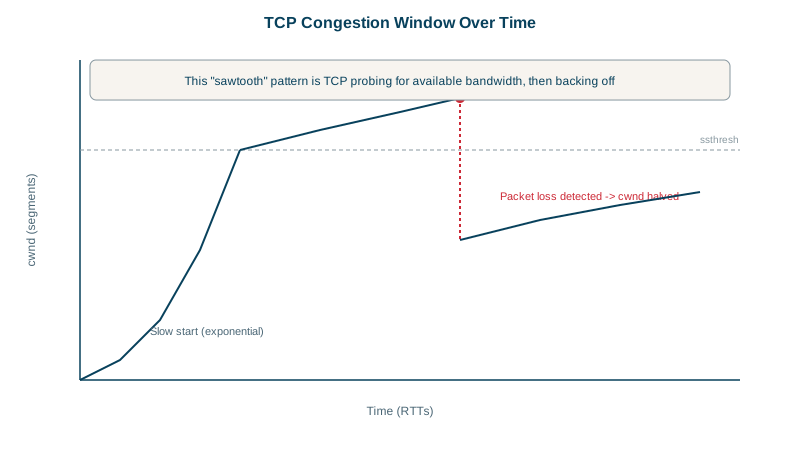
- Slow start: begin with about 10 segments (RFC 6928), and double cwnd every round trip. Despite the name, growth is exponential.
- Congestion avoidance: above a threshold (ssthresh), grow by one segment per round trip.
- On loss: halve cwnd and continue. This is AIMD, additive increase, multiplicative decrease.
A simplified Reno simulation, with losses at round trips 7 and 15:
# cwnd.py: a simplified Reno-style congestion window, one line per round trip
cwnd, ssthresh = 10, 64            # segments; modern stacks start at 10 (RFC 6928)
loss_at = {7, 15}                  # round trips where a packet is lost
for rtt in range(1, 19):
    phase = "slow start" if cwnd < ssthresh else "congestion avoidance"
    print(f"rtt {rtt:>2}: cwnd {cwnd:>3}  {phase}")
    if rtt in loss_at:
        ssthresh = max(cwnd // 2, 2)
        cwnd = ssthresh             # fast recovery: halve on loss
        print(f"        loss detected -> cwnd halved to {cwnd}")
    elif cwnd < ssthresh:
        cwnd = min(cwnd * 2, ssthresh)   # double each round trip
    else:
cwnd += 1 # one more segment per round triprtt 1: cwnd 10 slow start
rtt 2: cwnd 20 slow start
rtt 3: cwnd 40 slow start
rtt 4: cwnd 64 congestion avoidance
...
rtt 7: cwnd 67 congestion avoidance
loss detected -> cwnd halved to 33
rtt 8: cwnd 33 congestion avoidance
...
rtt 15: cwnd 40 congestion avoidance
loss detected -> cwnd halved to 20
rtt 16: cwnd 20 congestion avoidancePlot cwnd over time and you get the famous sawtooth: climb slowly, drop by half, climb again.
What TCP congestion control means for your app
- Throughput ≈ window / round-trip time. A 64 KB window over a 100 ms round trip caps you at about 5 Mbit/s, whatever the link speed. Long-distance transfers need large windows.
- New connections start slow. A fresh connection sends 10 segments (about 14 KB) in its first round trip. That's why reusing connections and keeping critical page resources small speeds up page loads.
- Small amounts of loss hurt a lot on long paths, since each loss halves the window and recovery takes many round trips.
- Bufferbloat: oversized router buffers delay loss signals, so queues fill and latency balloons for everyone sharing the link.
BBR: model the path instead of waiting for loss
Google's BBR (2016) estimates the path's bottleneck bandwidth and minimum round-trip time, and paces sending to match, instead of filling buffers until packets drop. Google reported large throughput gains on YouTube and lower latency, especially on lossy long-distance links. It's available in Linux (net.ipv4.tcp_congestion_control = bbr) and widely used by large content providers. On Linux, ss -tni shows each connection's algorithm, cwnd and round-trip time.
Check yourself
Flow control protects the receiver using the window it advertises; congestion control protects the network using a window the sender infers from loss or delay.
Slow start begins with a small congestion window and doubles it each round trip, so it takes several round trips to reach full speed.
Throughput is roughly the window size divided by the round-trip time. A long round trip needs a very large window to keep the link full, and loss-based congestion control halves the window on each loss, so a single dropped packet costs many round trips to recover.
Instead of treating loss as the congestion signal, it measures the path's bandwidth and minimum round-trip time and sends at that rate, which performs much better on lossy or long links.
Reuse connections instead of opening new ones, so the window stays large, and use HTTP/2 or HTTP/3 to put many requests on one connection.