Trunk-Based Development vs GitFlow
On this page
Why long-lived branches hurt
Two developers spend three weeks on separate feature branches. When they merge, their changes conflict in a dozen files, the tests that passed on each branch fail together, and nobody remembers why some lines changed. The longer branches live, the more they drift apart, and the later the team finds out.
Picture two people editing copies of the same document offline. If they sync every hour, each sync is a few small, obvious differences. If they sync after three weeks, they face hundreds of overlapping edits, and neither remembers why half of them were made. Branching strategy is mostly a decision about how often you sync.
How GitFlow works
GitFlow (Vincent Driessen, 2010) uses several long-lived branches:
mainholds released code;developcollects finished features.feature/*branches come offdevelopand can live for weeks.release/*branches stabilize a version;hotfix/*branches patch production.
It suits software shipped as versions (installed apps, libraries, firmware) where several releases are maintained at once. For a web service deployed continuously, its author later noted it's often more process than needed: work waits in branches, and integration happens late.
How trunk-based development works
In trunk-based development, everyone integrates into one branch, main, at least daily:
- Branches are short-lived: hours to a day or two, merged through small pull requests.
mainis always releasable, protected by CI (Day 3).- Releases come from
main, by tag or by continuous deployment.
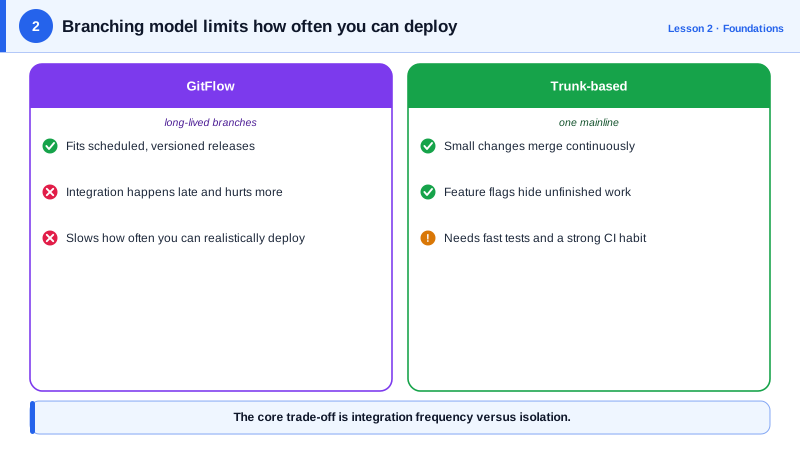
| GitFlow | Trunk-based | |
|---|---|---|
| Branch lifetime | Days to weeks | Hours to a day or two |
| Integration | When a feature is done | Continuously |
| Merge conflicts | Large and late | Small and early |
| Unfinished features | Hidden in branches | Hidden behind feature flags |
| Fits | Versioned products, several supported releases | Web services, continuous delivery |
DORA's research links trunk-based development (few active branches, merged at least daily) with higher delivery performance.
Merging unfinished work behind feature flags
"Merge daily" raises the obvious question: what about a feature that takes three weeks? You merge it in small, safe steps, hidden behind a feature flag (Day 15) until it's ready:
git switch -c checkout-layout main
# small change: new layout component, not used yet, behind a flag that's off by default
git commit -am "Add new checkout layout behind new-checkout flag (off)"
git push -u origin checkout-layout
gh pr create --base main --title "Checkout redesign 1/6: layout behind flag"
# reviewed and merged the same day
Each step is reviewed, tested against everyone else's latest code, and deployed, but users don't see it. Other techniques help too:
- Branch by abstraction: introduce an interface, build the new implementation behind it, switch over, delete the old one.
- Dark launches: run new code paths in production without showing results, to test performance.
Making trunk-based development work
- Fast CI (under about 10 minutes) so small merges aren't painful (Days 12 and 13).
- Small pull requests that reviewers can read in minutes.
- Branch protection: required checks and reviews on
main. - A merge queue for busy repositories, which tests each pull request against the latest
mainbefore merging, somainstays green.
Check yourself
Each branch drifts away from main and from other branches every day. Conflicts and broken interactions between changes pile up unseen and all surface at merge time, when they're hardest to understand and fix.
Merge it into main in small, working increments, at least daily, hidden behind a feature flag or behind an abstraction that keeps the old path in use. Users see nothing until the feature is complete and the flag is turned on.
For software released as numbered versions, such as installed apps, libraries or firmware, especially when several versions must be maintained and patched at once. For a continuously deployed web service, its extra branches mostly add delay.
Small enough to review in minutes and merge within a day, usually a few hundred lines at most. Small changes are easier to review, test and roll back.
Introducing an interface in front of the code being replaced, building the new implementation behind it in main, then switching over and removing the old one.