Artifact Repositories and Versioning Strategy
On this page
Why artifacts need a home and a naming plan
Every build produces something: a container image, a library package, a binary. Without a plan, you get registries full of latest, final-v2 and test-fix, nobody knows which is in production, and cleaning up deletes something still running.
Container and package registries
| Kind | Examples |
|---|---|
| Container registries | Amazon ECR, GitHub Container Registry, Google Artifact Registry, Docker Hub, Harbor |
| Package registries | npm, PyPI, Maven Central, NuGet, and private ones in GitHub Packages, Artifactory, Nexus, AWS CodeArtifact |
What a good repository setup gives you:
- Access control: CI can push; deploy systems and developers can pull; very few can delete.
- Immutable tags: once
checkout-svc:1.14.0exists, it can't be overwritten (ECR and most registries support this setting). - Retention rules: delete old, unreferenced builds automatically, while keeping releases and anything deployed.
- Scanning: registries like ECR and Artifact Registry scan images for known vulnerabilities on push.
- Proxying public sources: a pull-through cache for Docker Hub or npm protects you from rate limits, outages, and packages being deleted upstream.
Semantic versioning vs commit SHAs
| Scheme | Example | Good for |
|---|---|---|
| Commit SHA | 3f9a1c2b7d4e | Every build of a service; exact traceability |
| Semantic versioning | 2.4.1 (major.minor.patch) | Libraries and APIs other people depend on |
| Calendar versioning | 2026.10.11 | Products released on a schedule |
| Build number | build-4821 | Ordering builds within a pipeline |
For deployed services, the commit SHA is usually enough: every build is unique and maps to code. For libraries, semantic versioning is a promise to consumers: a major bump means breaking changes, a minor bump adds features compatibly, a patch fixes bugs. Starting from version 2.4.1:
| Change | Next version | What users can assume |
|---|---|---|
| Fix a bug in date parsing | 2.4.2 | Safe to upgrade; nothing else changes |
Add an optional timeout parameter | 2.5.0 | Safe to upgrade; a new feature is available |
| Rename a function or remove a parameter | 3.0.0 | Read the changelog first; your code may need changes |
That's why version ranges like ^2.4.1 in package.json accept 2.5.0 automatically but never 3.0.0. Tools like semantic-release or release-please can derive the next version from commit messages.
Use both for services that have public releases: tag the image with the SHA at build time, and add a semver tag when it's released.
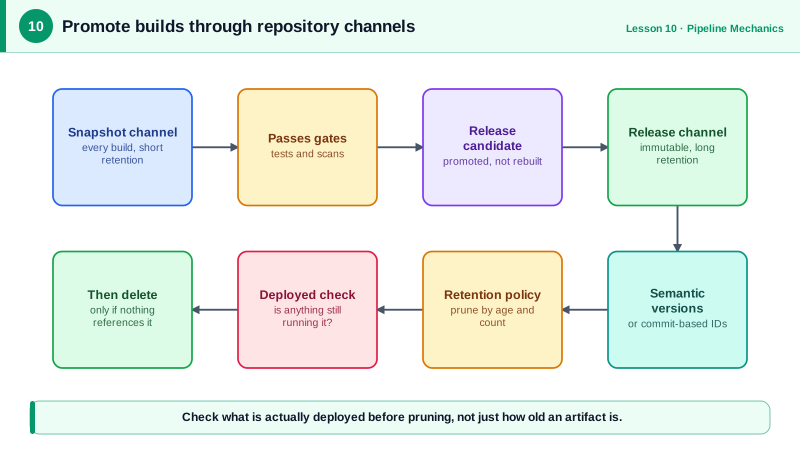
Promoting an image without rebuilding
Promotion marks an artifact as having passed a stage. For images, that's adding a tag to the same digest:
# Build stage pushed ghcr.io/acme/checkout-svc:3f9a1c2b7d4e
# After verification, add a release tag to the same image (no rebuild)
docker buildx imagetools create \
  --tag ghcr.io/acme/checkout-svc:1.14.0 \
  ghcr.io/acme/checkout-svc:3f9a1c2b7d4e
imagetools create writes a new tag pointing at the existing manifest, so the bytes stay identical. Tools like crane tag and skopeo copy do the same, including copying between registries (from a CI registry to a production one). For packages, promotion often means moving or copying between repositories (snapshots to releases).
Artifact rules that prevent confusion
- Never deploy
latest. It doesn't say what's running, and it changes. - Never overwrite a tag that has been deployed.
- Record what's running: deploy by digest, and keep a deploy log (or Git history in GitOps, Day 18) of which artifact went where.
- Sign and attest builds (Sigstore cosign, build provenance) so you can verify an artifact came from your pipeline (Day 25).
Check yourself
So a tag always refers to the same image. Nobody, including a buggy pipeline, can push different content under a tag that's already deployed, which keeps rollbacks and audits reliable.
For libraries and APIs that others depend on, where the version number communicates compatibility: a major bump signals breaking changes, a minor one new features and a patch only fixes. For internal deployable services, commit SHAs are usually enough.
Add a release tag to the existing image digest with a tool like docker buildx imagetools create, crane tag or skopeo copy.
2.0.0. Removing a function breaks code that uses it, and a major version bump is the signal that upgrading may require changes.
At least as long as you might roll back or need to investigate, plus anything still running. Lifecycle policies can delete untagged and old images beyond that.