Deployment Rollback Strategies
On this page
When a rollback can't work
A release renames a database column. The new code has a bug, so the team rolls back. The old code starts up, looks for the old column, and fails on every request. The rollback made things worse, because the database had moved forward and couldn't follow.
Ways to roll back a release
| Method | How | Speed |
|---|---|---|
| Feature flag off | Disable the new code path (Day 15) | Seconds |
| Traffic switch | Send traffic back to the old version in blue-green or canary (Day 14) | Seconds |
| Redeploy previous artifact | Deploy the last known-good image (Day 5) | Minutes |
| Git revert | Revert the commit; the pipeline or GitOps redeploys (Day 18) | Minutes, plus pipeline time |
Practice them. A rollback that's never been exercised fails when you need it, just like an untested backup.
Roll back or roll forward? Rolling forward means shipping a quick fix instead. Prefer rolling back when the cause isn't certain: it restores a known state. Roll forward when a rollback isn't possible or the fix is small and well understood. Either way, the first goal is ending user impact (Day 22).
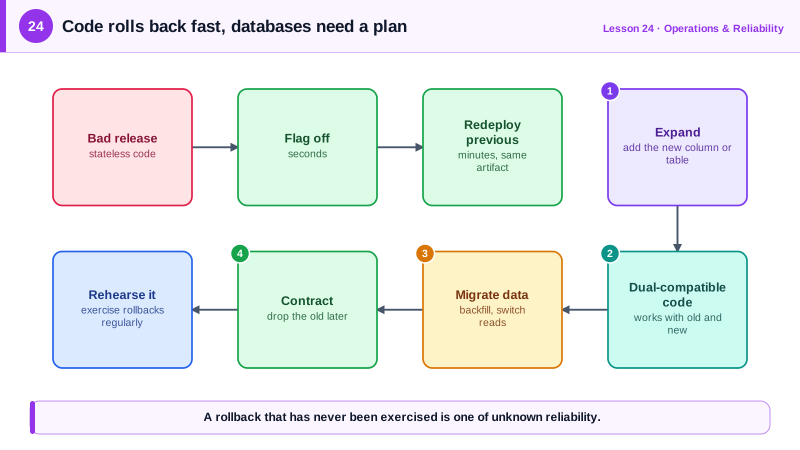
Expand and contract database migrations
The safe way to change a schema is in phases, so every intermediate state works with both the old and the new code. Renaming email to email_address, tested in PostgreSQL (PGlite):
Phase 1: expand. Add the new column and backfill it. Old code keeps working because nothing it uses changed.
ALTER TABLE users ADD COLUMN email_address text;
UPDATE users SET email_address = email WHERE email_address IS NULL;
Phase 2: migrate code. Deploy code that writes both columns and reads the new one. During the rollout, old and new versions run side by side. In the test, a row written by old code (id 3) is missing the new column:
after both versions wrote:
  {"id":3,"email":"cy@example.com","email_address":null}
  {"id":4,"email":"di@example.com","email_address":"di@example.com"}
So run the backfill again once the old version is gone:
rows missing email_address after re-backfill: [{"n":0}]If the new code has a bug at this point, rolling back is safe: the old column is still complete enough for the old code.
Phase 3: contract. Only after every running version uses the new column (days or weeks later), tighten and remove:
ALTER TABLE users ALTER COLUMN email_address SET NOT NULL;
ALTER TABLE users DROP COLUMN email;
After this, the old code really can't run, which the test confirms: column "email" of relation "users" does not exist. That's why contracting is a separate, later release.
The same thinking applies to APIs and message formats: add new fields first, stop using old ones, remove them last.
More deployment safety nets
- Automated rollback on alarm during canary or blue-green deploys (Days 14 and 21).
- Deploy freezes around high-risk periods only, not as a substitute for safe deploys.
- Backups and point-in-time recovery for data mistakes no rollback can fix.
- Small changes: the smaller the release, the easier it is to know what to undo.
Check yourself
The old code still reads and writes the old column name. Once the migration renames it, rolling back the code puts it against a schema it doesn't understand, so the rollback fails too.
Only after every running version of the application reads and writes the new column, and you no longer need to roll back to a version that uses the old one. That's a separate, later release.
When a rollback isn't possible, for example after an irreversible data migration, or when the fix is small, well understood and can ship faster than a rollback.
A rollback that has never been exercised may fail when it's needed. Practicing it shows it works and how long it takes.
A problematic feature can be turned off in seconds without a deploy, which is faster and less risky than rolling back the whole release.