Build Automation and Artifact Management
On this page
Why rebuilding for production is risky
Staging was green. Production broke. The investigation finds that production ran a different build: rebuilt from the same commit a day later, picking up a newer base image and a changed dependency. Staging tested one thing and production ran another.
Build once, deploy many
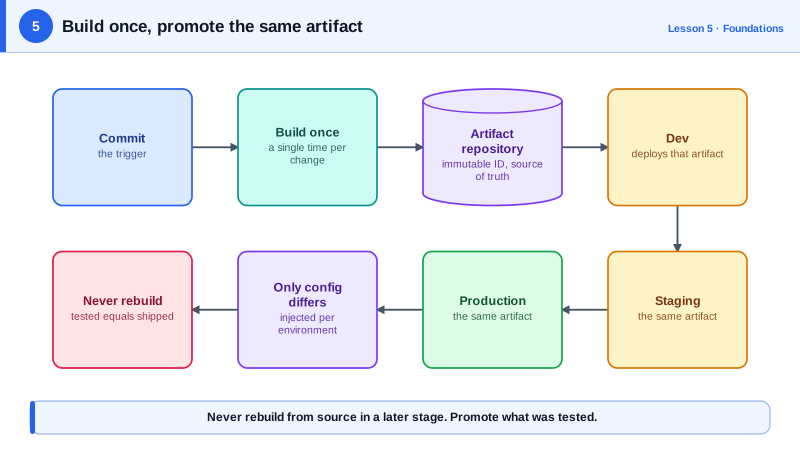
The fix is a rule: build each change exactly once, into an artifact (a container image, a JAR, a zip, a package), and deploy that same artifact to every environment.
- Immutable: once published, an artifact never changes. A new change means a new artifact.
- Traceable: the artifact's name or tag points back to the commit that produced it.
- Promoted, not rebuilt: staging and production run byte-for-byte the same thing, with only configuration differing (Day 20).
Building and pushing a container image in CI
name: Build image
on:
  push:
    branches: [main]

permissions:
  contents: read
  packages: write

jobs:
  build:
    runs-on: ubuntu-latest
    outputs:
      digest: ${{ steps.push.outputs.digest }}
    steps:
      - uses: actions/checkout@v7
      - uses: docker/setup-buildx-action@v4
      - uses: docker/login-action@v4
        with:
          registry: ghcr.io
          username: ${{ github.actor }}
          password: ${{ secrets.GITHUB_TOKEN }}
      - id: push
        uses: docker/build-push-action@v7
        with:
          push: true
          tags: ghcr.io/acme/checkout-svc:${{ github.sha }}
          cache-from: type=gha
          cache-to: type=gha,mode=max
      - run: echo "Pushed ghcr.io/acme/checkout-svc@${{ steps.push.outputs.digest }}"
The tag is the commit SHA, so checkout-svc:3f9a1c2b... always means that commit. The job also outputs the image digest (sha256:...), a hash of the image content. Deploying by digest (checkout-svc@sha256:...) guarantees the exact bytes, even if someone overwrites a tag. Think of a tag as a name label stuck on a box, which anyone could peel off and stick on a different box, and the digest as the box's fingerprint.
Later stages deploy that same reference:
kubectl -n staging    set image deployment/checkout-svc checkout-svc=ghcr.io/acme/checkout-svc@sha256:<digest>
# after staging checks pass, the identical reference
kubectl -n production set image deployment/checkout-svc checkout-svc=ghcr.io/acme/checkout-svc@sha256:<digest>
In a GitOps setup (Day 18), the pipeline would commit the new reference to a manifest repository instead of calling kubectl.
Build automation basics
- One command builds everything (
make build,npm run build,./gradlew build), and CI runs that same command. If a build needs manual steps, it will eventually be done wrong. - Pinned inputs: lockfiles for dependencies, pinned base images and tool versions (Day 9), so a rebuild of an old commit produces the same result.
- Metadata: record the commit, build time and pipeline run in the artifact (image labels, a
/versionendpoint).
Where build artifacts live
Artifacts go to a repository (Day 10): a container registry (ECR, GHCR, Docker Hub, Artifactory) or a package registry (npm, Maven, PyPI). Set retention rules so old builds are cleaned up, but keep anything currently deployed, plus enough history to roll back.
Check yourself
The rebuild can pull different dependency versions or a newer base image, or run with different build settings, so production runs an artifact that was never tested. Build once and promote the same artifact.
A tag is a movable name that can be reassigned; a digest is a content hash that always refers to the exact same image.
Only configuration, such as environment variables, secrets, endpoints and scaling, never the artifact itself. That way, what staging verified is byte for byte what production runs.
If untrusted branches can write to a shared build cache, a malicious change could plant a tampered artifact that later builds reuse. Keep caches scoped and protect release builds.
Provenance records which commit, workflow and builder produced an artifact, so you can verify a deployed image really came from your pipeline.