Continuous Delivery vs Continuous Deployment
On this page
Continuous delivery vs continuous deployment
Both start the same way: every change merged to main is built, tested and deployed to staging automatically. The difference is the last step, production.
- Continuous delivery: every change is ready to go to production. A person decides when, usually with one click or approval.
- Continuous deployment: every change that passes the pipeline goes to production automatically. No human gate.
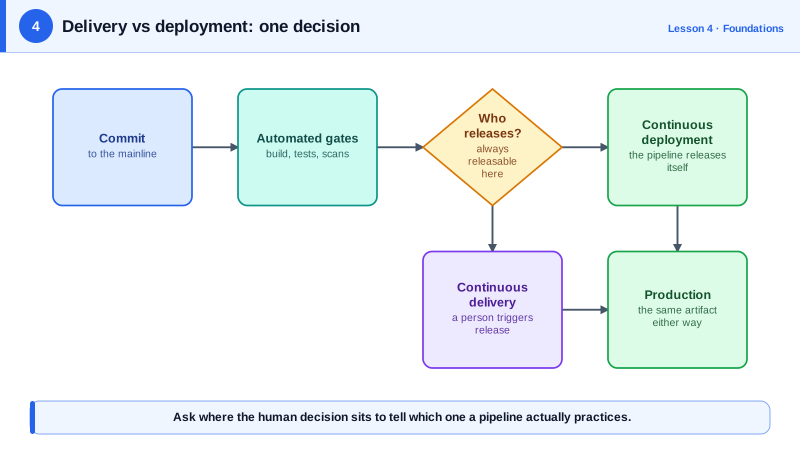
One workflow for both, one setting apart
name: Deploy
on:
  push:
    branches: [main]

permissions:
  contents: read
  id-token: write   # lets the job request an OIDC token for AWS

jobs:
  deploy-staging:
    runs-on: ubuntu-latest
    environment: staging
    steps:
      - uses: actions/checkout@v7
      - run: ./scripts/deploy.sh staging "${GITHUB_SHA::12}"

  deploy-production:
    needs: deploy-staging
    runs-on: ubuntu-latest
    environment: production   # required reviewers here = continuous delivery; none = continuous deployment
    steps:
      - uses: actions/checkout@v7
      - uses: aws-actions/configure-aws-credentials@v6
        with:
          role-to-assume: arn:aws:iam::123456789012:role/gha-deploy-checkout-svc
          aws-region: us-east-1
      - run: ./scripts/deploy.sh production "${GITHUB_SHA::12}"
The workflow file is identical for both. The production environment's protection rules in GitHub decide which you're doing: add required reviewers and the job pauses for approval (delivery); remove them and it runs straight through (deployment). The AWS credentials come from OIDC, with no stored keys (Day 11).
Choosing continuous delivery or deployment
| Continuous delivery | Continuous deployment | |
|---|---|---|
| Release decision | A person, at a chosen time | The pipeline |
| Needs | Reliable automation, deployable main | All of that, plus strong automated tests, monitoring and automatic rollback |
| Fits | Regulated changes, coordinated launches, mobile app store releases | Web services with mature testing and observability |
| Risk control | Human judgment before release | Small changes, progressive rollouts, fast rollback |
Continuous deployment isn't reckless when done well: each deploy contains one small change, rolls out gradually (Day 14) and rolls back automatically when metrics degrade. Separating deploy from release with feature flags (Day 15) means code can reach production continuously while product teams decide when users see a feature.
Prerequisites for continuous delivery
- Every change goes through the same pipeline; no manual hotfix path that skips tests.
- Build once, deploy the same artifact everywhere (Day 5).
- Automated tests you trust, without flaky failures (Day 6).
- Monitoring that tells you within minutes whether a deploy hurt users (Day 21).
- Fast, practiced rollback (Day 24).
If approving releases has become a rubber stamp that nobody examines, the gate adds delay without adding safety. That's often the signal to invest in automated checks and move toward continuous deployment.
Check yourself
Whether a production release needs a human decision. In continuous delivery, every passing change is ready to release and someone presses the button; in continuous deployment, every passing change goes to production automatically.
Automated tests the team actually trusts, monitoring that detects problems within minutes, progressive rollouts such as canaries, and automatic or very fast rollback. Without those, the approval is the only safety net.
Ship the code behind a feature flag and turn the flag on at launch time; deployment and release become separate steps.
Each release contains only a few small changes, so problems are rare, easy to trace to a cause, and quick to roll back.
Regulatory requirements, coordinated launches with other teams or customers, or a test suite and monitoring that aren't yet trusted enough.