Feature Flags and Progressive Delivery
On this page
Deploy is not release
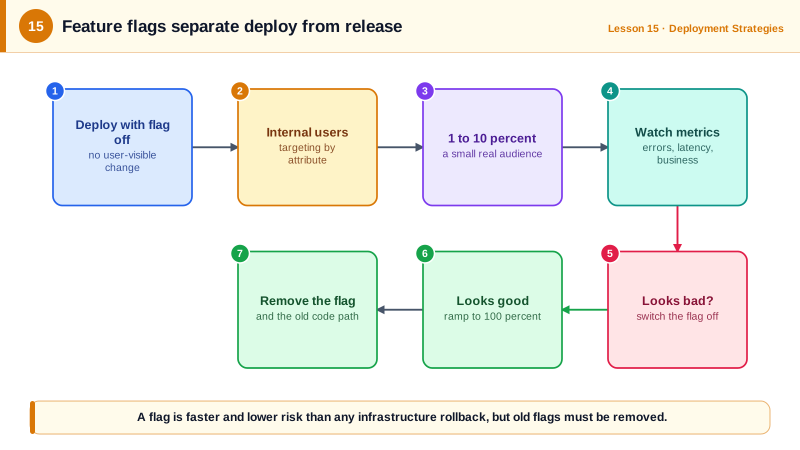
Without flags, deploying new code and showing it to users are the same event. A risky feature means a risky deploy, and turning it off means another deploy. A feature flag is a runtime switch around a code path. Code can be deployed dark, then released gradually, and switched off in seconds.
Progressive delivery combines this with canary deployments (Day 14): roll out to staff, then a small percentage, then everyone, watching metrics at each step.
Percentage rollouts with stable bucketing
A percentage rollout must give each user a consistent answer: a user who sees the new checkout on one request must see it on the next. The standard technique hashes the flag name with the user id into a bucket from 0 to 99:
# flags.py: percentage rollout with stable per-user bucketing
import hashlib

FLAGS = {
    "new-checkout": {"enabled": True, "allow": {"staff"}, "percent": 10},
}

def bucket(flag, user_id):
    """Map (flag, user) to 0-99. Same inputs always give the same bucket."""
    digest = hashlib.sha256(f"{flag}:{user_id}".encode()).digest()
    return int.from_bytes(digest[:4], "big") % 100

def is_enabled(flag, user_id, segments=()):
    rule = FLAGS.get(flag)
    if not rule or not rule["enabled"]:
        return False                                  # kill switch: off for everyone
    if rule["allow"] & set(segments):
        return True                                   # internal users always see it
    return bucket(flag, user_id) < rule["percent"]
Checked against 100,000 simulated users:
  1% rollout ->    982 of 100000 users
 10% rollout ->   9943 of 100000 users
 50% rollout ->  49928 of 100000 users
users from the 10% group still enabled at 50%: 9943 of 9943
after kill switch: 0 users; staff: False
Three properties show up in that output:
- The percentages are accurate at scale.
- Raising the percentage only adds users: everyone who had the feature at 10 percent still has it at 50. Users don't flip back and forth.
- The kill switch turns it off for everyone, staff included, in one change.
Including the flag name in the hash means each flag picks a different 10 percent, so the same unlucky users aren't in every experiment.
Kinds of feature flags
| Kind | Purpose | Lifetime |
|---|---|---|
| Release | Hide unfinished work; roll out gradually | Days to weeks, then delete |
| Experiment | A/B tests | Until the experiment concludes |
| Ops / kill switch | Turn off expensive or risky features under load | Long-lived, on purpose |
| Permission | Enable features for plans or customers | Long-lived; often belongs in the product's entitlement system |
Use a flag service (LaunchDarkly, Unleash, Flagsmith, ConfigCat, or AWS AppConfig) rather than a homemade config file once you have more than a few: they give targeting rules, audit logs, gradual rollouts and SDKs that evaluate flags locally without a network call per check. The OpenFeature standard gives a vendor-neutral API.
Keeping feature flags from becoming debt
Every flag doubles the paths through that code. Old flags pile up into confusion and untested combinations.
- Give every release flag an owner and an expiry date, and remove it (both code paths and config) once it's at 100 percent.
- Track flag count; some teams cap it per service.
- Test both paths while a flag exists.
- Default to off when the flag service is unreachable, unless off is the dangerous state.
Check yourself
Hashing the user id with the flag name gives each user a stable bucket, so they see the same version on every request and as the rollout grows from 5 to 50 percent. Random picks per request would flip users between versions.
A kill switch turns a feature off in seconds without deploying; a rollback redeploys previous code and reverts everything in that release.
Each flag doubles some code paths that must be maintained and tested, and stale flags confuse readers and can be flipped by accident. Give release flags an owner and expiry date, and remove them once rollout is complete.
Release flags for unfinished features, experiment flags for A/B tests, ops flags or kill switches for turning off features under load, and permission flags for plans or customers.
On the server. Client-side flags can be read and changed by users, so they mustn't be the only protection for paid or restricted features.