How to Speed Up CI: Pipeline Caching
On this page
Why caching speeds up CI
A typical pipeline downloads hundreds of megabytes of packages, compiles unchanged code and rebuilds Docker layers that haven't changed, every time. Caching saves the results of work that hasn't changed and restores them next run. It's usually the cheapest speed-up available.
Dependency caches keyed on lockfiles
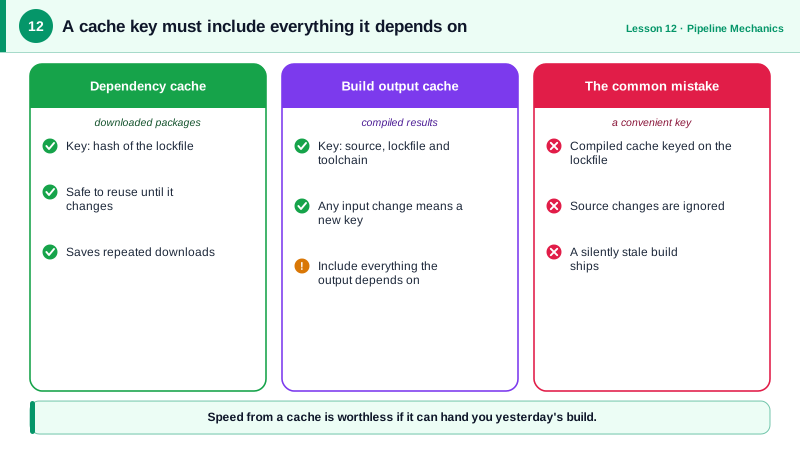
The key idea: the cache key must change exactly when the cached content should change. For dependencies, that's the lockfile.
name: Go build with cache
on: [pull_request]

permissions:
  contents: read

jobs:
  build:
    runs-on: ubuntu-latest
    steps:
      - uses: actions/checkout@v7
      - uses: actions/cache@v6
        with:
          path: |
            ~/.cache/go-build
            ~/go/pkg/mod
          key: go-${{ runner.os }}-${{ hashFiles('**/go.sum') }}
          restore-keys: |
            go-${{ runner.os }}-
      - run: go build ./...
- run: go test ./...- An exact hit on
keyrestores the cache made for this exactgo.sum. - On a miss,
restore-keysfalls back to the most recent cache with that prefix: an older but mostly useful cache, so only new modules download. - After a run with a miss, the job saves a new cache under the full key.
Many setup actions do this for you: actions/setup-node with cache: npm, setup-python with cache: pip, setup-go caches by default.
Docker layer caching in CI
Docker reuses a layer only if it and every layer before it are unchanged. So order instructions from least to most frequently changed:
FROM node:24-bookworm-slim
WORKDIR /app
COPY package.json package-lock.json ./
RUN --mount=type=cache,target=/root/.npm npm ci   # rebuilt only when the lockfile changes
COPY . .                                          # changes on almost every commit
RUN npm run build
Copying the whole source before npm ci would invalidate the install layer on every commit.
CI runners start empty, so layer caches need to be stored somewhere. With BuildKit:
- uses: docker/build-push-action@v7
  with:
    push: true
    tags: ghcr.io/acme/checkout-svc:${{ github.sha }}
    cache-from: type=gha
    cache-to: type=gha,mode=max
type=gha stores layers in the GitHub Actions cache; type=registry stores them in your image registry, which works across CI systems. mode=max caches intermediate stages of multi-stage builds too.
Other ways to speed up CI
- Skip unaffected work:
pathsfilters, or monorepo tools (Nx, Turborepo, Bazel, Pants) that build and test only what a change affects, with remote caches shared across machines. - Shallow clones for large repositories (the default in
actions/checkout). - Bigger or self-hosted runners for CPU-heavy builds, when time saved is worth the cost.
CI cache pitfalls
- Stale caches: keys that don't include the lockfile restore old dependencies, causing "works in CI, fails locally" mysteries.
- Caching outputs instead of inputs: caching
node_modulesacross OS or Node versions breaks native modules; includerunner.osand tool versions in keys, or cache the package manager's download directory instead. - Cache poisoning: a malicious pull request could write a poisoned cache that later trusted runs restore. GitHub scopes caches by branch (a PR can read
main's cache but not write to it), but be careful with workflows that run untrusted code and then save caches. - Size limits: GitHub evicts caches beyond the repository's limit, oldest first, so huge caches push out useful ones.
Check yourself
The key changes exactly when dependencies change. You never restore a stale set of packages for new dependencies, and you never reinstall from scratch when nothing changed.
Docker reuses a layer until its inputs change. With only the manifest and lockfile copied before npm ci, the install layer stays cached through ordinary code changes and is rebuilt only when dependencies change.
A fallback to the most recent cache matching the prefix, so most dependencies are already present and only new ones download.
A stale or wrong output can be reused, so tests pass on artifacts that don't match the code. Cache inputs like dependencies; rebuild outputs unless the tool tracks inputs reliably.
Use BuildKit with a remote cache, such as --cache-from and --cache-to pointing at the registry or the CI provider's cache. Each fresh runner then reuses layers from earlier builds instead of rebuilding everything.