Terraform Tutorial: Infrastructure as Code
On this page
What infrastructure as code is
Clicking through a cloud console leaves no record of why something is configured the way it is, and recreating it for staging means clicking it all again. Infrastructure as code (IaC) writes it down. Terraform, and its open-source fork OpenTofu (same language and workflow), are the most widely used tools, working with AWS, Azure, Google Cloud, Kubernetes, Cloudflare, GitHub and hundreds of other providers.
Terraform providers, resources and variables
terraform {
  required_version = ">= 1.10"
  required_providers {
    aws = {
      source  = "hashicorp/aws"
      version = "~> 6.0"
    }
  }
}

provider "aws" {
  region = "us-east-1"
}

variable "environment" {
  type    = string
  default = "staging"
}

resource "aws_vpc" "main" {
  cidr_block = "10.20.0.0/16"
  tags       = { Name = "checkout-${var.environment}" }
}

resource "aws_security_group" "web" {
  name        = "web-${var.environment}"
  description = "HTTPS from anywhere"
  vpc_id      = aws_vpc.main.id
}

resource "aws_vpc_security_group_ingress_rule" "https" {
  security_group_id = aws_security_group.web.id
  cidr_ipv4         = "0.0.0.0/0"
  from_port         = 443
  to_port           = 443
  ip_protocol       = "tcp"
}

output "security_group_id" {
  value = aws_security_group.web.id
}- A provider talks to an API; the version constraint
~> 6.0allows 6.x updates but not 7.0. - Each resource is one infrastructure object. References like
aws_vpc.main.idcreate dependencies, so Terraform knows to build the VPC first. - Variables parameterize; outputs expose values.
Terraform init, plan and apply
These outputs come from running OpenTofu against a local AWS emulator:
tofu init      # or: terraform init. Downloads providers, sets up state
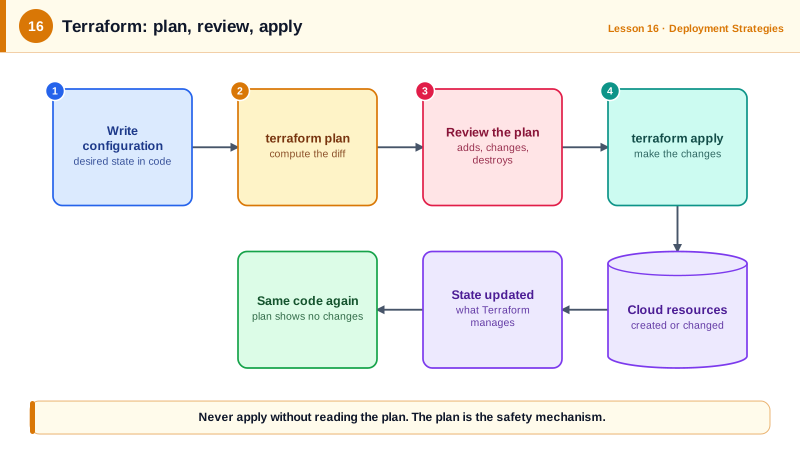
tofu plan -out=plan.out # aws_security_group.web will be created
# aws_vpc.main will be created
# aws_vpc_security_group_ingress_rule.https will be created
Plan: 3 to add, 0 to change, 0 to destroy.tofu apply plan.outApply complete! Resources: 3 added, 0 changed, 0 destroyed.Applying a saved plan guarantees you apply exactly what was reviewed. In CI, the plan is posted to the pull request, and apply runs after merge.
Reading a Terraform plan: update vs replace
Two changes that look equally small in code:
# Adding a tag to the VPC
  # aws_vpc.main will be updated in-place
Plan: 0 to add, 1 to change, 0 to destroy.

# Editing the security group's description
  # aws_security_group.web must be replaced
      ~ description = "HTTPS from anywhere" -> "HTTPS from the internet" # forces replacement
  # aws_vpc_security_group_ingress_rule.https must be replaced
Plan: 2 to add, 0 to change, 2 to destroy.
Some attributes can't be changed in place, so Terraform deletes and recreates the resource. For a security group, that briefly removes rules; for a database, it means data loss. Look for must be replaced and forces replacement in every plan, and protect critical resources with lifecycle { prevent_destroy = true }.
Detecting drift
When someone changes a resource outside Terraform, the next plan notices. After a tag was edited in the console:
  # aws_vpc.main will be updated in-place
          ~ "Team" = "hacked-by-console" -> "payments"
Plan: 0 to add, 1 to change, 0 to destroy.
Terraform puts it back to what the code says. Running plan on a schedule, with -detailed-exitcode (exit code 2 means changes), turns this into drift detection.
Terraform habits
terraform fmtandvalidatein CI, plus a policy or security scanner (Checkov, tflint, Trivy).- Remote, locked state for teams (Day 17).
- Small, separate configurations per environment or component, so one plan doesn't touch everything.
Check yourself
The saved plan is exactly what was reviewed and approved. Running apply alone computes a fresh plan, which may include changes from new commits or drift that appeared since the review.
The change can't be made in place, such as changing a database's engine or an instance's subnet, so Terraform will destroy the resource and create a new one. For stateful resources that can mean data loss, so stop and check.
Terraform compares the real resource with the code and detects the drift, then plans to change the resource back to what the code says. Either update the code to keep the manual change, or let the apply revert it.
A new major provider version can change resource behavior. Version constraints and the lock file make every run use tested provider versions.
Consistent formatting, so diffs show real changes, and early detection of syntax errors, wrong types and missing variables. Both run in seconds without credentials, before anyone runs a plan against real infrastructure.