CI Pipeline Optimization and Parallel Jobs
On this page
When CI is too slow
The test suite has grown to 30 minutes. Caching won't help: the time is spent running tests, not installing things. The remaining lever is parallelism: split the work across several machines that run at the same time.
Finding where pipeline time goes
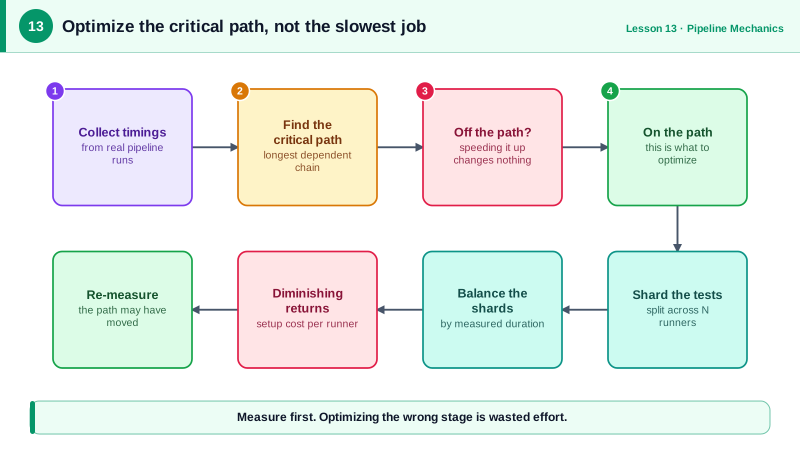
Before optimizing, find where time goes:
- Look at per-job and per-step timings in your CI system's UI or API, over many runs, not one.
- Find the critical path: the longest chain of dependent jobs. Speeding up anything off that path doesn't shorten the pipeline.
- Find the slowest tests: most test runners can report durations (
jest --verbose,pytest --durations=20). A few slow tests often dominate.
Parallel jobs and matrix builds
Independent checks (lint, unit tests, security scans) should be separate jobs that run side by side (Day 7). A matrix runs the same job with different parameters, such as several Node versions or operating systems for a library:
strategy:
  matrix:
    node: [22, 24]
    os: [ubuntu-latest, windows-latest]
That creates four jobs. Use matrices where the variations matter to your users, not by habit: each combination costs runner time.
Sharding a test suite
Sharding splits one suite across N jobs, each running a slice:
name: Sharded tests
on: [pull_request]

permissions:
  contents: read

jobs:
  test:
    runs-on: ubuntu-latest
    strategy:
      fail-fast: false
      matrix:
        shard: [1, 2, 3, 4]
    steps:
      - uses: actions/checkout@v7
      - uses: actions/setup-node@v7
        with: { node-version: 24, cache: npm }
      - run: npm ci
      - run: npx jest --shard=${{ matrix.shard }}/${{ strategy.job-total }}
fail-fast: false lets every shard finish, so you see all failures at once rather than only the first shard's. Running 12 test files with Jest 30 locally, each shard ran exactly 3 of them:
$ npx jest --shard=1/4    Test Suites: 3 passed, 3 total
$ npx jest --shard=2/4    Test Suites: 3 passed, 3 total
$ npx jest --shard=3/4    Test Suites: 3 passed, 3 total
$ npx jest --shard=4/4    Test Suites: 3 passed, 3 total
Jest splits by test file count, not duration. If one file takes 10 minutes and the rest take seconds, one shard does almost all the work. Split big files, or use a runner that balances by recorded timings: Playwright, pytest-split, CircleCI's test splitting and Knapsack Pro can.
The costs of parallelism
- Setup is repeated in every shard: checkout, installing dependencies, starting services. With 2 minutes of setup and 8 minutes of tests, 8 shards don't give 8× speed; each still takes 3 minutes.
- Runner minutes go up even as wall-clock time goes down.
- Hidden test coupling appears: tests that passed only because another test ran first now fail. That's a real bug worth fixing.
- Merging reports: combine coverage and test results from all shards in a final job.
Other CI optimizations
- Test impact analysis: run only tests affected by the change (Nx, Bazel, or built-in features of some CI platforms), with the full suite on
main. - Cancel superseded runs with
concurrency(Day 3). - Faster runners for CPU-bound builds.
- Delete or fix slow, low-value tests. The fastest test is one that doesn't need to exist.
Check yourself
Total pipeline time is set by the longest chain of dependent jobs. Speeding up a job that isn't on that chain doesn't make the pipeline finish any sooner, so measure first and optimize the critical path.
Jest shards by file count, and one shard got a very slow file; split that file or use timing-based splitting.
Each shard repeats fixed setup like checkout, dependency install and test database startup, and tests rarely divide evenly, so the slowest shard sets the time. More shards also cost more runner minutes.
Running the same job across several combinations, such as Node versions or operating systems, in parallel, without duplicating the job definition.
Path filters in the workflow, or affected-project detection in monorepo tools like Nx or Turborepo, run only the builds and tests for the parts that changed. A docs change then doesn't run the whole backend test suite.