What Is Continuous Integration? CI Explained
On this page
Why continuous integration exists
A developer's change passes on their laptop. Merged, it breaks the build for everyone: a missing dependency, a test that depended on their local database, a conflict with a change merged an hour earlier. Continuous integration (CI) catches this before the merge, every time, by building and testing each change in a clean, shared environment.
Words you'll see all course
| Term | In plain words |
|---|---|
| Pipeline | The automated series of checks and steps that runs for every change |
| Workflow | GitHub Actions' name for a pipeline, defined in a YAML file |
| Job | A group of steps that runs on one machine; separate jobs can run side by side |
| Step | One command or action inside a job |
| Runner | The machine, usually a fresh virtual machine, that runs a job and is thrown away afterwards |
| Green / red | The pipeline passed / failed |
| Artifact | The packaged output of a build, such as a container image (Day 5) |
The principles of continuous integration
CI is a practice first and a tool second:
- Integrate often: merge into
mainat least daily (Day 2). - Every change triggers an automated build and test run.
- Keep the build fast: feedback in minutes, not hours.
- A broken main is everyone's top priority: fix or revert immediately.
- Test in a clean, production-like environment, not on someone's laptop.
What a CI pipeline runs, in order
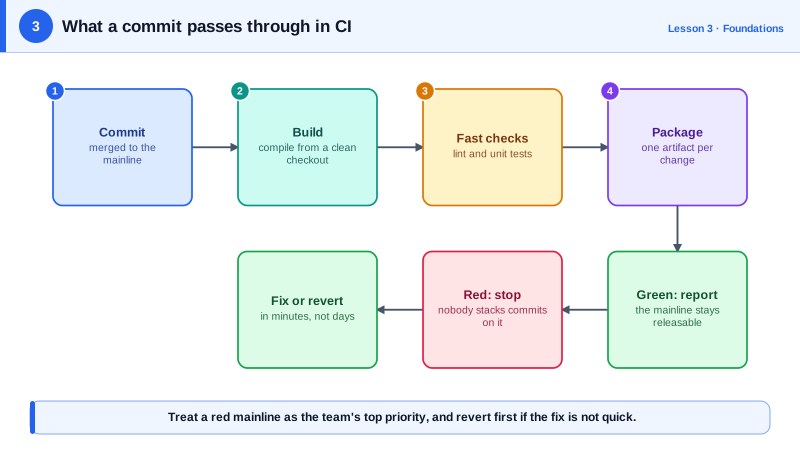
A typical order, cheapest and fastest checks first so failures arrive early:
- Check out the exact commit.
- Install dependencies from a lockfile (
npm ci, notnpm install, so versions can't drift). - Lint and format checks.
- Unit tests.
- Build the application or artifact.
- Later stages: integration tests, security scans, packaging (Days 5, 6, 25).
A GitHub Actions CI workflow
name: CI
on:
  push:
    branches: [main]
  pull_request:

concurrency:
  group: ci-${{ github.ref }}
  cancel-in-progress: true

permissions:
  contents: read

jobs:
  build-and-test:
    runs-on: ubuntu-latest
    timeout-minutes: 15
    steps:
      - uses: actions/checkout@v7
      - uses: actions/setup-node@v7
        with:
          node-version: 24
          cache: npm
      - run: npm ci
      - run: npm run lint
      - run: npm test
      - run: npm run build
Details that matter:
- Triggers: every pull request, and every push to
main(to confirm the merged result). concurrency: a new push to the same branch cancels the previous run, saving runner time.permissions: contents: read: the job's token can only read the repository, limiting damage if a step is compromised.timeout-minutes: a hung test fails in 15 minutes instead of the 6-hour default.cache: npmreuses downloaded packages between runs (Day 12).- Pinned major versions of actions (
@v7); pin to a full commit SHA for stricter supply-chain safety (Day 25).
This workflow passes actionlint, which catches typos in keys, invalid expressions and unsafe patterns before you push.
Making CI matter: required checks and flaky tests
- Required status checks: branch protection on
mainblocks merging until CI passes. - Don't tolerate flaky tests. A test that fails randomly trains people to rerun and ignore red builds. Quarantine and fix it.
- Keep it under about 10 minutes. Slow CI pushes people toward bigger, rarer merges, which defeats the purpose.
- Treat a red main as an incident: revert first, investigate after.
Check yourself
npm ci deletes node_modules and installs exactly the versions in the lockfile, failing if package.json and the lockfile disagree. Builds are reproducible, whereas npm install can resolve newer versions and rewrite the lockfile.
Cheap checks catch most problems in seconds, so developers get fast feedback and slow stages like E2E tests don't waste minutes running on code that was already broken.
Stop merging and fix or revert the breaking change immediately. Merging on top of a broken main hides new failures behind the existing one and makes the culprit harder to find; reverting first is usually fastest.
So nothing left over from earlier runs or from someone's setup can make a build pass by accident; every change is built and tested in the same clean environment.