GitOps Explained: Argo CD and Flux
On this page
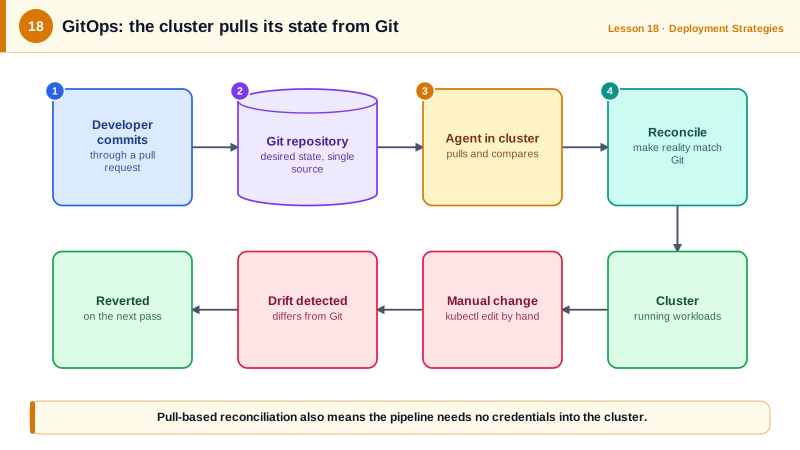
How GitOps works
In a push-based pipeline, CI runs kubectl apply against the cluster. That means CI holds cluster credentials, and nobody can say for sure what's running, because anyone with access might have changed something by hand.
GitOps flips it around:
- Git holds the desired state: every manifest for every environment.
- An agent inside the cluster (Argo CD or Flux) continuously compares Git with the cluster.
- When they differ, the agent applies Git's version. Changes happen by merging commits.
This loop is called reconciliation, and it works like a thermostat. You don't tell a thermostat "heat for ten minutes"; you set the temperature you want, and it keeps checking and correcting. In GitOps, Git holds the setting and the agent is the thermostat.
An Argo CD Application with self-healing
apiVersion: argoproj.io/v1alpha1
kind: Application
metadata:
  name: checkout-svc-production
  namespace: argocd
spec:
  project: default
  source:
    repoURL: https://github.com/acme/k8s-manifests.git
    targetRevision: main
    path: apps/checkout-svc/overlays/production
  destination:
    server: https://kubernetes.default.svc
    namespace: checkout
  syncPolicy:
    automated:
      prune: true      # delete resources removed from Git
      selfHeal: true   # undo manual changes made in the cluster
    syncOptions:
      - CreateNamespace=true
This validates against Argo CD's schema with kubeconform. It tells Argo CD to keep the checkout namespace matching the production overlay in the manifests repository:
- Automated sync applies new commits without a manual step.
prunedeletes resources that were removed from Git, so stale objects don't linger.selfHealreverts manualkubectl editchanges within minutes, so the cluster can't silently drift from Git.
Flux expresses the same with GitRepository and Kustomization resources.
The GitOps deployment flow
- A developer merges application code. CI builds and pushes
checkout-svc:3f9a1c2b7d4e(Day 5). - CI (or a bot such as Renovate or Argo CD Image Updater) opens a pull request in the manifests repository changing the image tag in the staging overlay.
- Merging it deploys to staging. Promoting to production is another small pull request (Day 20).
- Rollback is
git revertof that commit. The agent applies the previous state.
Every deploy has an author, a reviewer, a timestamp and a diff, which auditors appreciate.
Benefits of GitOps
- No cluster credentials in CI. The agent pulls from inside the cluster.
- Drift is visible and corrected. The UI shows "OutOfSync" when the cluster differs from Git.
- Disaster recovery: a new cluster pointed at the repository rebuilds itself.
- Many clusters: Argo CD ApplicationSets and Flux generate applications per cluster or environment from one template.
GitOps trade-offs
- Secrets don't belong in Git in plain text. Use Sealed Secrets, SOPS, or the External Secrets Operator to pull from a secrets manager.
- Separate repositories for application code and manifests are common, so CI tag bumps don't trigger application builds and access can differ.
- Emergency changes must also go through Git, or
selfHealwill undo them. Practice the fast path for urgent commits. - It doesn't replace CI: testing and building still happen in pipelines; GitOps covers the deploy step.
Check yourself
Revert the commit that changed the production manifests. The GitOps agent sees the repository change and reconciles the cluster back to the previous state, and the rollback is recorded in Git history like any other change.
Argo CD detects that the live replica count differs from Git and restores the count defined in the repository, usually within minutes. Manual changes don't stick, so lasting changes must go through Git.
CI no longer needs credentials that can change the cluster. Only the in-cluster agent applies changes, and only from the approved repository, so a compromised CI system can't deploy directly.
Secrets: they can't be stored in Git in plain text, so teams use sealed secrets, SOPS, or an external secrets operator that pulls from a secret manager.
Manifest changes then don't trigger code builds, access can be controlled separately, for example only CI and release managers may change production, and the deployment history stays a clean record of what ran where.