Deployment Strategies: Blue-Green and Canary
On this page
Why deployment strategy matters
A new version with a memory leak goes out to all 20 servers at once. Ten minutes later, every server is struggling and every user is affected. The same bug released to 5 percent of traffic first would have touched a few users, tripped an alarm, and rolled back automatically.
Recreate, rolling, blue-green and canary compared
| Strategy | How it works | Downtime | Rollback | Extra capacity | Bad release reaches |
|---|---|---|---|---|---|
| Recreate | Stop all old, start all new | Yes | Redeploy old | None | Everyone |
| Rolling | Replace instances in batches | No | Another rollout | A little | Everyone, gradually |
| Blue-green | Start a full new set (green), switch all traffic | No | Switch back instantly | Double, during the deploy | Everyone, at once |
| Canary | Send a small share of traffic to the new version, grow it while metrics stay healthy | No | Shift traffic back | Small | A small share, if caught |
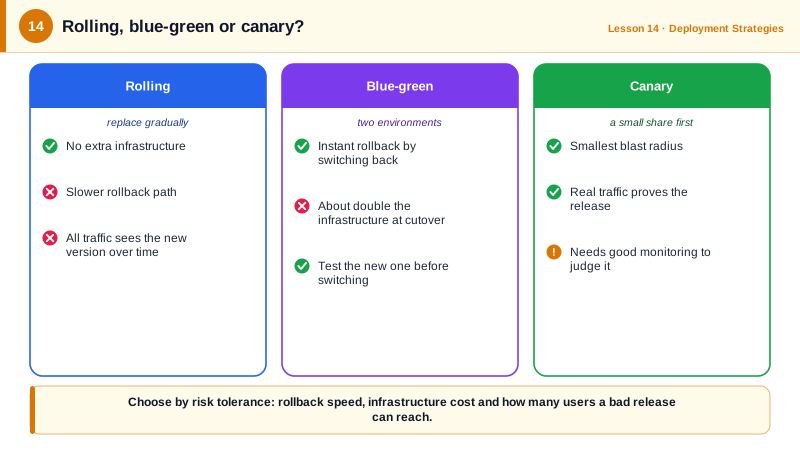
Rolling is the default in Kubernetes Deployments and ECS services: fine for most changes, especially with good readiness probes. Blue-green gives an instant, clean rollback but can't limit how many users see a bug. Canary limits exposure and gives real production signals, at the cost of more machinery: traffic splitting and automated analysis.
An automated canary with Argo Rollouts
Argo Rollouts replaces a Kubernetes Deployment with a Rollout that shifts traffic in steps and runs an analysis between them:
apiVersion: argoproj.io/v1alpha1
kind: Rollout
metadata:
  name: checkout-svc
  namespace: checkout
spec:
  replicas: 10
  selector:
    matchLabels:
      app: checkout-svc
  template:
    metadata:
      labels:
        app: checkout-svc
    spec:
      containers:
        - name: checkout-svc
          image: ghcr.io/acme/checkout-svc:3f9a1c2b7d4e
          ports:
            - containerPort: 8080
  strategy:
    canary:
      steps:
        - setWeight: 5
        - pause: { duration: 5m }
        - analysis:
            templates:
              - templateName: error-rate
        - setWeight: 25
        - pause: { duration: 10m }
        - setWeight: 50
        - pause: { duration: 10m }
---
apiVersion: argoproj.io/v1alpha1
kind: AnalysisTemplate
metadata:
  name: error-rate
  namespace: checkout
spec:
  metrics:
    - name: error-rate
      interval: 1m
      count: 5
      failureLimit: 1
      successCondition: result[0] < 0.01
      provider:
        prometheus:
          address: http://prometheus.monitoring:9090
          query: |
            sum(rate(http_requests_total{app="checkout-svc",status=~"5.."}[2m]))
            /
            sum(rate(http_requests_total{app="checkout-svc"}[2m]))
Both resources validate against the Argo CRD schemas with kubeconform. The rollout sends 5 percent of traffic to the new version, waits, then checks the error rate five times at one-minute intervals. If it exceeds 1 percent more than once, the rollout aborts and returns all traffic to the stable version with no human involved. Otherwise it proceeds to 25, 50 and 100 percent.
Without a service mesh or ingress integration, weights are approximated by pod counts; with one (Istio, an ALB, NGINX, Gateway API), traffic is split precisely. Flagger is a similar tool, and AWS CodeDeploy and ECS offer canary deployments too (see the AWS course).
What makes canary deployments work
- Enough traffic at each step for metrics to mean something; at 3 a.m., 5 percent may be a handful of requests.
- The right metrics: error rate and latency of the canary compared to the stable version, plus business metrics like checkout completion.
- Compatible changes: old and new versions run side by side, so APIs, messages and database schemas must work with both (Day 24).
- Sticky sessions where needed, so one user doesn't bounce between versions mid-flow.
Check yourself
Blue-green rolls back fastest, because the old version is still running and traffic simply switches back. Canary limits how many users see a bad release, since only a small percentage gets the new version until metrics confirm it's healthy.
The success condition fails. Once failures exceed the allowed limit of one, the rollout aborts and Argo Rollouts shifts all traffic back to the stable version, without anyone having to intervene.
Old and new versions serve traffic at the same time against the same database, and a rollback returns everyone to the old version. Both must work with the current schema, so schema changes use expand and contract.
It needs no extra capacity and replaces instances gradually, but old and new versions run together for a while, and rollback means rolling everything back again.
Error rate, latency percentiles and key business metrics like successful checkouts, compared with the stable version over the same period.