What Are Containers? Namespaces and Cgroups Explained
On this page
What is a container? Just a Linux process
People often picture a container as a small virtual machine. It isn't. Start one and look from the host, and you find an ordinary process in the process list, with a normal process id, run by the same Linux kernel as everything else. What makes it a "container" is that the kernel shows it a restricted view of the system and limits what it can use.
Three kernel features do the work:
- Namespaces control what the process can see.
- Control groups (cgroups) control how much it can use.
- An image gives it its own filesystem.
Linux namespaces: what a container can see
Each namespace type isolates one kind of resource:
| Namespace | Isolates | Effect inside the container |
|---|---|---|
| PID | Process ids | The app sees itself as PID 1 and can't see host processes |
| Network | Interfaces, IPs, ports, routes | Its own eth0, its own port 80 |
| Mount | Filesystem mounts | Sees only its image's filesystem and mounted volumes |
| UTS | Hostname | Its own hostname |
| IPC | Shared memory, semaphores | Can't touch other processes' IPC |
| User | User and group ids | Root inside can map to an unprivileged user outside |
One caveat on the last row: Docker doesn't turn on user namespaces by default. Unless you enable remapping or run Docker in rootless mode, root inside a container is the same user id 0 as root on the host, held back only by the other namespaces, dropped capabilities and seccomp (Day 13).
Cgroups: what a container can use
Namespaces don't stop a process from using all the CPU or memory. Cgroups do: they cap memory, CPU time, I/O and the number of processes for a group of processes. A container with a 512 MB memory limit that tries to use more is killed by the kernel's out-of-memory killer, and only that container is affected.
Seeing a container from the host
On a Linux host with Docker:
docker run -d --name web --memory 256m nginx:alpine
docker inspect -f '{{.State.Pid}}' web          # e.g. 41873: an ordinary host process id
ps -o pid,user,cmd -p 41873                     # nginx: master process ...
sudo ls -l /proc/41873/ns                       # links to its own pid, net, mnt, uts... namespaces
docker exec web ps                              # inside, nginx's master process is PID 1
The same process has one id on the host and PID 1 inside its PID namespace. Nothing was booted; the kernel just started a process with different settings. (On macOS and Windows, Docker Desktop runs these processes inside a small Linux virtual machine, because containers need a Linux kernel.)
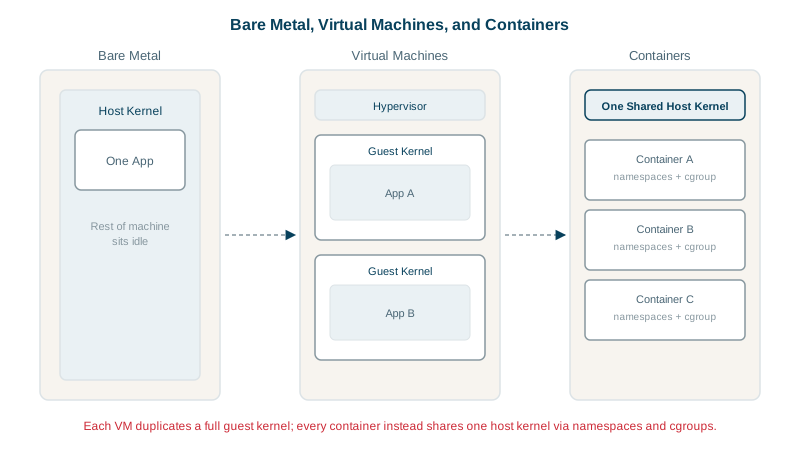
Containers vs virtual machines
| Virtual machine | Container | |
|---|---|---|
| Isolation | A hypervisor emulates hardware; each VM runs its own kernel | Namespaces on a shared kernel |
| Start time | Tens of seconds (boot an OS) | Usually under a second (start a process) |
| Overhead | A full guest OS per VM | Only the app and its libraries |
| Security boundary | Strong: separate kernels | Weaker: one kernel bug affects all containers |
The shared kernel is the trade-off. Containers are fast and dense, but a kernel vulnerability can let one break out. Where the workload is untrusted, as in multi-tenant platforms, providers add a stronger boundary: lightweight VMs such as Firecracker or gVisor's sandboxed kernel.
Why this matters later
Almost every container problem in this course maps back to these three pieces: a container killed for exceeding memory (cgroups), two containers that can't reach each other (network namespaces), data lost when a container is removed (the image's filesystem layer). Tomorrow you install Docker and start running containers.
Check yourself
A normal process whose view of the system is restricted by namespaces, whose resource use is limited by cgroups, and whose filesystem comes from an image.
The kernel's out-of-memory killer terminates the container's process, because its cgroup reached the memory limit, and Docker reports exit code 137 with OOMKilled: true. Other containers and the host aren't affected, which is the point of the limit. Raise the limit or fix the app's memory use.
All containers share one kernel, so a kernel vulnerability can expose the host or other containers; VMs each run their own kernel behind a hypervisor.
It gives the container its own view of process ids, so its first process sees itself as PID 1 and can't see or signal processes outside the container. From the host, the same process has a normal, different PID, which is why ps on the host lists container processes.
A container is just a process with namespaces and cgroups applied, sharing the host's running kernel. A virtual machine must boot a whole guest operating system with its own kernel. That difference also explains containers' lower overhead and weaker isolation.