Docker Environment Variables and Secrets
On this page
One image, many environments: runtime configuration
The same image should run in development, staging and production. What changes between them, the database address, feature flags, log levels, credentials, is configuration, supplied when the container starts. This is the twelve-factor app rule "store config in the environment". It means what you tested in staging is byte-for-byte what you run in production.
Environment variables: fine for config, weak for secrets
docker run -e ASPNETCORE_ENVIRONMENT=Production \
           -e Logging__LogLevel__Default=Warning \
           --env-file ./staging.env myorg/api:1.4.0
Every language reads them, and frameworks map them onto config (in .NET, __ becomes the : separator, so Logging__LogLevel__Default sets Logging:LogLevel:Default). They're right for ordinary settings.
For secrets they're a compromise: anyone who can run docker inspect sees them in plain text, they're inherited by child processes, and they easily end up in crash dumps or debug logs.
Never bake secrets into an image
ENV DB_PASSWORD=Sup3rSecret!         # wrong: visible in docker history and inspect
COPY appsettings.Production.json .    # wrong if it contains credentials
Image layers are permanent. Even if a later layer deletes the file, it still exists in the earlier one (Day 4), and anyone who can pull the image can extract it. Images get pushed to registries, cached on CI runners and shared widely. Once a secret is in an image, treat it as leaked and rotate it.
Build arguments are not a way around this. ARG NPM_TOKEN passed with docker build --build-arg looks temporary, but argument values used by a RUN step can show up in docker history and in the image's build metadata. Use a secret mount instead.
Build-time secrets with BuildKit secret mounts
Sometimes a build needs a credential, for example a token for a private package feed. BuildKit secret mounts provide it to one RUN step without writing it into any layer:
RUN --mount=type=secret,id=npm_token \
NPM_TOKEN="$(cat /run/secrets/npm_token)" npm cidocker build --secret id=npm_token,env=NPM_TOKEN -t myorg/web:2.0 .Runtime secrets: mount files, not variables
Prefer mounting secrets as files the app reads at startup:
- Docker Compose
secrets:mount files under/run/secrets/. Outside Swarm they're plain files bind-mounted from the host, not encrypted, but they still stay out ofdocker inspectand the environment. - Kubernetes Secrets can be mounted as files (Day 20).
- Many frameworks read config from a directory of files (for example .NET's key-per-file configuration provider).
Files don't appear in docker inspect, aren't inherited by every child process, and can be rotated without changing the container definition.
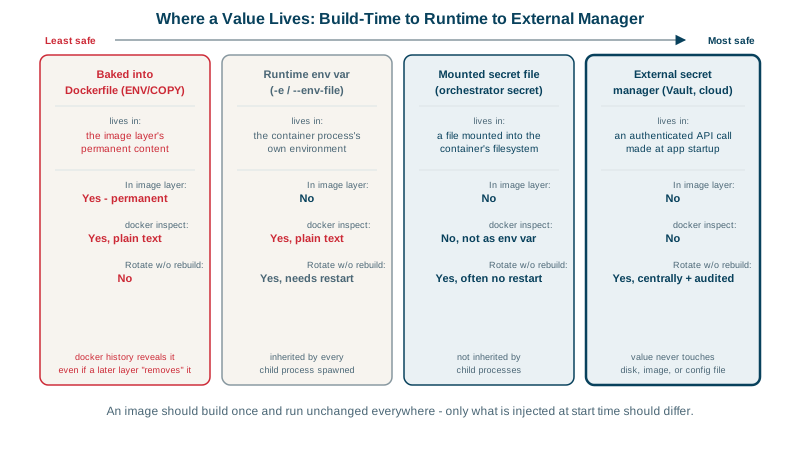
| Approach | In the image? | Shown by `docker inspect`? | Rotate without rebuilding? |
|---|---|---|---|
ENV or COPY in the Dockerfile | Yes, permanently | Yes | No |
-e at runtime | No | Yes, plain text | Yes, with a restart |
| Mounted secret file | No | No | Yes, sometimes without a restart |
| Secret manager fetched at startup | No | No | Yes |
Using a secret manager
For production, keep secrets in a dedicated store: Azure Key Vault, AWS Secrets Manager, Google Secret Manager or HashiCorp Vault. Access is controlled and audited, secrets can rotate automatically, and the app (or a sidecar, or the platform) fetches them using its workload identity rather than another stored password. In Kubernetes, the External Secrets Operator or the Secrets Store CSI driver syncs them in.
Keep secrets out of git too
Add .env to .gitignore, commit a .env.example with placeholder values, and run a secret scanner (gitleaks, GitHub secret scanning) in CI.
Check yourself
No. Every image built while the line existed contains the key in its layers and metadata, and docker history or inspecting the image reveals it, including copies already pushed to registries. Rotate the key immediately, rebuild the images, and pass secrets at runtime or with BuildKit secret mounts.
Environment variables are visible in docker inspect, inherited by every child process, and often end up in crash dumps and logs. A secret mounted as a file, readable only by the app's user, avoids those leaks and can be replaced on disk for rotation.
Use a BuildKit secret mount: RUN --mount=type=secret,id=npm_token ... exposes the token as a file only while that one step runs. It's never written to a layer or the build cache, so the final image and its history don't contain it.
Any real secret: passwords, API keys, tokens and connection strings for shared environments. Commit an example file with placeholder values instead, and keep real values in a secret manager or local, git-ignored files.