Kubernetes Deployments and Rolling Updates
On this page
- Zero-downtime updates with Deployments
- Deployments, ReplicaSets and Pods
- Deployment YAML with a safe rolling update
- Why readiness probes make rollouts safe
- Running and watching a rollout with kubectl
- Rolling back with kubectl rollout undo
- The Recreate strategy
- PodDisruptionBudgets: limits on voluntary disruptions
- Other workload controllers
- Check yourself
Zero-downtime updates with Deployments
You run 4 replicas of the orders API at version 1.4.2 and need to ship 1.4.3. Stopping all four and starting new ones means an outage. Replacing them one at a time, and only continuing when each new Pod is ready, means none. A Deployment does the second, and can undo it.
Deployments, ReplicaSets and Pods
- Pod: one running instance (Day 17).
- ReplicaSet: keeps exactly N Pods matching a template running; replaces any that disappear.
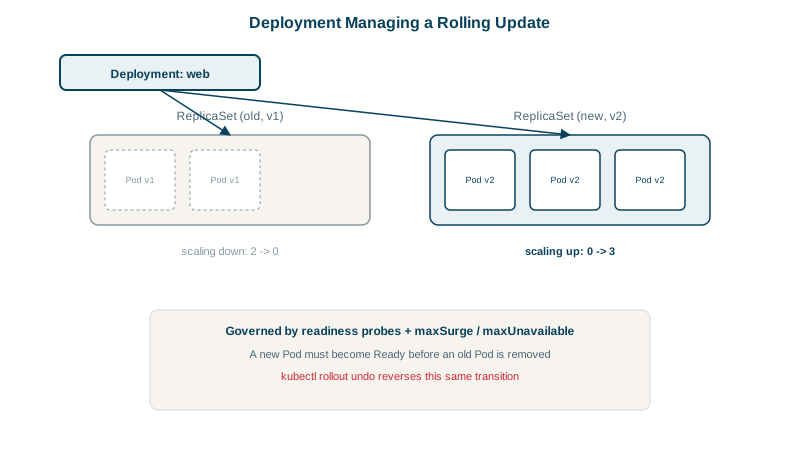
- Deployment: owns ReplicaSets and manages changes to the template. Each new template version gets a new ReplicaSet; the Deployment shifts Pods from the old one to the new one.
You work with Deployments; ReplicaSets are created for you.
Deployment YAML with a safe rolling update
apiVersion: apps/v1
kind: Deployment
metadata:
  name: orders-api
  labels: { app: orders-api }
spec:
  replicas: 4
  revisionHistoryLimit: 5
  selector:
    matchLabels: { app: orders-api }
  strategy:
    type: RollingUpdate
    rollingUpdate:
      maxSurge: 1          # at most 1 extra Pod above 4 during the update
      maxUnavailable: 0    # never fewer than 4 ready Pods
  template:
    metadata:
      labels: { app: orders-api }
    spec:
      containers:
        - name: api
          image: ghcr.io/myorg/orders-api:1.4.3
          ports: [{ containerPort: 8080 }]
          readinessProbe:
            httpGet: { path: /health/ready, port: 8080 }
            periodSeconds: 5
          resources:
            requests: { cpu: 250m, memory: 256Mi }
            limits: { memory: 512Mi }
With maxSurge: 1 and maxUnavailable: 0, the rollout starts one new Pod, waits until its readiness probe passes, removes one old Pod, and repeats. Capacity never drops below 4. Higher values roll out faster with less margin. The default for both is 25 percent.
Why readiness probes make rollouts safe
Without a readiness probe, a Pod counts as ready as soon as its container starts, so a version that crashes a few seconds after starting, or can't reach its database, gets rolled out to every replica. With one, a broken version stalls on its first Pod while the old Pods keep serving. Set progressDeadlineSeconds (default 600) so a stalled rollout is reported as failed.
Running and watching a rollout with kubectl
kubectl set image deployment/orders-api api=ghcr.io/myorg/orders-api:1.4.3
kubectl rollout status deployment/orders-api      # waits until done, or reports failure
kubectl get rs -l app=orders-api                  # old and new ReplicaSets
kubectl rollout history deployment/orders-api
In practice the image change comes from your manifests in git and CI/CD (Days 25 and 27), not from typing set image.
Rolling back with kubectl rollout undo
The old ReplicaSet is kept (up to revisionHistoryLimit), scaled to zero. Rolling back scales it up again:
kubectl rollout undo deployment/orders-api                 # previous revision
kubectl rollout undo deployment/orders-api --to-revision=3
Because the old Pods' template is still stored, rollback is just another rolling update in the other direction. Database changes aren't rolled back, though: keep schema changes backward compatible (expand, then contract) so the previous version still works.
If you deploy with GitOps (Day 25), kubectl rollout undo is only a stopgap: git still says 1.4.3, so Argo CD or Flux will put it back on its next sync. Roll back by reverting the commit, and the tool rolls the cluster back for you.
The Recreate strategy
strategy: Recreate deletes all old Pods before creating new ones. That means downtime, but it's needed when two versions must never run at once, for example an app holding an exclusive lock on a resource. Blue-green and canary releases (Day 27) give more control than either.
PodDisruptionBudgets: limits on voluntary disruptions
A rollout replaces Pods at a pace you choose. A node drain, during a cluster upgrade or when the autoscaler removes a node, evicts every Pod on that node, and two drains at once can take out several replicas of the same app. A PodDisruptionBudget (PDB) tells Kubernetes how many replicas must stay up during such voluntary disruptions:
apiVersion: policy/v1
kind: PodDisruptionBudget
metadata:
  name: orders-api
spec:
  minAvailable: 3            # or maxUnavailable: 1
  selector:
    matchLabels: { app: orders-api }
With 4 replicas, a drain may evict one orders API Pod, then has to wait until its replacement is Ready elsewhere before it can evict another. A PDB doesn't help with involuntary disruptions such as a node crashing; spreading replicas across nodes and zones does (Day 16). And don't set minAvailable equal to the replica count: then no Pod can ever be evicted, and node upgrades hang.
Other workload controllers
Deployments fit stateless services. Kubernetes has a controller for each other common shape of work:
| Controller | Runs | Typical use |
|---|---|---|
| StatefulSet | Pods with stable names and their own volumes (Day 21) | Databases, Kafka, anything with identity |
| DaemonSet | One Pod on every node, or every matching node | Log and monitoring agents, network plugins |
| Job | Pods until a task completes successfully | Migrations, batch imports, one-off reports |
| CronJob | A Job on a schedule | Nightly reports, cleanup, backups |
A nightly report as a CronJob:
apiVersion: batch/v1
kind: CronJob
metadata:
  name: nightly-report
spec:
  schedule: "0 2 * * *"
  timeZone: "America/New_York"
  concurrencyPolicy: Forbid          # skip a run if the previous one is still going
  jobTemplate:
    spec:
      backoffLimit: 3                 # retry a failing Pod up to 3 times
      activeDeadlineSeconds: 3600     # give up after an hour
      ttlSecondsAfterFinished: 86400  # clean up the finished Job after a day
      template:
        spec:
          restartPolicy: OnFailure
          containers:
            - name: report
              image: ghcr.io/myorg/reports:2.1.0
The Kubernetes documentation warns that a CronJob can occasionally start a Job twice, or not at all, so make the work idempotent: a second run of the same night's report should overwrite it, not create a duplicate.
Check yourself
It adds one new Pod, waits for it to become ready, removes one old Pod, and repeats, keeping at least 4 ready Pods throughout.
The rollout only moves on when new Pods are ready. Without a readiness probe, Kubernetes treats a new Pod as ready as soon as its container starts, so a version that fails on its first request can replace every working Pod before anyone notices. With a probe, a broken version stalls the rollout instead.
It scales the previous ReplicaSet, kept at zero replicas, back up and the current one down, as a rolling update in reverse.
A PodDisruptionBudget, for example minAvailable: 3, so drains evict one Pod at a time and wait for its replacement to be Ready.