Docker Networking Explained
On this page
Why containers can't find each other by name
An API container and a PostgreSQL container both run fine. The API's connection string says Host=db. Connecting fails with "name not resolved". Both were started with plain docker run on the default network, where container names don't resolve. One extra command fixes it.
Each container has its own network stack
Each container gets its own network namespace (Day 1): its own interfaces, IP address, routing table and ports. That's why two containers can both listen on port 80 without conflict. To talk to each other or the outside world, they're attached to networks.
Default bridge vs user-defined bridge networks
The default driver is bridge: a virtual switch on the host with a private subnet. Containers on the same bridge reach each other by IP, and reach the internet through the host via NAT.
There are two kinds, and the difference matters:
| Default `bridge` | User-defined bridge | |
|---|---|---|
| Created by | Docker, automatically | You: docker network create |
| Name resolution | No: IPs only | Yes: built-in DNS resolves container names |
| Isolation | Every container without --network lands here | Only containers you attach |
| Recommended | No | Yes |
Fix: create a user-defined network
docker network create appnet
docker run -d --name db --network appnet -e POSTGRES_PASSWORD=dev postgres:17
docker run -d --name api --network appnet -p 8080:8080 \
  -e ConnectionStrings__Default="Host=db;Username=postgres;Password=dev" myorg/api:1.4.0
docker exec api getent hosts db        # resolves to db's IP on appnet
Docker's embedded DNS resolves db to the database container's current IP. If it restarts and gets a new IP, the name still works. Docker Compose (Day 9) creates such a network for every project automatically, which is why Compose services find each other by service name.
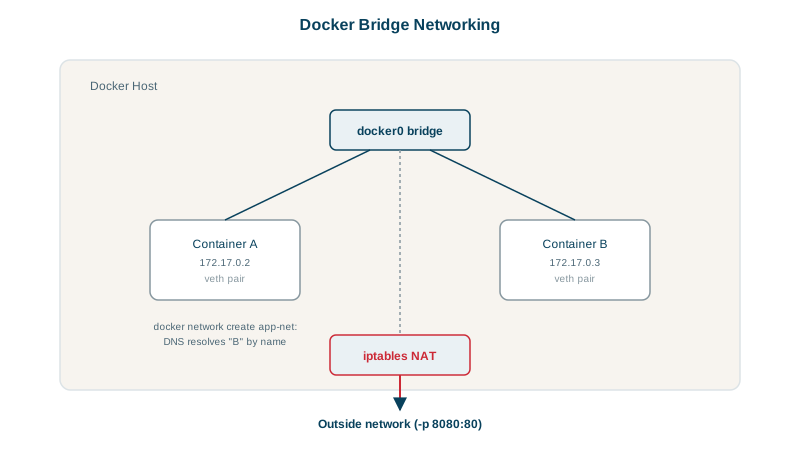
Publishing ports with -p
A container's ports are private to its network until you publish one:
-p 8080:8080              # host 8080 -> container 8080, on all host interfaces
-p 127.0.0.1:5432:5432    # only reachable from the host itself
Note what wasn't published above: the database. The API reaches it over appnet; nothing outside the host can. Publish only what users need, and bind development databases to 127.0.0.1. On Linux, published ports are implemented with firewall rules that can bypass host firewalls like ufw, which surprises people.
Inside a container, localhost means the container itself, not your machine. To reach a service on the host from a container, Docker Desktop provides the name host.docker.internal. On Linux with Docker Engine, that name doesn't exist unless you add it: docker run --add-host=host.docker.internal:host-gateway ..., or the same entry under extra_hosts in Compose.
Other Docker network drivers: host, none, overlay, macvlan
| Driver | What it does | Use |
|---|---|---|
host | No network isolation; shares the host's network stack (Linux) | Maximum network performance, host-level tools |
none | Only a loopback interface | Jobs that need no network |
overlay | A virtual network spanning several Docker hosts | Docker Swarm clusters |
macvlan | Gives the container its own address on the physical network | Legacy apps expecting to be on the LAN |
You can attach a container to several networks with docker network connect, for example a frontend network and a backend network, to separate tiers.
Check yourself
Docker's default bridge network has no embedded DNS, so containers on it can only reach each other by IP address, which changes. Create a user-defined bridge network with docker network create app and attach both containers; Docker's built-in DNS then resolves each container by its name.
Each container has its own network stack, so localhost inside the API container means the API container itself, where no database is listening. Put both containers on a user-defined network and connect to the database container by name, such as db:5432.
The API already reaches the database over the private Docker network, so publishing the port adds nothing for the app. It would only expose the database on the host's interfaces, possibly to the whole network, giving attackers a direct target.
When a container needs the host's network stack directly, for example for very high network performance or software that must see real network interfaces. It removes network isolation and port mapping, so it's the exception, and it works this way only on Linux.