Docker Volumes vs Bind Mounts
On this page
Why container data disappears
A developer runs PostgreSQL in a container, creates tables, loads test data, then upgrades the image: docker rm -f db and docker run with the new tag. Every table is gone. The data lived in the container's writable layer (Day 3), and removing the container removed it. Containers are meant to be disposable; data mustn't be.
Volumes vs bind mounts vs tmpfs
| Named volume | Bind mount | tmpfs | |
|---|---|---|---|
| What | Storage Docker creates and manages | An existing host path mapped in | Memory only |
| Lives | Until you remove the volume | On the host, as long as the path exists | Until the container stops |
| Referenced by | Name | Absolute host path | Mount point |
| Typical use | Database files, uploads, durable app data | Source code and config in development | Secrets or scratch files that must not hit disk |
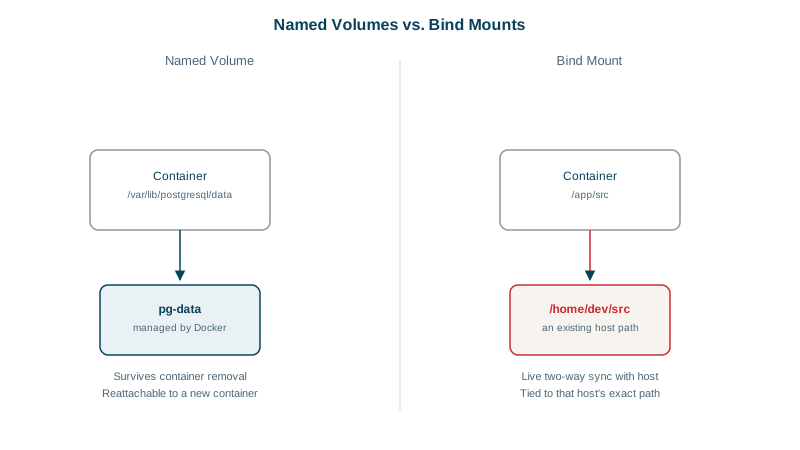
Named volumes for database data
docker volume create pgdata
docker run -d --name db -e POSTGRES_PASSWORD=dev \
  -v pgdata:/var/lib/postgresql/data postgres:17

docker rm -f db                                # container gone...
docker run -d --name db -e POSTGRES_PASSWORD=dev \
  -v pgdata:/var/lib/postgresql/data postgres:17   # ...data still there
The volume lives independently of any container. Docker stores it in its own area on the host and refers to it by name, so the same command works on any machine. Check an image's documentation for where it keeps data. The PostgreSQL image is the classic trap: up to version 17 you mount /var/lib/postgresql/data, but from 18 the image keeps data in a version-specific folder under /var/lib/postgresql and declares that as the volume. Mount the old path on an 18 image and the data doesn't persist when the container is recreated (Docker Hub: postgres).
Upgrading a database across major versions still needs its own migration step (for PostgreSQL, pg_upgrade or dump and restore); keeping the volume only keeps the old files.
Bind mounts for development
docker run --rm -it -v "$PWD":/app -w /app -p 3000:3000 node:22-alpine npm run devYour editor changes files on the host; the container sees them immediately, so hot reload works. Bind mounts depend on the host's directory layout and file permissions, which is why they're for development and host configuration, not production data. On macOS and Windows, bind mounts cross the VM boundary and can be slower for large dependency folders; keep node_modules in a named volume if that bites. On Linux, watch file ownership too: files a container creates in a bind mount belong to the container's user id, often root, so your own user may not be able to edit or delete them. Run the container with --user "$(id -u):$(id -g)" in development.
Read-only mounts and filesystems
-v ./nginx.conf:/etc/nginx/nginx.conf:ro       # the container can read, not change
docker run --read-only --tmpfs /tmp myorg/api:1.4.0   # whole root filesystem read-only, scratch in memory
A read-only root filesystem with explicit writable mounts limits what a compromised process can change (Day 13).
How to back up a Docker volume
Volumes aren't backed up by Docker. A common approach is a throwaway container that archives the volume:
docker run --rm -v pgdata:/data:ro -v "$PWD":/backup alpine \
  tar czf /backup/pgdata-2026-10-10.tgz -C /data .
For databases, a logical or physical backup with the database's own tools (pg_dump, pg_basebackup) is safer than copying files from a running database.
Housekeeping: docker volume ls, docker volume inspect pgdata, and docker volume prune to delete volumes no container uses. Prune carefully; that's where your data is.
Check yourself
The database wrote its files to the container's writable layer, which belongs to that container and is deleted when it's removed. A new container from the same image starts empty. Mount a named volume at the database's data directory so the data lives outside any container's lifecycle.
In development, to share source code or configuration from your machine into a container, so edits appear instantly without rebuilding. In production, named volumes are usually better, because bind mounts depend on the host's directory layout and permissions.
Not reliably. PostgreSQL may be in the middle of writing files, so a file-level copy can capture an inconsistent state that won't start or silently loses data. Use the database's own tools, such as pg_dump or pg_basebackup, or stop the database before copying the volume.
It stores files in memory only, never on disk, and they vanish when the container stops. It suits scratch space and short-lived sensitive files, and pairs well with a read-only root filesystem for paths the app must write to.
With --read-only, an attacker who gets into the app can't modify its binaries or drop tools onto the filesystem. Give the app writable volumes or tmpfs mounts only for the directories it really needs, such as /tmp.