Kubernetes Horizontal Pod Autoscaler (HPA)
On this page
Why an HPA shows unknown and never scales
A team adds a Horizontal Pod Autoscaler at 70 percent CPU. Under load, the Pods are clearly busy, but the replica count never changes, and kubectl get hpa shows <unknown>/70%. The Pods have no CPU requests, and the HPA measures utilization as a percentage of the request. No request, no percentage, no scaling.
Kubernetes resource requests and limits
resources:
  requests: { cpu: 250m, memory: 256Mi }   # reserved for scheduling
limits: { memory: 512Mi } # hard cap- Requests are what the scheduler reserves on a node. A Pod is only placed where its requests fit. They're also the baseline for autoscaling percentages.
- Limits cap usage. Exceeding the memory limit gets the container OOM-killed; exceeding a CPU limit throttles it (Day 14). Many teams set memory limits but leave CPU limits off, to avoid throttling while still guaranteeing requests.
250mmeans 250 millicores, a quarter of a CPU.
Set requests from measured usage (kubectl top pods, or a Vertical Pod Autoscaler in recommendation mode). Too low, and nodes are overpacked and Pods fight for resources; too high, and you pay for idle capacity.
Requests and limits also set a Pod's QoS class, which decides who is evicted first when a node runs short of memory. Pods with no requests (BestEffort) go first, then Pods using more than they requested (Burstable). Pods whose requests equal their limits for every container (Guaranteed) go last. Critical services shouldn't run without requests.
The Vertical Pod Autoscaler (VPA), an add-on, watches actual usage and recommends requests. Run it with updateMode: "Off" and it only reports, which is the safe way to right-size: read kubectl describe vpa orders-api and copy its target values into your manifests. In its automatic modes it changes requests itself by replacing Pods. Don't let a VPA and an HPA both act on CPU for the same Deployment: the HPA adds Pods because utilization is high, the VPA raises requests so utilization falls, and the two keep undoing each other.
How the Horizontal Pod Autoscaler works
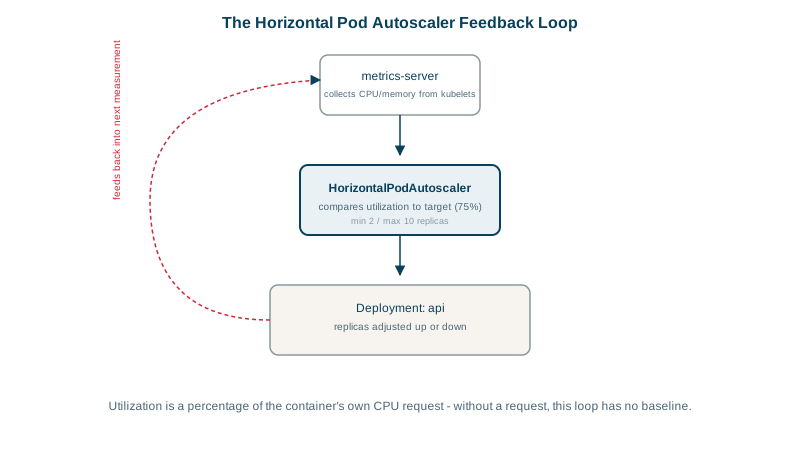
The HPA is a control loop: it reads metrics every 15 seconds or so, compares them with the target and changes the Deployment's replica count. CPU and memory metrics come from metrics-server, which must be installed.
apiVersion: autoscaling/v2
kind: HorizontalPodAutoscaler
metadata:
  name: orders-api
spec:
  scaleTargetRef:
    apiVersion: apps/v1
    kind: Deployment
    name: orders-api
  minReplicas: 3
  maxReplicas: 20
  metrics:
    - type: Resource
      resource:
        name: cpu
        target: { type: Utilization, averageUtilization: 70 }
  behavior:
    scaleDown:
      stabilizationWindowSeconds: 300      # wait 5 minutes of low load before removing Pods
The math: desired replicas = current replicas × current metric ÷ target. Four Pods averaging 105 percent of their request against a 70 percent target gives 4 × 10⁵ ÷ 70 = 6 replicas. The scale-down stabilization window prevents flapping when load briefly dips.
Scaling on custom metrics and KEDA
CPU is a poor signal for many workloads. A queue worker can be idle on CPU while 50,000 messages wait. Options:
- Custom or external metrics in the HPA (requests per second, queue depth) through a metrics adapter such as Prometheus Adapter.
- KEDA (Kubernetes Event-Driven Autoscaling) scales on dozens of event sources, such as Kafka lag, RabbitMQ or SQS queue length, and can scale workers to zero when there's no work.
Cluster Autoscaler and Karpenter: adding nodes
The HPA adds Pods; it doesn't add machines. If new Pods can't fit, they stay Pending. The Cluster Autoscaler or Karpenter watches for unschedulable Pods and adds nodes, and removes underused nodes later. You need both levels: Pod autoscaling for the app, node autoscaling for the capacity underneath.
Node startup takes a minute or more, so keep some headroom or a minimum replica count for sudden spikes.
Check yourself
The HPA can't compute CPU utilization. Usually the Pods have no CPU requests, so there's nothing to compare usage against, or metrics-server isn't installed, so there's no usage data. Add requests to the containers, check kubectl top pods, and look at kubectl describe hpa for the exact error.
Node capacity. The HPA only creates Pods; if the nodes can't fit them, the extra Pods stay Pending. A cluster autoscaler or Karpenter adds nodes when Pods can't be scheduled, so pod-level and node-level scaling work together.
CPU is the wrong signal for this workload, because the worker spends its time waiting on I/O. Scale on queue depth or consumer lag instead, with KEDA or an HPA using an external metric, so the number of workers follows the backlog.
Run it with updateMode: "Off", read its recommendations and copy them into the manifests, and don't combine it with an HPA scaling on CPU.