Kubernetes Pods Explained
On this page
What is a Kubernetes Pod?
Sometimes two processes must live side by side: an app and a proxy that handles its TLS, or an app and an agent that ships its logs. They need the same network address and maybe the same files, and must always run on the same machine. Kubernetes' unit for that is the Pod: one or more containers scheduled together on one node, sharing:
- one network namespace: one IP address, one port space; containers reach each other on
localhost, - volumes defined at the Pod level, mounted into any of its containers,
- a lifecycle: created, scheduled and deleted together.
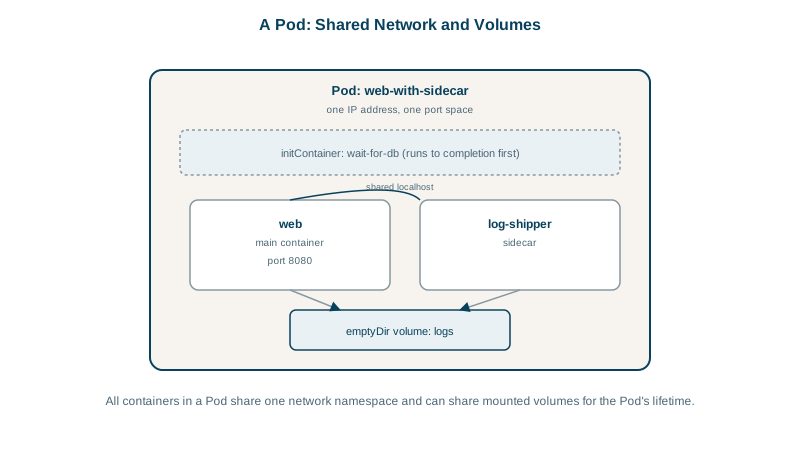
Most Pods have exactly one container. A Pod is not "a group of related services": put the API and its database in the same Pod and you can't scale or update them separately. A second container belongs in a Pod only if it's a helper that must share the app's network or files.
Sidecars and init containers
- Sidecar: a helper running alongside the app for its whole life: a log shipper, a service-mesh proxy, a config reloader. Kubernetes supports native sidecars, stable since 1.33: an init container with
restartPolicy: Alwaysstarts before the app, keeps running, and is stopped after the app on shutdown, so a proxy no longer dies before the app finishes its last requests (Kubernetes docs). - Init container: runs to completion before the app starts: wait for a dependency, run a migration check, fetch config. Init containers run one at a time; if one fails, the Pod retries it.
Example Pod manifest with probes
apiVersion: v1
kind: Pod
metadata:
  name: orders-api
  labels: { app: orders-api }
spec:
  initContainers:
    - name: wait-for-db
      image: busybox:1.37
      command: ["sh", "-c", "until nc -z postgres 5432; do echo waiting; sleep 2; done"]
  containers:
    - name: api
      image: ghcr.io/myorg/orders-api:1.4.2
      ports: [{ containerPort: 8080 }]
      resources:
        requests: { cpu: 250m, memory: 256Mi }
        limits: { memory: 512Mi }
      readinessProbe:
        httpGet: { path: /health/ready, port: 8080 }
        periodSeconds: 5
      livenessProbe:
        httpGet: { path: /health/live, port: 8080 }
        initialDelaySeconds: 15
        periodSeconds: 10
Readiness, liveness and startup probes
| Probe | Question | On failure |
|---|---|---|
startupProbe | Has the app finished starting? | Keep waiting; other probes are paused until it passes |
readinessProbe | Can it serve traffic right now? | Removed from Service endpoints; not restarted |
livenessProbe | Is it stuck beyond recovery? | Container restarted |
Kubernetes ignores a Dockerfile's HEALTHCHECK; probes replace it. Keep liveness checks simple (is the process responsive?); put dependency checks in readiness, or a database blip restarts every Pod (Day 14).
The timing fields decide how long Kubernetes waits: a probe fails the container after failureThreshold consecutive failures, periodSeconds apart. For an app that can need up to two minutes to start, such as a .NET service that warms caches or runs migrations at startup, use a startup probe rather than a long initialDelaySeconds on liveness:
startupProbe:
  httpGet: { path: /health/live, port: 8080 }
  periodSeconds: 5
  failureThreshold: 24        # 24 x 5 s = up to 2 minutes to start
Liveness and readiness don't run until the startup probe passes, so a slow start isn't mistaken for a hang, and once the app is up, liveness can react within seconds.
Pod status and debugging: Pending, CrashLoopBackOff, OOMKilled
Phases: Pending (not scheduled or pulling images), Running, Succeeded/Failed (for run-to-completion Pods). Common statuses:
| Status | Usually means |
|---|---|
Pending | No node has enough resources, or constraints can't be met |
ImagePullBackOff | Wrong image name or tag, or no pull credentials |
CrashLoopBackOff | The container keeps exiting; Kubernetes waits longer between restarts |
OOMKilled | Exceeded its memory limit |
kubectl get pod orders-api -o wide
kubectl describe pod orders-api          # events: scheduling, pulls, probe failures
kubectl logs orders-api -c api --previous   # logs of the last crashed instance
kubectl exec -it orders-api -c api -- sh
What happens when a Pod is deleted
When a Pod is deleted, by you, a rollout or a node drain, Kubernetes runs a fixed sequence:
- The Pod is marked Terminating and removed from its Services' endpoints. That removal reaches kube-proxy, ingress controllers and cloud load balancers asynchronously, over the next second or more.
- Any
preStophook runs. - Each container receives SIGTERM.
- Kubernetes waits up to
terminationGracePeriodSeconds(30 by default), counted from the start of step 2. - Anything still running receives SIGKILL.
Steps 1 and 2 begin at the same moment, which is why an app that exits instantly on SIGTERM can still drop requests already on their way to it. Day 27 closes that gap with a short preStop pause and graceful shutdown.
Don't create bare Pods
A Pod created directly isn't recreated if its node fails or it's deleted. Use controllers that manage Pods for you: Deployments for stateless apps (Day 18), StatefulSets for stateful ones, Jobs for run-to-completion work.
Check yourself
No. Containers in a Pod are scheduled, scaled and restarted together, so scaling the API would scale the database, and restarting one would disrupt the other. Run them as separate workloads, a Deployment for the API and a StatefulSet or managed database for the data, connected through a Service.
A failing readiness probe removes the Pod from its Services' endpoints, so it stops receiving traffic, but the container keeps running until it's ready again. A failing liveness probe tells the kubelet the container is stuck, so it restarts the container.
Run kubectl logs <pod> --previous to see the output of the container that crashed, and kubectl describe pod <pod> for the exit code, OOM kills and recent events. CrashLoopBackOff only means Kubernetes is waiting longer between restarts; the cause is in what the container did before it exited.
Add a startup probe whose failureThreshold times periodSeconds covers at least 90 seconds, such as 18 checks every 5 seconds. Liveness and readiness probes don't run until the startup probe succeeds, so a slow but healthy start isn't mistaken for a hang.
It runs to completion before the app containers start, for setup work such as waiting for a dependency, running a migration or fetching configuration. If it fails, the Pod's app containers never start.