Helm Tutorial: Packaging Kubernetes Apps
On this page
Why Helm: the same YAML in three environments
The orders API needs a Deployment, Service, HPA, ConfigMap, Ingress, ServiceAccount and NetworkPolicy, in dev, staging and production. The environments differ in replicas, resources, hostnames and image tags. Copying the files three times means fixing every bug three times, and the copies drift. Helm solves this with templates and values.
Anatomy of a Helm chart
A chart is a folder:
orders-api/
  Chart.yaml              # name, version, dependencies
  values.yaml             # default settings
  templates/
    deployment.yaml
    service.yaml
    ingress.yaml
    hpa.yaml
    _helpers.tpl          # shared template snippets
Templates use Go template syntax to pull in values:
# templates/deployment.yaml (excerpt)
apiVersion: apps/v1
kind: Deployment
metadata:
  name: {{ include "orders-api.fullname" . }}
spec:
  replicas: {{ .Values.replicaCount }}
  template:
    spec:
      containers:
        - name: api
          image: "{{ .Values.image.repository }}:{{ .Values.image.tag }}"
          resources:
{{- toYaml .Values.resources | nindent 12 }}# values.yaml: defaults
replicaCount: 2
image: { repository: ghcr.io/myorg/orders-api, tag: "1.4.2" }
resources:
requests: { cpu: 100m, memory: 128Mi }
ingress: { enabled: false }# values-prod.yaml: only what differs in production
replicaCount: 4
resources:
requests: { cpu: 500m, memory: 512Mi }
limits: { memory: 1Gi }
ingress: { enabled: true, host: shop.example.com }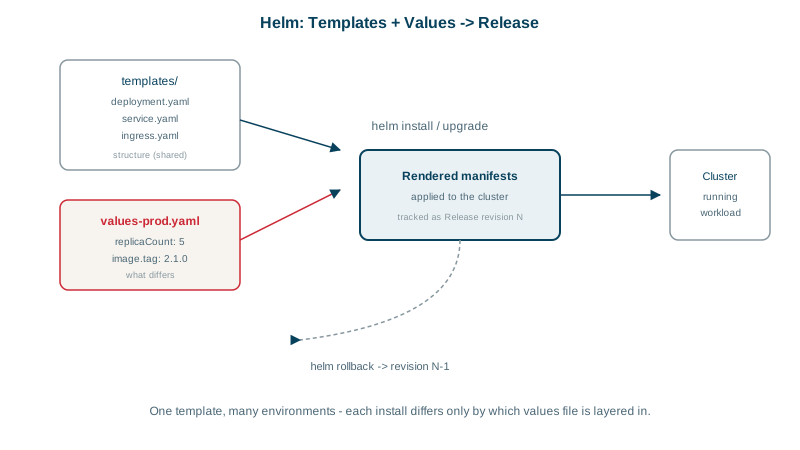
Helm releases: install, upgrade and roll back
helm upgrade --install orders-api ./orders-api -n checkout -f values-prod.yaml --set image.tag=1.4.3
helm list -n checkout                # releases and their revision numbers
helm history orders-api -n checkout
helm rollback orders-api 7 -n checkout
helm uninstall orders-api -n checkout
Each install or upgrade creates a numbered revision of the release, stored in the cluster, so you can see what changed and roll back to any earlier one. Those revisions are stored as Secrets in the release's namespace and include the rendered values, so don't pass real passwords through --set or values files; reference Secrets created by your secret tooling instead (Day 20).
Helm 4 was released in November 2025, with server-side apply support, better waiting on resources and a new plugin system. Helm 3 gets security fixes only until November 11, 2026, so plan the upgrade (Helm blog).
Rendering and validating charts before deploying
Templates are one more layer between you and the YAML the cluster sees, so render before you apply:
helm lint ./orders-api
helm template orders-api ./orders-api -f values-prod.yaml   # print rendered manifests
helm diff upgrade orders-api ./orders-api -f values-prod.yaml   # with the helm-diff plugin
Validate the rendered output with kubeconform in CI, the same way the manifests in this course were checked.
Using community Helm charts safely
Charts are published in repositories and OCI registries: databases, ingress controllers, cert-manager, monitoring stacks. A chart can depend on others in Chart.yaml. Pin chart versions, read the values they expose, and treat them like any third-party dependency: review upgrades and scan the images they pull.
Helm vs Kustomize, and GitOps with Argo CD or Flux
- Kustomize (built into
kubectl apply -k) uses plain YAML bases plus per-environment patches, with no templating language. Simpler for your own apps; no release history. - GitOps tools, Argo CD and Flux, keep the cluster in sync with Helm charts or Kustomize overlays stored in git. Git becomes the record of what's deployed, and drift is corrected automatically. Most mature setups combine Helm or Kustomize with GitOps.
Here's Kustomize for the same app: a base with the shared manifests, and an overlay per environment that lists only the differences.
k8s/
  base/
    kustomization.yaml       # resources: [deployment.yaml, service.yaml]
    deployment.yaml
    service.yaml
  overlays/
    prod/
kustomization.yaml# overlays/prod/kustomization.yaml
apiVersion: kustomize.config.k8s.io/v1beta1
kind: Kustomization
namespace: checkout
resources:
- ../../base
images:
- name: ghcr.io/myorg/orders-api
newTag: "1.4.3"
patches:
- target: { kind: Deployment, name: orders-api }
patch: |-
- op: replace
path: /spec/replicas
value: 4kubectl kustomize overlays/prod prints the result, and kubectl apply -k overlays/prod applies it. Every file is plain YAML you can read on its own, which is Kustomize's main advantage over templates. The cost is no packaging, versioning or release history; GitOps supplies those from git.
Check yourself
Without them, each environment needs its own nearly identical copy of every manifest, and they drift apart. With Helm, one set of templates serves all environments, and small values files hold only what differs, such as replica counts, resource requests, host names and image tags.
Run helm history <release> to find the last good revision, then helm rollback <release> <revision>. Helm re-applies that revision's rendered manifests and records the rollback as a new revision. Data changes, such as database migrations, aren't rolled back, so plan those separately.
It renders the chart into the exact manifests that would be applied, without touching a cluster, so they can be reviewed and diffed in the pull request and validated with tools like kubeconform or policy checks. Problems surface before deploy instead of during it.
When you want plain, readable YAML with small per-environment patches, and get history and rollback from GitOps rather than Helm releases.