Docker Security Best Practices
On this page
How container breaches usually happen
Most container incidents aren't exotic kernel exploits. They're a public image with a vulnerable library, a container running as root with the Docker socket mounted, a secret in an image layer, or --privileged added "to make it work". Each has a simple default that prevents it.
1. Image security: trusted, scanned and signed
- Use trusted base images: official images, verified publishers, or your organization's own hardened bases. Pin versions or digests (Day 4).
- Keep images small: multi-stage builds and slim or distroless bases (Day 8). Fewer packages, fewer vulnerabilities.
- Scan every image for known vulnerabilities in CI and in the registry, with Trivy, Grype or Docker Scout. Fail builds on critical issues with a fix available.
- Rebuild regularly, even without code changes, to pick up patched base images.
- Sign images (Sigstore cosign) and verify signatures before deploying, so only images your pipeline built can run.
- No secrets in layers (Day 10).
trivy image ghcr.io/myorg/orders-api:1.4.2 --severity HIGH,CRITICAL --exit-code 12. Runtime security: non-root, read-only, no capabilities
docker run -d --name api \
  --user 10001:10001 \
  --read-only --tmpfs /tmp \
  --cap-drop ALL \
  --security-opt no-new-privileges \
  --memory 512m --cpus 1 --pids-limit 200 \
-p 8080:8080 myorg/api:1.4.0- Non-root user: root in a container is root on the shared kernel, limited only by namespaces and capabilities. A non-root user removes a whole class of escalations.
- Read-only root filesystem with explicit writable mounts: an attacker can't drop tools or modify the app.
- Drop capabilities: Linux splits root's power into capabilities (bind low ports, change file ownership, use raw sockets...). Docker grants a default set; most apps need none. Drop all, add back only what's needed with
--cap-add. no-new-privileges: setuid binaries can't raise privileges.- Resource limits (Day 14) contain denial-of-service and fork bombs.
3. The kernel boundary: seccomp, AppArmor and --privileged
All containers share the host kernel (Day 1). Docker's default seccomp profile blocks dozens of risky system calls, and AppArmor or SELinux profiles add mandatory access control. Keep them enabled and keep the host kernel patched.
Never use --privileged for applications. It gives the container nearly all capabilities and device access, effectively removing the isolation. If something "only works with privileged", find the specific capability or device it needs.
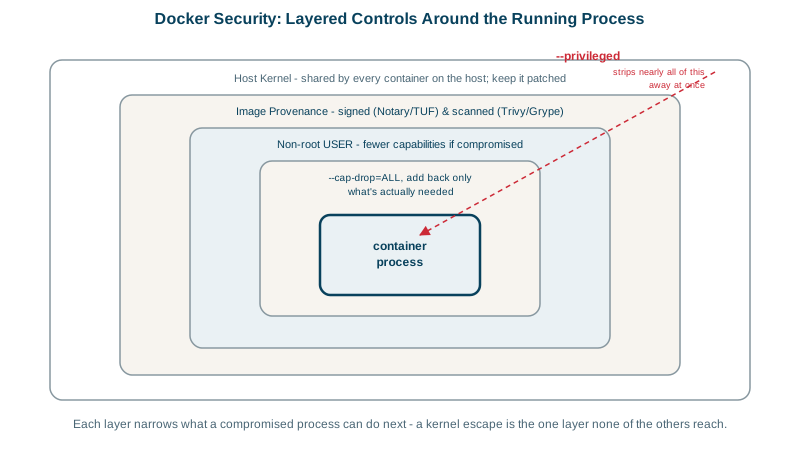
4. Protecting the Docker daemon and socket
Access to the Docker daemon is equivalent to root on the host: anyone who can run docker run -v /:/host can read and change everything.
- Don't mount
/var/run/docker.sockinto containers unless you fully trust them; a compromised container with the socket owns the host. - Treat membership in the
dockergroup as root access. - Consider rootless mode, where the daemon runs as an unprivileged user.
- In CI, build images with tools that don't need a privileged daemon (BuildKit rootless, Kaniko, Buildah).
Docker security checklist
| Area | Default |
|---|---|
| Image | Trusted, pinned, minimal base; scanned; signed; rebuilt regularly |
| User | Non-root, numeric UID |
| Filesystem | Read-only root, explicit writable mounts |
| Capabilities | Drop all, add only what's needed; never --privileged |
| Kernel | Default seccomp and AppArmor/SELinux on; host patched |
| Daemon | No socket mounts; restricted docker group; rootless where possible |
Kubernetes enforces the same settings through securityContext and Pod Security Standards (Day 28).
Check yourself
It lets the container control the Docker daemon, which can start privileged containers and mount the host filesystem, effectively giving root on the host.
It removes every Linux capability from the container's processes, so even root inside has few special powers. Most applications don't need any.
Rebuild the image on the patched version of the base image, rescan it to confirm the fix, and redeploy. Your code didn't change, but your image contains the base layers, so you're shipping the vulnerability. Scheduled rebuilds, for example weekly, keep base image fixes from piling up.
Nearly all capabilities, access to host devices, and no seccomp or AppArmor restrictions, which removes most of the isolation between the container and the host. It's only acceptable for special system tools in controlled environments, never for ordinary application containers.
Keep the socket off the network, never expose the daemon's TCP API without mutual TLS, limit who can run Docker commands (membership in the docker group is effectively root), and consider rootless Docker or Podman to reduce the daemon's privileges.