Kubernetes Services and Networking Explained
On this page
Why Pod IPs aren't stable
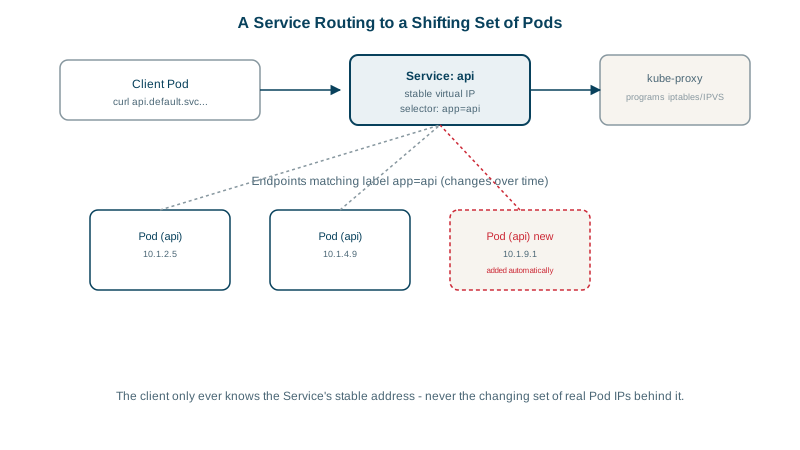
Every Pod gets its own IP address, and every Pod in the cluster can reach every other Pod directly; that's the Kubernetes network model. But Pods are replaced constantly: rollouts, rescheduling, autoscaling. Each replacement gets a new IP. Hardcoding Pod IPs is as fragile as hardcoding container IPs (Day 6).
How a Kubernetes Service works
A Service selects Pods by labels and gives them one stable virtual IP and DNS name:
apiVersion: v1
kind: Service
metadata:
  name: orders-api
spec:
  selector:
    app: orders-api          # every ready Pod with this label is a backend
  ports:
    - port: 80               # the Service's port
      targetPort: 8080       # the container's port
Kubernetes keeps an EndpointSlice listing the IPs of matching Pods that pass readiness. New Pods are added and removed Pods dropped automatically. On each node, kube-proxy (or a replacement such as Cilium) routes connections for the Service's virtual IP to one of those endpoints.
Note the word connections. A Service picks a backend once per connection, not per request. That's fine for short HTTP/1.1 requests, but gRPC and other HTTP/2 clients keep one long-lived connection and send everything down it, so one Pod can take all the load while new replicas sit idle. Fix it with client-side load balancing over a headless Service (below), periodic reconnects, or a service mesh or gateway that balances per request.
Kubernetes DNS names for Services
CoreDNS gives every Service a name:
orders-api                                   same namespace
orders-api.shop                              from another namespace
orders-api.shop.svc.cluster.local            fully qualified
So the checkout service simply calls http://orders-api/. No addresses in config.
Service types: ClusterIP, NodePort, LoadBalancer, ExternalName, headless
| Type | Reachable from | Use |
|---|---|---|
ClusterIP (default) | Inside the cluster only | Service-to-service traffic |
NodePort | Every node's IP on a high port (30000-32767) | Rarely directly; a building block |
LoadBalancer | A cloud load balancer with an external IP | Exposing a TCP/UDP service publicly |
ExternalName | DNS alias to an outside name | Pointing a cluster name at an external database |
Headless (clusterIP: None) | DNS returns Pod IPs directly | StatefulSets, client-side load balancing |
For HTTP, you usually expose many Services through one entry point with Ingress or the Gateway API (Day 23) instead of a load balancer per Service.
A headless Service also gives each StatefulSet Pod its own stable DNS name, <pod>.<service>.<namespace>.svc.cluster.local, such as postgres-0.postgres.shop.svc.cluster.local. That's how a client reaches one specific database replica, the primary for example, instead of a random one.
Debugging a Service: no endpoints or connection refused
Most Service problems are a mismatch somewhere in the chain. Check in order:
kubectl get svc orders-api                         # does it exist, which port?
kubectl get endpointslices -l kubernetes.io/service-name=orders-api   # any endpoints at all?
kubectl get pods -l app=orders-api --show-labels   # do Pod labels match the selector?
kubectl describe pod <pod>                         # are they Ready? readiness failures?
kubectl run tmp --rm -it --image=nicolaka/netshoot -- curl -sv http://orders-api/health| Finding | Cause |
|---|---|
| No endpoints | Selector doesn't match Pod labels, or no Pods are Ready |
| Endpoints exist, connection refused | targetPort doesn't match the port the app listens on |
| Name doesn't resolve | Wrong namespace, or DNS issue in the cluster |
| Works by Pod IP, not by Service | NetworkPolicy blocking, or kube-proxy problem |
Also common: the app listens on 127.0.0.1 inside the container, so only the container itself can reach it. Listen on 0.0.0.0.
Check yourself
Pod IPs change whenever Pods are replaced; the Service's name and virtual IP stay the same while its endpoint list follows the Pods.
Either the Service's label selector doesn't match the Pods' labels, often a typo or a changed label, or the matching Pods exist but are failing their readiness probes. Check with kubectl get endpointslices -l kubernetes.io/service-name=<name> and compare kubectl get pods --show-labels with the selector.
Use the DNS name orders-api.shop, or the fully qualified orders-api.shop.svc.cluster.local. A bare orders-api only resolves within the caller's own namespace, so cross-namespace calls need at least the namespace suffix.
A Service with clusterIP: None. Instead of one virtual IP, its DNS name returns the IPs of the individual Pods. StatefulSets use it so clients can address specific members, such as db-0.db, and some clients use it to do their own load balancing.