Kubernetes Architecture: Control Plane and Nodes
On this page
Control plane and worker nodes
A Kubernetes cluster has:
- the control plane, which stores the desired state and makes decisions, and
- worker nodes, which run your containers.
In managed services (AKS, EKS, GKE) the provider runs the control plane for you; you see and pay for the nodes.
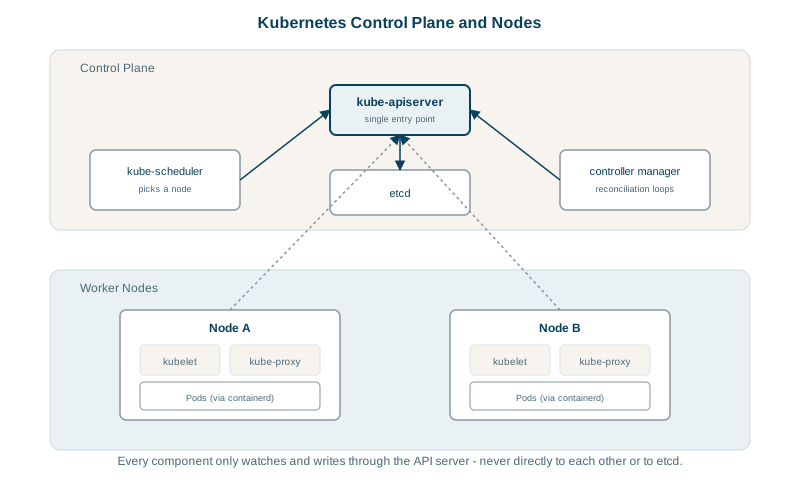
Kubernetes control plane components
| Component | Job |
|---|---|
| kube-apiserver | The front door. Every client (kubectl, CI, controllers, kubelets) reads and writes cluster state through its REST API. It authenticates, authorizes and validates every request. |
| etcd | A strongly consistent key-value store (Raft consensus) holding all cluster objects. Only the API server talks to it. Back it up: losing etcd means losing the cluster's state. |
| kube-scheduler | Watches for Pods with no node assigned and picks one, based on resource requests, affinity rules, taints and spreading constraints. |
| kube-controller-manager | Runs the built-in controllers: Deployments, ReplicaSets, nodes, Jobs, endpoints and more, each reconciling its objects. |
| cloud-controller-manager | Talks to the cloud provider: creates load balancers for Services, attaches disks, manages node lifecycle. |
Components never call each other directly; they all watch the API server for changes and write back their results. That's what makes the system loosely coupled and recoverable.
In a self-managed cluster, etcd runs as 3 or 5 members and needs a majority to accept writes. Lose 2 of 3 and the cluster can't change anything: no deploys, no rescheduling. Pods that are already running keep running, though, because the kubelets keep their containers up without the control plane. A control-plane outage stops changes, not traffic.
How the scheduler picks a node
For each Pending Pod, the scheduler first filters out nodes that can't run it, then scores the rest and picks the best. The filters you'll meet most:
- Resource requests: a node is skipped unless its unreserved CPU and memory cover the Pod's requests (Day 24). Actual usage doesn't count here, only requests.
- Taints and tolerations: a taint on a node repels Pods that don't tolerate it. That's how GPU nodes or a dedicated node pool stay reserved: after
kubectl taint nodes gpu-1 gpu=true:NoSchedule, only Pods with a matching toleration land there. - Node affinity: a Pod can require or prefer node labels, such as an instance type or a zone.
Scoring prefers spreading replicas out, but only as a preference. Make it a rule with a topology spread constraint in the Deployment's Pod template. This one keeps the orders API's replicas spread across availability zones, so losing one zone of three takes out about a third of them:
spec:
  topologySpreadConstraints:
    - maxSkew: 1
      topologyKey: topology.kubernetes.io/zone
      whenUnsatisfiable: DoNotSchedule
      labelSelector:
        matchLabels: { app: orders-api }
maxSkew: 1 means the replica counts in any two zones may differ by at most one. Use whenUnsatisfiable: ScheduleAnyway if you'd rather run unevenly than leave Pods Pending. Add a second constraint on kubernetes.io/hostname to spread across nodes within a zone as well. Without rules like these, nothing stops all three replicas landing on one node.
Kubernetes node components: kubelet, runtime, kube-proxy, CNI
| Component | Job |
|---|---|
| kubelet | The node agent. Watches for Pods assigned to its node, asks the runtime to start their containers, runs probes, reports status. |
| Container runtime | containerd or CRI-O, through the Container Runtime Interface (CRI). Docker images run unchanged because they're OCI images. |
| kube-proxy | Programs the node's networking (iptables, IPVS or nftables rules) so traffic to a Service's virtual IP reaches a Pod. Some network plugins, such as Cilium, replace it. |
| CNI plugin | Gives each Pod an IP and connects Pods across nodes (Calico, Cilium, cloud-provider plugins). |
What happens after kubectl apply
kubectl apply -f deployment.yaml- kubectl sends the Deployment to the API server, which authenticates you, checks RBAC permissions, runs admission checks and stores it in etcd.
- The Deployment controller sees a new Deployment and creates a ReplicaSet.
- The ReplicaSet controller sees it wants 3 Pods and creates 3 Pod objects, with no node yet.
- The scheduler sees unscheduled Pods, picks a node for each and writes the assignment.
- The kubelet on each chosen node sees its new Pod, pulls the image through containerd, starts the containers and runs the probes.
- The kubelet reports status back; when readiness passes, the Pod is added to matching Services, and kube-proxy routes traffic to it.
Every step is a component reacting to a change in the API server. If a component restarts, it simply re-reads the current state and carries on.
kubectl commands for inspecting a cluster
kubectl get nodes -o wide                  # nodes, versions, internal IPs
kubectl describe node <name>               # capacity, allocated resources, conditions
kubectl get pods -A -o wide                # every Pod and the node it runs on
kubectl get events --sort-by=.lastTimestamp   # what the controllers and kubelets reported
Check yourself
The kube-scheduler. It filters out nodes that can't run the Pod, because of insufficient resources for its requests, taints or affinity rules, then scores the remaining nodes and binds the Pod to the best one. The kubelet on that node then starts the containers.
etcd stores every Kubernetes object: Deployments, Services, Secrets, configuration and their current state. If it's lost without a backup, the cluster forgets everything it was running, and rebuilding means redeploying every application from scratch. Managed services back it up for you; self-managed clusters must do it themselves.
The scheduler couldn't place them, usually for lack of resources or unsatisfiable constraints; kubectl describe pod shows the scheduling events and reason.
Topology spread constraints (or Pod anti-affinity) on the hostname and zone labels, so the scheduler is required to spread replicas across nodes and zones.
It runs on every node, watches the API server for Pods assigned to its node, asks the container runtime to start and stop their containers, runs their probes, and reports their status back. It's the agent that turns scheduling decisions into running containers.