Kubernetes Persistent Volumes and Storage Classes
On this page
Why Pods need persistent storage
A PostgreSQL Pod is rescheduled to another node after a node upgrade. Its container filesystem is gone, like a Docker container's writable layer (Day 7). For data that matters, a Pod needs storage that exists independently of it and can follow it to another node.
PersistentVolume, PersistentVolumeClaim and StorageClass
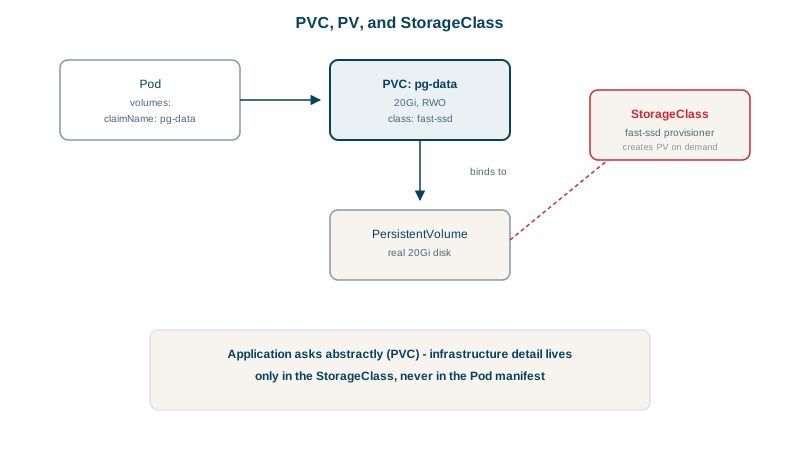
- PersistentVolume (PV): an actual piece of storage: a cloud disk, an NFS share, a file share.
- PersistentVolumeClaim (PVC): a request for storage by an application: "20 GiB, read-write by one node, fast SSD".
- StorageClass: a template describing a kind of storage and how to create it, backed by a CSI driver for the cloud or storage system.
Applications only ever write PVCs. With dynamic provisioning, a PVC that names a StorageClass makes the driver create a matching disk and PV automatically, and binds the claim to it. Developers ask for storage; the platform decides how it's supplied.
PVC access modes and reclaim policies
| Access mode | Meaning | Typical storage |
|---|---|---|
ReadWriteOnce (RWO) | Read-write by one node at a time | Cloud block disks (EBS, Azure Disk, Persistent Disk) |
ReadWriteOncePod | Read-write by exactly one Pod | Block disks, when you must prevent two Pods sharing |
ReadOnlyMany (ROX) | Read-only by many nodes | Shared reference data |
ReadWriteMany (RWX) | Read-write by many nodes | File shares: NFS, Azure Files, EFS |
| Reclaim policy | When the PVC is deleted |
|---|---|
Delete | The disk is deleted too (common default for dynamic provisioning) |
Retain | The disk is kept for manual recovery |
For production databases, a StorageClass with reclaimPolicy: Retain prevents one accidental kubectl delete pvc from destroying data. allowVolumeExpansion: true lets you grow a volume by editing the claim.
A ReadWriteOnce disk also has to move when its Pod does. During a node drain the new Pod can wait in ContainerCreating with a Multi-Attach error until the old node releases the disk, often a minute or more. That's one reason a single-replica database on a block disk has a short outage on every node upgrade.
Running databases as StatefulSets
A Deployment's Pods are interchangeable and would share one claim. Databases need each replica to keep its own disk and identity. A StatefulSet gives each Pod a stable name (postgres-0, postgres-1) and creates a separate PVC per Pod from a template, which follows that Pod wherever it's rescheduled:
apiVersion: storage.k8s.io/v1
kind: StorageClass
metadata:
  name: fast-retain
provisioner: disk.csi.azure.com          # the CSI driver for your platform
parameters:
  skuName: Premium_LRS
reclaimPolicy: Retain
allowVolumeExpansion: true
volumeBindingMode: WaitForFirstConsumer  # create the disk in the zone where the Pod lands
---
apiVersion: apps/v1
kind: StatefulSet
metadata:
  name: postgres
spec:
  serviceName: postgres
  replicas: 1
  selector:
    matchLabels: { app: postgres }
  template:
    metadata:
      labels: { app: postgres }
    spec:
      containers:
        - name: postgres
          image: postgres:17
          env:
            - name: PGDATA
              value: /var/lib/postgresql/data/pgdata
            - name: POSTGRES_PASSWORD
              valueFrom: { secretKeyRef: { name: postgres-auth, key: password } }
          volumeMounts:
            - name: data
              mountPath: /var/lib/postgresql/data
  volumeClaimTemplates:
    - metadata:
        name: data
      spec:
        accessModes: ["ReadWriteOnce"]
        storageClassName: fast-retain
        resources:
          requests:
            storage: 20Gi
WaitForFirstConsumer matters with zonal disks: the disk is created in the same availability zone as the node the Pod is scheduled to, instead of a random zone the Pod can't reach.
Two more StatefulSet behaviors to know. Pods start in order, postgres-0 first, and each must be Ready before the next starts; they stop in reverse order. And deleting a StatefulSet or scaling it down leaves its PVCs, and their disks, in place by default, so a later scale-up reattaches the same data. Delete them deliberately when you mean to, or set persistentVolumeClaimRetentionPolicy to have them removed.
Should the database run in Kubernetes at all?
Running databases in Kubernetes is possible and common with good operators (CloudNativePG for PostgreSQL, for example), which handle replication, failover and backups. But a managed database service (RDS, Azure Database, Cloud SQL) removes most of that work. Many teams run stateless apps in Kubernetes and keep databases managed. Either way, volumes aren't backups: snapshot them and test restores.
Check yourself
A PV is a piece of real storage; a PVC is an application's request for storage, which Kubernetes binds to a matching PV, often provisioned on demand.
StatefulSets give each Pod a stable identity and its own persistent volume that follows it, which databases need; Deployment Pods are interchangeable.
So the disk is created in the zone where the Pod is scheduled; otherwise it may be created in a zone the Pod can't attach to.
With Delete, deleting the claim deletes the volume and its data. With Retain, the volume and data survive and must be cleaned up or reattached manually. Use Retain for important data, so a mistaken kubectl delete pvc doesn't destroy it.
Often not, unless the team has strong Kubernetes and database operations skills or uses a mature operator. A managed database service takes care of backups, failover and upgrades, which is usually a better use of a small team's time.