Docker Container Lifecycle Explained
On this page
Why docker stop takes ten seconds: exit code 137
docker stop api hangs for ten seconds, every time, then the container exits with code 137. Logs show the app never ran its shutdown code. Requests in flight were cut off. The cause is a detail of how Linux treats PID 1, and it's common in hand-written Dockerfiles.
Docker container lifecycle states
| State | How you get there | Notes |
|---|---|---|
| Created | docker create | Configured, not started |
| Running | docker start / docker run | Main process alive |
| Paused | docker pause | Processes frozen via cgroups |
| Exited | Main process ended, or docker stop/kill | Filesystem kept; docker ps -a shows it |
| Removed | docker rm | Writable layer deleted |
A container lives exactly as long as its main process (PID 1 inside it). When that process exits, the container exits.
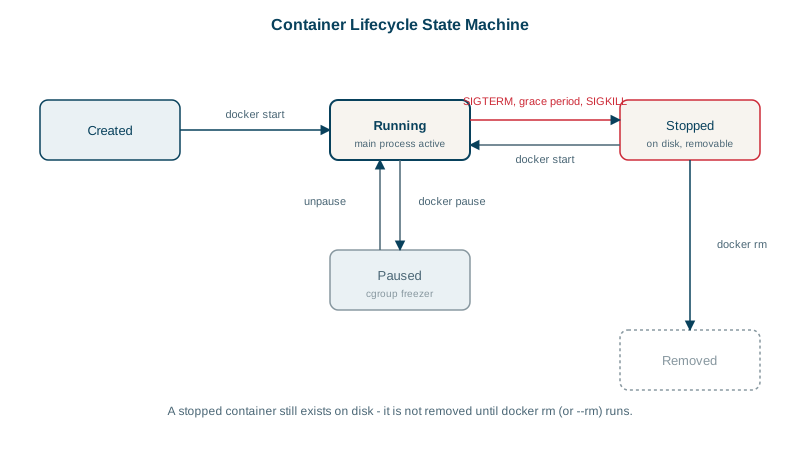
What docker stop does: SIGTERM, then SIGKILL
- Sends SIGTERM to PID 1: "please shut down".
- Waits for a grace period: 10 seconds by default (
docker stop -t 30to change it). - If the process is still running, sends SIGKILL, which can't be caught.
A well-behaved app catches SIGTERM, stops accepting new work, finishes in-flight requests, closes connections and exits.
Why a container ignores SIGTERM
Two usual causes:
1. A shell is PID 1. With shell-form CMD node server.js or a wrapper script, /bin/sh is PID 1 and your app is its child. Many shells don't forward SIGTERM to children, so your app never hears it.
2. PID 1 has no default signal handling. The kernel doesn't apply default actions to signals sent to PID 1 in a namespace. If your app doesn't install a SIGTERM handler, the signal is simply ignored.
docker inspect -f '{{.State.ExitCode}}' api       # 137 = 128 + 9: killed by SIGKILL
docker exec api ps                                # is PID 1 "sh -c ..." instead of your app?
Fix: make the app PID 1 and handle SIGTERM
- Use exec-form
CMD ["node", "server.js"], orexecin wrapper scripts (exec node server.js), so the app becomes PID 1. - Handle SIGTERM in the app. Most frameworks do it: ASP.NET Core's host stops gracefully on SIGTERM; in Node,
process.on('SIGTERM', ...)to close the server. - If the app can't be PID 1 safely, run a tiny init process:
docker run --initaddstini, which forwards signals and reaps zombie processes.
Then docker stop returns in under a second with exit code 0 or 143 (128 + 15, terminated by SIGTERM).
Docker exit codes: 0, 1, 125-127, 137 and 143
| Code | Meaning |
|---|---|
| 0 | Clean exit |
| 1 (or other small numbers) | Application error |
| 125 / 126 / 127 | Docker couldn't run it / command not executable / command not found |
| 137 | Killed by SIGKILL: grace period expired, or out of memory (check OOMKilled in docker inspect) |
| 143 | Terminated by SIGTERM |
Docker restart policies compared
| Policy | After a crash | After `docker stop` | After the daemon or host restarts |
|---|---|---|---|
no (default) | No | No | No |
on-failure[:N] | Yes, up to N times | No | Yes, if it was running |
unless-stopped | Yes | No | Yes, unless you stopped it |
always | Yes | Stays stopped until the daemon restarts | Yes |
For services on a single host, unless-stopped is a sensible default. In Kubernetes, the platform handles restarts instead (Day 17).
Check yourself
It was killed with SIGKILL, either because it ignored SIGTERM until the grace period ran out, or because it exceeded its memory limit.
A shell is PID 1 and doesn't forward the signal, or the app runs as PID 1 without a SIGTERM handler, so the kernel ignores the signal.
unless-stopped. It restarts the container whenever it exits and after the Docker daemon starts on boot, but not if you stopped it yourself with docker stop. always would also restart a manually stopped container after a daemon restart, and on-failure only restarts after non-zero exits.
128 + 15: the process was terminated by SIGTERM and exited because of it, which is the normal result of docker stop for an app that doesn't handle the signal itself. An app that shuts down cleanly on SIGTERM usually exits with 0 instead.
It runs a tiny init process (tini) as PID 1, which forwards signals to your app and reaps zombie processes. That fixes apps that don't handle SIGTERM as PID 1, without changing the app.