Kubernetes ConfigMaps and Secrets
On this page
Runtime configuration with ConfigMaps and Secrets
The orders API runs in staging and production from the same image (Day 10). The database host, log level and feature flags differ, and so do the credentials. Kubernetes stores configuration in two objects that Pods consume at runtime: ConfigMaps and Secrets.
ConfigMaps for ordinary settings
apiVersion: v1
kind: ConfigMap
metadata:
  name: orders-api-config
data:
  Logging__LogLevel__Default: "Information"
  Features__NewCheckout: "true"
  appsettings.Production.json: |
    { "Orders": { "MaxItems": 50 } }
Secrets for sensitive values
apiVersion: v1
kind: Secret
metadata:
  name: orders-api-db
type: Opaque
stringData:                       # plain text here; stored base64-encoded
  password: "change-me"
In practice you don't commit this file; the Secret is created by your secret tooling (below).
Using ConfigMaps and Secrets as env vars or files
apiVersion: v1
kind: Pod
metadata:
  name: orders-api
spec:
  containers:
    - name: api
      image: ghcr.io/myorg/orders-api:1.4.2
      envFrom:
        - configMapRef: { name: orders-api-config }     # every key becomes an env var
      volumeMounts:
        - name: db-secret
          mountPath: /run/secrets/db
          readOnly: true
  volumes:
    - name: db-secret
      secret:
        secretName: orders-api-db                       # file /run/secrets/db/password
Environment variables are read once at startup. Mounted files are updated by the kubelet when the ConfigMap or Secret changes (after a short delay), so an app that re-reads them can pick up rotated values without a restart; environment variables need a rollout (kubectl rollout restart deployment/orders-api). Mounted files also keep secrets out of kubectl describe output and process environments. One exception: a file mounted with subPath never receives updates, so mount the whole directory if you rely on rotation.
In ASP.NET Core, the key-per-file provider (the Microsoft.Extensions.Configuration.KeyPerFile package) turns a mounted directory into configuration, one file per key:
builder.Configuration.AddKeyPerFile("/run/secrets/db", optional: true, reloadOnChange: true);
// the file /run/secrets/db/password becomes the configuration key "password"
A double underscore in a file name marks nesting, so a file named ConnectionStrings__Default becomes ConnectionStrings:Default.
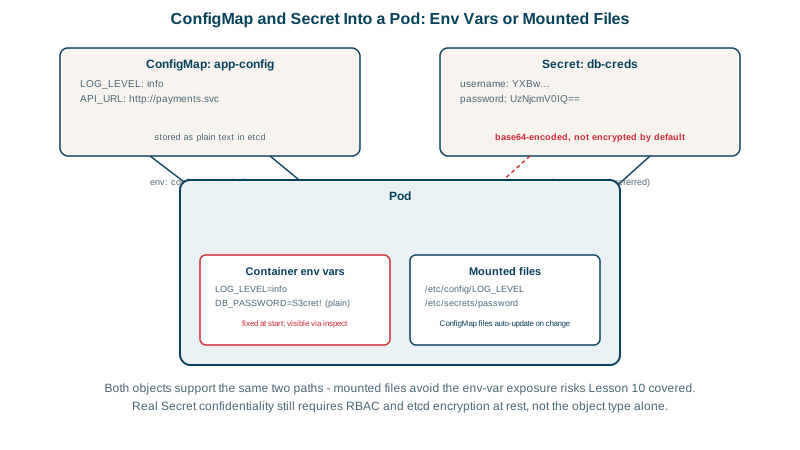
A Kubernetes Secret is base64-encoded, not encrypted
kubectl get secret orders-api-db -o jsonpath='{.data.password}' | base64 -d
# change-me
Base64 is an encoding anyone can reverse. By default Secrets are also stored unencrypted in etcd. What protects them is:
- RBAC (Day 28): only the workloads and people who need a Secret can
getit. Listing Secrets in a namespace effectively grants reading them, and so does permission to create Pods there, because a Pod can mount any Secret in its namespace. - Encryption at rest for etcd, enabled through the API server's encryption configuration or, on managed clusters, the provider's KMS integration.
- Not committing Secret manifests to git. Use one of: - External Secrets Operator or the Secrets Store CSI Driver, which sync from Azure Key Vault, AWS Secrets Manager, Google Secret Manager or Vault; - Sealed Secrets or SOPS, which commit an encrypted form that only the cluster can decrypt.
Practical tips for ConfigMaps and Secrets
- Keep ConfigMaps and Secrets in the same namespace as the Pods using them.
- Mark them
immutable: truewhen they never change: it protects against accidental edits and reduces API server load. Change by creating a new name and rolling out. - Size limit: about 1 MiB per object; large files belong elsewhere.
Check yourself
By default they're only base64-encoded and stored in etcd unencrypted. Protection comes from RBAC, etcd encryption at rest and keeping them out of git.
Pods that mount the Secret as a file and re-read it; values injected as environment variables need the Pods to be restarted.
Sync them from an external secret manager with the External Secrets Operator, or commit encrypted Sealed Secrets or SOPS files.
When it differs between environments or may change without a code change, such as feature flags, URLs of dependencies or log levels. Keeping it out of the image lets one image run everywhere.
Environment variables are only read at container start, so Pods must be restarted. A common pattern is to add a hash of the ConfigMap's contents as an annotation on the Pod template, so any change triggers a rolling update; Helm and Kustomize can do this automatically.