Kubernetes Security and RBAC Best Practices
On this page
- The problem: lock down a production namespace
- Step 1: least-privilege RBAC with Roles and RoleBindings
- Step 2: ServiceAccounts and workload identity
- Step 3: enforce Pod Security Standards
- Step 4: default-deny NetworkPolicies
- Step 5: admission policies for rules RBAC can't express
- Kubernetes production-readiness checklist
- Check yourself
The problem: lock down a production namespace
The checkout namespace runs the orders API in production. Lock it down: only the checkout team and its CI pipeline can deploy; the API can read only its own Secrets; Pods must run unprivileged; only the ingress controller may reach the API, and the API may reach only its database. Try it before reading on.
Step 1: least-privilege RBAC with Roles and RoleBindings
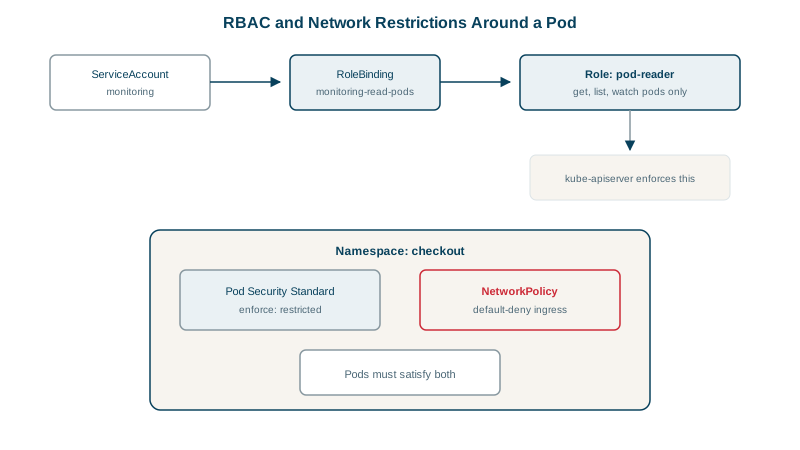
Role-based access control grants verbs (get, list, create, update, delete) on resources, to users, groups or ServiceAccounts. A Role is namespaced; a ClusterRole is cluster-wide.
apiVersion: rbac.authorization.k8s.io/v1
kind: Role
metadata:
  name: deployer
  namespace: checkout
rules:
  - apiGroups: ["apps"]
    resources: ["deployments"]
    verbs: ["get", "list", "watch", "create", "update", "patch"]
  - apiGroups: [""]
    resources: ["services", "configmaps"]
    verbs: ["get", "list", "watch", "create", "update", "patch"]
---
apiVersion: rbac.authorization.k8s.io/v1
kind: RoleBinding
metadata:
  name: checkout-ci-deployer
  namespace: checkout
subjects:
  - kind: ServiceAccount
    name: ci-deployer
    namespace: checkout
roleRef:
  kind: Role
  name: deployer
  apiGroup: rbac.authorization.k8s.io
Grant the smallest set that works. Watch for broad grants: cluster-admin, wildcard * verbs, list on Secrets (it returns their contents), and create pods (which lets someone run anything with any mounted ServiceAccount). Check with kubectl auth can-i --list --as=system:serviceaccount:checkout:ci-deployer -n checkout.
Step 2: ServiceAccounts and workload identity
Every Pod runs as a ServiceAccount. Give each app its own, with only the permissions it needs, usually none on the Kubernetes API at all, and disable token mounting where it's not needed (automountServiceAccountToken: false). For cloud access, use workload identity (AKS, EKS Pod Identity or IRSA, GKE) so Pods get short-lived cloud credentials instead of stored keys.
On AKS, for example, that's an annotation on the ServiceAccount and a label on the Pod. A webhook then injects a token that the Azure SDK exchanges for Microsoft Entra ID credentials (Microsoft docs):
apiVersion: v1
kind: ServiceAccount
metadata:
  name: orders-api
  namespace: checkout
  annotations:
    azure.workload.identity/client-id: "<managed-identity-client-id>"
In the Deployment's Pod template, add the label azure.workload.identity/use: "true" and set serviceAccountName: orders-api. In .NET, new DefaultAzureCredential() then finds the injected identity, with no secret in configuration.
Step 3: enforce Pod Security Standards
Kubernetes defines three levels, privileged, baseline and restricted, enforced per namespace by labels:
apiVersion: v1
kind: Namespace
metadata:
  name: checkout
  labels:
    pod-security.kubernetes.io/enforce: restricted
Under restricted, Pods must run as non-root, drop all capabilities, disallow privilege escalation and use the default seccomp profile, the same defaults as Day 13. Your containers need a matching securityContext:
securityContext:
  runAsNonRoot: true
  allowPrivilegeEscalation: false
  readOnlyRootFilesystem: true
  capabilities: { drop: ["ALL"] }
  seccompProfile: { type: RuntimeDefault }
Step 4: default-deny NetworkPolicies
Namespaces don't isolate traffic (Day 22). NetworkPolicies do, if your network plugin enforces them (Calico, Cilium and most managed options do):
apiVersion: networking.k8s.io/v1
kind: NetworkPolicy
metadata:
  name: default-deny
  namespace: checkout
spec:
  podSelector: {}
  policyTypes: ["Ingress", "Egress"]
---
apiVersion: networking.k8s.io/v1
kind: NetworkPolicy
metadata:
  name: orders-api-allow
  namespace: checkout
spec:
  podSelector:
    matchLabels: { app: orders-api }
  policyTypes: ["Ingress", "Egress"]
  ingress:
    - from:
        - namespaceSelector:
            matchLabels: { kubernetes.io/metadata.name: ingress-nginx }
      ports: [{ port: 8080 }]
  egress:
    - to:
        - podSelector:
            matchLabels: { app: postgres }
      ports: [{ port: 5432 }]
    - to:
        - namespaceSelector: {}
          podSelector:
            matchLabels: { k8s-app: kube-dns }
      ports: [{ port: 53, protocol: UDP }, { port: 53, protocol: TCP }]
Deny everything, then allow exactly what's needed. Forgetting the DNS rule is the classic mistake: everything fails to resolve names.
Step 5: admission policies for rules RBAC can't express
RBAC decides who may create a Deployment; it can't say what the Deployment may contain. Admission policies can. They run inside the API server on every create and update, and reject objects that break your rules, such as images tagged latest. Kubernetes has this built in, stable since 1.30, as ValidatingAdmissionPolicy, with rules written in CEL:
apiVersion: admissionregistration.k8s.io/v1
kind: ValidatingAdmissionPolicy
metadata:
  name: no-latest-tag
spec:
  failurePolicy: Fail
  matchConstraints:
    resourceRules:
      - apiGroups: ["apps"]
        apiVersions: ["v1"]
        operations: ["CREATE", "UPDATE"]
        resources: ["deployments"]
  validations:
    - expression: "object.spec.template.spec.containers.all(c, c.image.contains(':') && !c.image.endsWith(':latest'))"
      message: "Images must use an explicit tag other than latest."
---
apiVersion: admissionregistration.k8s.io/v1
kind: ValidatingAdmissionPolicyBinding
metadata:
  name: no-latest-tag
spec:
  policyName: no-latest-tag
  validationActions: ["Deny"]
  matchResources:
    namespaceSelector:
      matchLabels: { kubernetes.io/metadata.name: checkout }
Kyverno and OPA Gatekeeper do the same with larger policy libraries, including verifying image signatures (Day 11). Roll a new policy out with validationActions: ["Warn", "Audit"] first to see what it would block, then switch to Deny.
Kubernetes production-readiness checklist
| Area | Ready when |
|---|---|
| Images | Small, pinned, scanned, signed, non-root (Days 4, 8, 13) |
| Resources | Requests from measurements; memory limits; autoscaling (Days 14, 24) |
| Health | Readiness, liveness and startup probes; graceful shutdown (Days 17, 27) |
| Availability | 2+ replicas spread across zones; PodDisruptionBudget (Day 18) |
| Config | ConfigMaps; secrets from a secret manager, never in git (Day 20) |
| Data | StatefulSets or managed databases; backups tested (Day 21) |
| Exposure | Ingress or Gateway with automated TLS (Day 23) |
| Security | Least-privilege RBAC, restricted Pod Security, default-deny network policies |
| Observability | Metrics, logs and traces with alerts (Day 26) |
| Releases | Versioned charts, GitOps, canary or rolling with fast rollback (Days 25, 27) |
| Upgrades | Cluster and add-ons on supported versions; upgrades rehearsed in staging |
The last row is the one teams forget. Kubernetes ships about three minor versions a year and supports only the three most recent, so a cluster that isn't upgraded falls out of support within about a year, and managed services eventually upgrade it for you, on their schedule. Add-ons age too: an ingress controller that stopped getting security fixes (Day 23) is a production risk even if the cluster is current.
Check yourself
In Kubernetes, list returns the full objects, including the Secret data, not just their names. So list on Secrets is effectively read access to every Secret in the namespace, including other applications' credentials. Grant get on specific, named Secrets instead.
Default-deny egress also blocks DNS queries to the cluster DNS Pods. Add an egress rule allowing UDP and TCP port 53 to the kube-dns Pods in kube-system. DNS is the first thing to allow, then each dependency the app actually calls.
Containers must run as a non-root user, must not allow privilege escalation, must drop all capabilities (adding back only NET_BIND_SERVICE if needed), must use a RuntimeDefault or localhost seccomp profile, and can't use host namespaces, host paths or privileged mode.
With an admission policy, such as a ValidatingAdmissionPolicy or a Kyverno rule, that rejects workloads whose images use latest or no tag at all.