Docker Images and Layers Explained
On this page
Why Docker reinstalls dependencies on every build
You change one line of JavaScript and rebuild. Docker spends four minutes reinstalling every npm package, again. Nothing is broken; the Dockerfile is just in an order that defeats the build cache. Understanding layers fixes it.
Docker image layers explained
Each instruction that changes the filesystem (RUN, COPY, ADD) produces a layer: a read-only set of file changes. An image is an ordered stack of layers plus metadata (the command to run, environment variables, exposed ports).
docker history node:22-alpine # one row per layer, with the instruction and sizeWhen a container starts, Docker adds one thin writable layer on top. Changes the container makes go there; the image layers underneath are never modified. The storage driver (overlay2 on Linux) does this with copy-on-write: the first time a container changes a file that came from an image layer, the whole file is copied up into the writable layer and then changed. That's cheap for a config file and expensive for a big one: appending one line to a 2 GB file from the image copies all 2 GB first. Anything a container writes heavily, such as database files, belongs in a volume (Day 7), which bypasses the layered filesystem. Removing the container discards that writable layer (Day 7 covers keeping data).
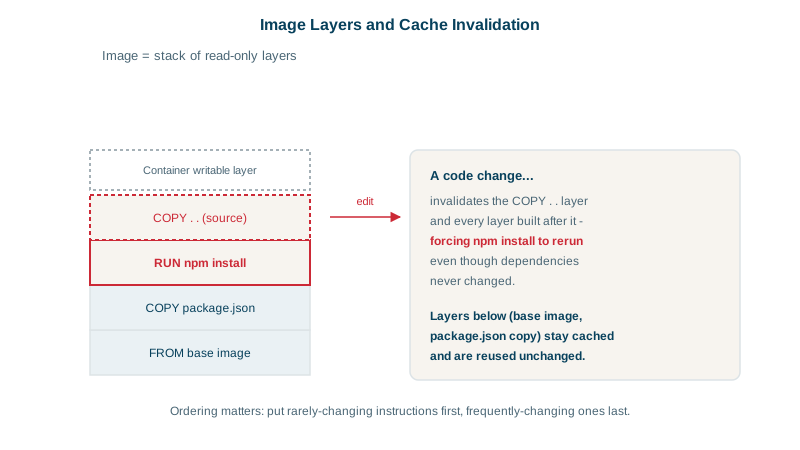
Layers are identified by a hash of their content, so they're shared. Ten images built on node:22-alpine store its layers once on disk, and pulling a new version of your app downloads only the layers that changed.
How the Docker build cache works
During docker build, Docker checks each instruction in order: if the instruction and its inputs are unchanged since a previous build, it reuses the existing layer. For COPY, the inputs are the copied files' contents. The rule that matters:
Once one layer is rebuilt, every layer after it is rebuilt too.
The cache can also be wrong in the other direction. For RUN, the cache key is the instruction's text, not what it downloads, so RUN apt-get update && apt-get install -y curl stays cached for months while new security patches appear upstream. Rebuild on a schedule with docker build --pull --no-cache so base images and packages actually refresh.
Ordering a Dockerfile for the build cache
Before:
FROM node:22-alpine
WORKDIR /app
COPY . .                  # any source change invalidates this layer...
RUN npm ci                # ...so dependencies reinstall every time
CMD ["node", "server.js"]
After:
FROM node:22-alpine
WORKDIR /app
COPY package.json package-lock.json ./   # changes only when dependencies change
RUN npm ci                               # cached on code-only changes
COPY . .                                 # source changes rebuild only from here
CMD ["node", "server.js"]
Now a code change rebuilds only the last COPY. The same pattern applies everywhere: copy *.csproj and run dotnet restore before copying source; copy requirements.txt and pip install before the code; copy go.mod/go.sum and go mod download first.
Using .dockerignore to shrink the build context
COPY . . sends the whole directory as the build context. Without a .dockerignore, that includes node_modules, .git, build output and local secrets: slower builds, bigger images, cache busted by files that don't matter, and possibly leaked credentials.
# .dockerignore
node_modules
.git
bin
obj
dist
*.log
.env
Build caches in CI and BuildKit cache mounts
Docker's build engine, BuildKit (the default in current Docker), can also keep package manager caches between builds even when a layer is rebuilt:
RUN --mount=type=cache,target=/root/.npm npm ciThe layer reruns when dependencies change, but downloads come from the cache.
CI is where caching usually disappears. A fresh CI runner has no layers from earlier builds, so every build starts cold however well the Dockerfile is ordered. Export the cache and import it on the next run, for example docker buildx build --cache-to type=registry,ref=ghcr.io/myorg/orders-api:buildcache,mode=max --cache-from type=registry,ref=ghcr.io/myorg/orders-api:buildcache ., or use your CI's built-in cache backend such as type=gha on GitHub Actions.
Check yourself
The source was copied before npm ci, so any source change invalidated that layer and everything after it. Copy the package files and install first, then copy the source.
Image layers are content-addressed by their hash and stored once, so every image built on node:22-alpine shares the same base layers on disk and in the registry. Only the layers each image adds on top take extra space, which is why consistent base images save storage and download time.
Anything the build doesn't need: node_modules and other dependency folders, .git, build output, logs, test data and local secret files like .env. Excluding them shrinks the build context sent to the builder, speeds up builds, and keeps secrets and stale artifacts out of the image.
A RUN --mount=type=cache,target=/root/.npm npm ci keeps the package manager's download cache between builds without putting it in an image layer. Even when the layer has to rebuild, packages come from the cache instead of the network.
Docker reuses cached layers until the first instruction whose inputs changed, then rebuilds everything after it. Put rarely changing steps, like installing dependencies from the lockfile, before frequently changing ones, like copying source code.