Docker Multi-Stage Builds: Smaller Images
On this page
Why single-stage images are huge
A .NET API built with a single-stage Dockerfile based on the SDK image ships the entire SDK: compilers, NuGet caches, build tools. The app needs none of that at runtime, but every deploy pulls it, every scan reports its vulnerabilities, and an attacker who gets in finds a full toolchain waiting. Multi-stage builds separate building from running.
How multi-stage builds work
A Dockerfile can have several FROM lines. Each starts a new stage. A later stage copies only what it needs from an earlier one with COPY --from=<stage>, and only the last stage becomes the image.
# Stage 1: build with the full SDK
FROM mcr.microsoft.com/dotnet/sdk:9.0 AS build
WORKDIR /src
COPY Orders.Api/Orders.Api.csproj Orders.Api/
RUN dotnet restore Orders.Api/Orders.Api.csproj
COPY . .
RUN dotnet publish Orders.Api/Orders.Api.csproj -c Release -o /app --no-restore

# Stage 2: run on the much smaller ASP.NET runtime image
FROM mcr.microsoft.com/dotnet/aspnet:9.0 AS runtime
WORKDIR /app
COPY --from=build /app .
USER $APP_UID
EXPOSE 8080
ENTRYPOINT ["dotnet", "Orders.Api.dll"]
The SDK, source code and intermediate build files stay in the build stage. The final image has the runtime and the published output. Microsoft's runtime images define the APP_UID variable for their built-in non-root user and listen on port 8080 by default.
Two .NET-specific options go further. Chiseled Ubuntu images (tags ending in -noble-chiseled) are Microsoft's distroless-style runtime images, with no shell or package manager, running as non-root by default. And since .NET 8 the SDK can build an image with no Dockerfile at all: dotnet publish --os linux --arch x64 /t:PublishContainer picks a suitable base image and pushes to your local Docker or a registry (Microsoft docs).
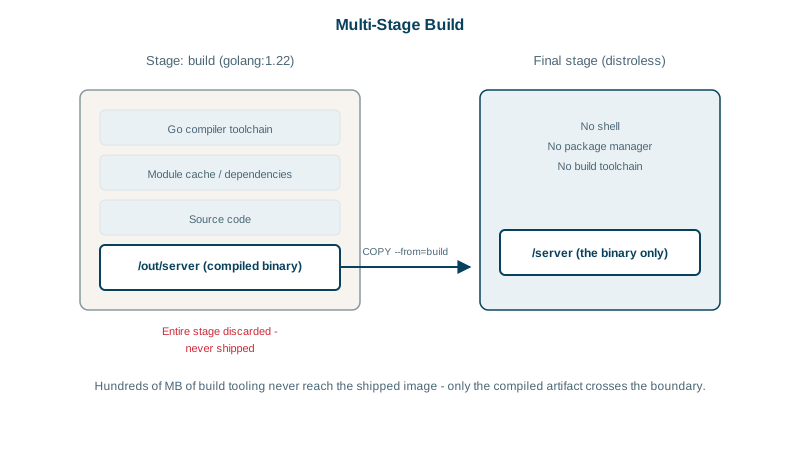
Multi-stage builds for Node and Go
Node frontend: build with Node, serve static files with nginx.
FROM node:22-alpine AS build
WORKDIR /app
COPY package.json package-lock.json ./
RUN npm ci
COPY . .
RUN npm run build

FROM nginx:1.27-alpine
COPY --from=build /app/dist /usr/share/nginx/html
Go: a static binary can run on a nearly empty image.
FROM golang:1.24 AS build
WORKDIR /src
COPY go.mod go.sum ./
RUN go mod download
COPY . .
RUN CGO_ENABLED=0 go build -o /out/api ./cmd/api

FROM gcr.io/distroless/static-debian12:nonroot
COPY --from=build /out/api /api
ENTRYPOINT ["/api"]
Distroless images contain the app's runtime dependencies and almost nothing else: no shell, no package manager. Smaller and with far fewer vulnerabilities to patch, but you can't docker exec into them with a shell. Debugging uses other tools (Day 12).
Image size by approach: runtime, distroless, scratch
| Approach | Final image contains | Relative size |
|---|---|---|
| Single stage on an SDK image | App, SDK, build tools, caches | Largest |
| Multi-stage on a runtime image | App and its runtime | Much smaller |
Multi-stage on distroless or scratch | App binary, CA certificates | Smallest |
Check what you built:
docker images myorg/orders-api          # total size
docker history myorg/orders-api:1.4.0   # which layer adds the bulk
Tools like dive show each layer's files, which is the fastest way to find a stray 200 MB folder.
Build targets, shared stages and cache mounts
- Target a stage:
docker build --target build .builds only the build stage, handy for running tests in CI with the same toolchain. - Shared base stage: define common setup once (
FROM ... AS base) and build several targets from it. - Cache mounts keep package caches between builds (Day 3).
Check yourself
Compilers, package managers and source code never reach the final image, so there are fewer vulnerable packages and fewer tools for an attacker to use.
It copies the /app directory from the earlier stage named build into the current stage's working directory. Only those files cross over; compilers, source code, caches and everything else in the build stage stay behind and never reach the final image.
Read its logs and docker inspect output first, then attach a separate debug container that shares its process and network namespaces, such as docker debug or a netshoot container, which brings its own tools. In non-production environments you can also use the image's debug variant, which includes a shell.
Distroless images contain a minimal runtime, such as CA certificates, time zone data and a language runtime, but no shell or package manager. scratch is completely empty, which only suits fully static binaries, typically Go, that include everything they need.