Docker Health Checks, Limits and Restart Policies
On this page
Why running isn't the same as working
A container shows Up 3 days. The app inside deadlocked an hour ago and answers nothing. Nothing restarts it, because the process is still alive. On the same host, another container with a memory leak has slowly pushed everything else into swap. Three settings, used together, prevent both stories.
Docker memory limits: OOM kills and exit code 137
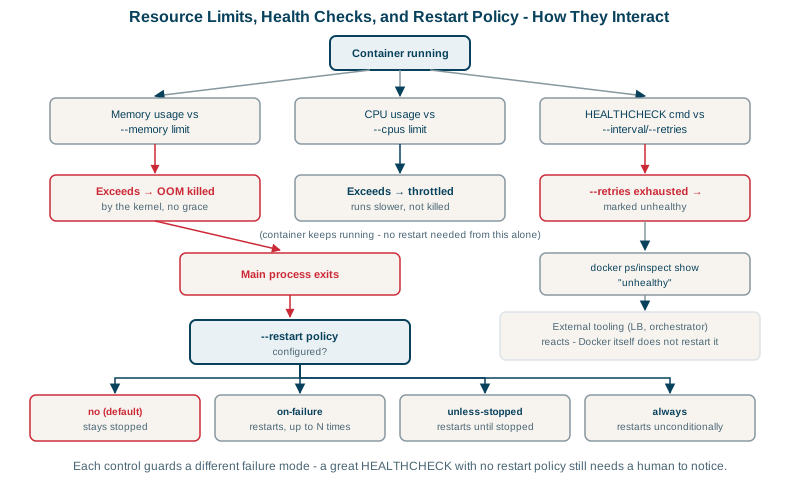
docker run -d --memory 512m --memory-swap 512m myorg/api:1.4.0A container that exceeds its memory limit is killed by the kernel's out-of-memory killer (exit code 137, OOMKilled: true in docker inspect). Setting --memory-swap equal to --memory stops it from using swap to slow down instead.
Size the limit from observed use (docker stats) plus headroom. Make sure the runtime knows: modern JVMs, .NET and Node detect container limits and size their heaps accordingly; older versions don't and can be killed even when the app isn't leaking. On .NET, the garbage collector caps the heap at 75 percent of the container's memory limit by default, leaving the rest for the runtime and native memory (Microsoft docs).
Docker CPU limits: throttling, not killing
docker run -d --cpus 1.5 myorg/api:1.4.0A container over its CPU share isn't killed; it's throttled, slowed down. That shows up as higher latency, not crashes, which makes it easy to miss. If p99 latency rises under load while CPU use sits at exactly the limit, throttling is the suspect.
Docker HEALTHCHECK: detecting a stuck container
A health check is a command Docker runs periodically inside the container to decide whether it's healthy:
HEALTHCHECK --interval=15s --timeout=3s --start-period=20s --retries=3 \
CMD wget -qO- http://127.0.0.1:8080/health || exit 1--start-periodgives the app time to boot before failures count.- Three consecutive failures mark the container unhealthy;
docker psshows(unhealthy).
What should /health check? Whether this process can serve requests: it responds, its thread pool isn't stuck, it can reach the things it can't work without. Keep it fast and cheap. Avoid making it fail when a shared dependency is down, or every container goes unhealthy at once.
Distroless images have no wget or curl; use a tiny health binary built into the app, or rely on the orchestrator's HTTP probes instead (Kubernetes ignores the Dockerfile HEALTHCHECK and uses its own probes, Day 17).
Limits, health checks and restart policies together
| Setting | At the limit | Protects against |
|---|---|---|
--memory | Container killed | One container exhausting host memory |
--cpus | Container throttled | One container starving others of CPU |
HEALTHCHECK | Marked unhealthy | A running but broken container going unnoticed |
--restart unless-stopped | Restarted after exit | Crashes and host reboots needing manual action |
An important detail: plain Docker doesn't restart unhealthy containers. A restart policy only reacts when the process exits. Unhealthy status is used by Compose (depends_on: condition: service_healthy), by Docker Swarm, and by your monitoring. If you need "restart when unhealthy" on a single host, either make the app exit when it detects it's stuck, or use an orchestrator; Kubernetes liveness probes do exactly this.
A complete docker run example
docker run -d --name api \
  --memory 512m --memory-swap 512m --cpus 1 \
  --restart unless-stopped \
  --health-cmd "wget -qO- http://127.0.0.1:8080/health || exit 1" \
  --health-interval 15s --health-retries 3 --health-start-period 20s \
  -p 8080:8080 myorg/api:1.4.0
That's the single-host version of what Kubernetes formalizes with requests, limits and probes in the next part of the course.
Check yourself
Memory can't be taken back, so a container that exceeds its memory limit is killed by the OOM killer with exit code 137. CPU can be shared over time, so a container that exceeds its CPU limit is throttled: it keeps running but gets less CPU time, which shows up as higher latency rather than crashes.
Restart policies only react when the main process exits. Docker doesn't restart unhealthy containers by itself; an orchestrator or the app must act on it.
Many apps need time to start, load configuration or warm caches. The start period gives them that time: health check failures during it don't count toward marking the container unhealthy, so a slow but normal startup isn't treated as a failure.
It runs repeatedly, every few seconds, for the life of the container. An expensive check, such as running heavy database queries, adds load and can itself make the app slow or unhealthy. Check that the app can serve requests and its essential dependencies are reachable.