Docker Registries: Push, Pull and Tag Images
On this page
Why the same tag can pull a different image
Production pulled myorg/api:1.4 on Monday and on Wednesday, and behaved differently. Nobody deployed a new version. Someone rebuilt and re-pushed 1.4 with a fix, and the tag quietly moved. Understanding what a tag is, and isn't, prevents this.
Registry, repository, tag, manifest and digest
- Registry: a server that stores and serves images: Docker Hub, GitHub Container Registry (ghcr.io), Amazon ECR, Azure Container Registry, Google Artifact Registry, or a self-hosted Harbor.
- Repository: one image name inside a registry:
ghcr.io/myorg/orders-api. - Tag: a human-friendly label pointing at one image in that repository:
1.4.2,latest. - Manifest: a small JSON document listing the image's config and its layers by content hash.
- Digest: the SHA-256 hash of the manifest:
sha256:3f9a.... Change any byte of any layer and the digest changes.
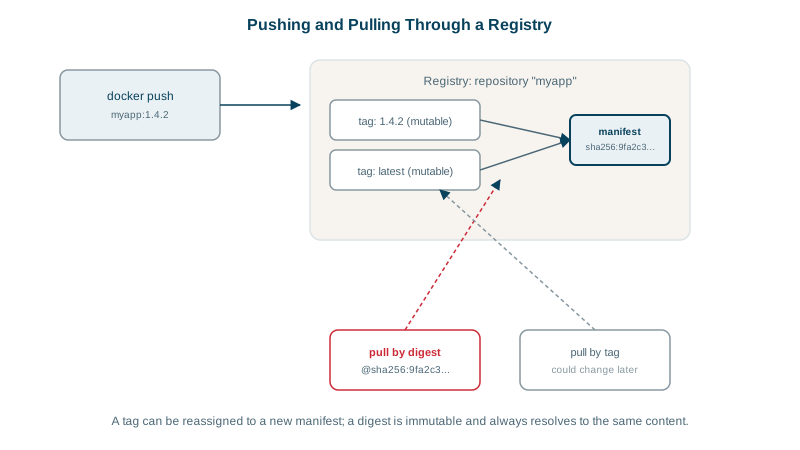
Tags vs digests
| Reference | Example | Can change? | Same content every pull? |
|---|---|---|---|
| Tag | orders-api:1.4.2 | Yes, if someone re-pushes | Not guaranteed |
latest | orders-api:latest | Yes, it's just a default tag name | No |
| Digest | orders-api@sha256:3f9a... | No | Yes |
latest doesn't mean "newest"; it's simply the tag used when you don't specify one. Never deploy it.
For deploys, either use immutable tags (most registries can enforce that a tag can't be overwritten) or pin by digest. Many CI/CD systems deploy by digest even when people talk in tags.
A Docker image tagging strategy
Tag each build with several labels:
docker build -t ghcr.io/myorg/orders-api:1.4.2 \
             -t ghcr.io/myorg/orders-api:sha-7c1e9ab .
docker push --all-tags ghcr.io/myorg/orders-api- A version (
1.4.2) for humans and release notes. - The git commit (
sha-7c1e9ab) so you can trace any running image back to its source. - Optionally moving tags like
1.4ormainfor convenience, never for production deploys.
docker login ghcr.io                                   # authenticate (CI uses a token)
docker pull ghcr.io/myorg/orders-api:1.4.2
docker buildx imagetools inspect ghcr.io/myorg/orders-api:1.4.2   # shows the digest and platforms
Multi-architecture images (amd64 and arm64)
Laptops with Apple silicon and cloud ARM servers (Graviton, Ampere) run arm64; many servers run amd64. One tag can cover both: the registry stores an image index pointing to a manifest per platform, and each machine pulls the one matching its architecture.
docker buildx build --platform linux/amd64,linux/arm64 \
  -t ghcr.io/myorg/orders-api:1.4.2 --push .
An exec format error when a container starts usually means the image was built for a different CPU architecture.
Keeping registries secure and tidy
- Private repositories for internal images, with access per team; CI pushes with short-lived tokens, clusters pull with read-only credentials or workload identity.
- Scan images on push for known vulnerabilities (Day 13), and sign them (Sigstore cosign) so clusters can verify where an image came from.
- Retention policies to delete untagged and old images; registries grow fast and storage costs money.
- Pull-through caches or mirrors for public images, avoiding Docker Hub rate limits and outages during deploys. Docker Hub allows 100 pulls per 6 hours per IP address without logging in and 200 with a free account (Docker docs), and a shared CI runner or a cluster's NAT gateway hits that fast.
Signing and verifying images with cosign
A digest proves an image hasn't changed; a signature proves who built it. With Sigstore's cosign, CI signs each image right after pushing it. In keyless mode the signature is tied to the CI job's identity through OIDC, so there's no private key to store or leak:
# in CI, after the push (GitHub Actions needs the id-token: write permission)
cosign sign --yes ghcr.io/myorg/orders-api@sha256:3f9a...

# anywhere: check it was signed by a workflow in your repository
cosign verify ghcr.io/myorg/orders-api@sha256:3f9a... \
  --certificate-identity-regexp '^https://github.com/myorg/orders-api/' \
  --certificate-oidc-issuer https://token.actions.githubusercontent.com
Sign the digest, not a tag, because a tag can be moved after signing. In a cluster, an admission controller such as Kyverno or the Sigstore policy controller can then refuse any image whose signature doesn't verify (Day 28).
Check yourself
Tags are mutable pointers: anyone with push access can point 1.4 at a different image, and some registries or workflows re-push tags on rebuild. Deploy by digest, such as orders-api@sha256:..., which identifies exact content, or enable immutable tags in the registry.
Only that it's the default tag when none is given. It doesn't guarantee the newest version and shouldn't be used for deployments.
The image was built for a different CPU architecture than the host, for example amd64 on an arm64 machine. Build a multi-architecture image.
A tag can be pointed at another image after signing. The digest names exact content, so the signature stays tied to what CI actually built.