Kubernetes Namespaces and Labels
On this page
Why shared clusters need namespaces and quotas
The checkout team and the search team share a cluster. Search deploys a batch job that requests 40 CPU cores, and checkout's new Pods sit in Pending. A checkout engineer runs kubectl delete deployment api in the wrong context and deletes search's API, which had the same name. Namespaces, labels and quotas prevent both.
Kubernetes namespaces: scopes for names, access and quotas
A namespace partitions most objects into separate scopes: two api Deployments can exist in checkout and search without clashing.
kubectl create namespace checkout
kubectl get pods -n checkout
kubectl config set-context --current --namespace=checkout   # default namespace for your commands
Namespaces are the unit for:
- Access control: RBAC roles grant permissions within a namespace (Day 28).
- Quotas: resource budgets per namespace.
- Policies: network policies and Pod security levels per namespace.
What a namespace is not: a network boundary. By default, Pods in any namespace can reach Pods in every other. Network isolation needs NetworkPolicies (Day 28). Nodes, PersistentVolumes, StorageClasses and namespaces themselves are cluster-scoped, not inside any namespace.
Deleting a namespace deletes everything in it: Deployments, Secrets, Services and PersistentVolumeClaims, which can take their disks with them under a Delete reclaim policy (Day 21). Restrict who can delete namespaces, and make production contexts visibly different in your terminal prompt.
A common layout: one namespace per team or application per environment (checkout-staging, checkout-prod), or separate clusters for production, which give a much stronger boundary.
Labels and selectors
Labels are key-value pairs on any object, and selectors are how objects find each other: a Service selects Pods (Day 19), a Deployment manages Pods matching its selector, NetworkPolicies target Pods by label.
Kubernetes recommends a common set:
metadata:
  labels:
    app.kubernetes.io/name: orders-api
    app.kubernetes.io/version: "1.4.2"
    app.kubernetes.io/component: api
    app.kubernetes.io/part-of: shop
    app.kubernetes.io/managed-by: helm
team: checkoutkubectl get pods -l app.kubernetes.io/name=orders-api
kubectl get all -l team=checkout --all-namespacesAnnotations look similar but aren't used for selection. They hold metadata for people and tools: a git commit, a contact, a config hash that triggers a rollout, settings for an ingress controller or monitoring.
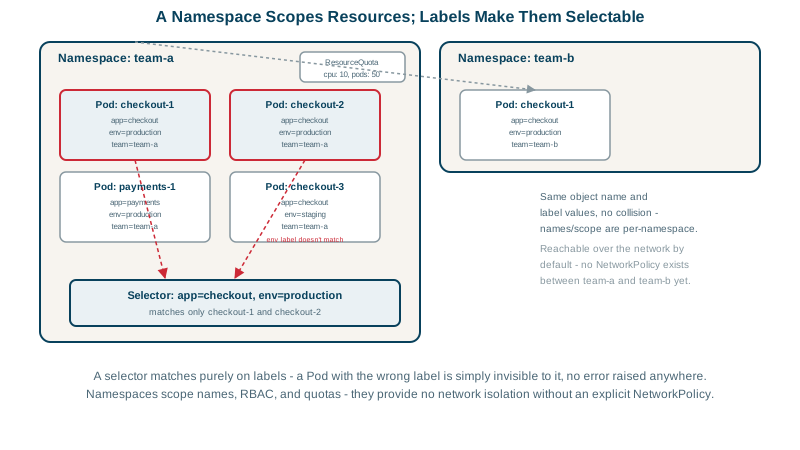
ResourceQuota and LimitRange
A ResourceQuota caps a namespace's total use; a LimitRange sets defaults and bounds for each container, so Pods without explicit values still get sensible requests and limits:
apiVersion: v1
kind: ResourceQuota
metadata:
  name: search-quota
  namespace: search
spec:
  hard:
    requests.cpu: "20"
    requests.memory: 64Gi
    limits.memory: 96Gi
    pods: "100"
---
apiVersion: v1
kind: LimitRange
metadata:
  name: search-defaults
  namespace: search
spec:
  limits:
    - type: Container
      defaultRequest: { cpu: 100m, memory: 128Mi }
      default: { memory: 512Mi }
      max: { cpu: "4", memory: 8Gi }
With a quota in place, search's 40-core batch job is rejected at creation time with a clear error, instead of quietly starving checkout.
Check yourself
No. Namespaces scope names, RBAC permissions and quotas, but by default every Pod can reach every other Pod in the cluster. To restrict traffic between namespaces, apply NetworkPolicies, ideally starting from a default-deny policy, with a network plugin that enforces them.
Labels are used by selectors to group and find objects; annotations carry metadata for people and tools and aren't used for selection.
Once a quota covers CPU or memory, Pods without requests or limits are rejected; a LimitRange gives them defaults and caps individual containers.
Selectors, dashboards, cost reports and tools all group resources by labels. Agreeing on standard keys, such as name, component, team and environment, makes them work consistently across every team's workloads.
New Pods or objects that would exceed the quota are rejected at creation, and the error appears in the Deployment's ReplicaSet events, not in the Pods. Check kubectl describe quota when Pods mysteriously fail to appear.