Docker Compose Tutorial: Multi-Container Apps
On this page
What you'll build with Docker Compose
An API, a PostgreSQL database, Redis and a background worker, defined in one compose.yaml and started with docker compose up. A new teammate clones the repository and has the whole stack running in a minute, with no install guide.
Step 1: write compose.yaml
# compose.yaml
services:
  api:
    build: ./api
    ports:
      - "8080:8080"
    environment:
      ConnectionStrings__Default: "Host=db;Database=shop;Username=shop;Password=${DB_PASSWORD}"
      Redis__Host: "cache:6379"
    depends_on:
      db:
        condition: service_healthy
      cache:
        condition: service_started

  worker:
    build: ./worker
    environment:
      ConnectionStrings__Default: "Host=db;Database=shop;Username=shop;Password=${DB_PASSWORD}"
    depends_on:
      db:
        condition: service_healthy

  db:
    image: postgres:17
    environment:
      POSTGRES_DB: shop
      POSTGRES_USER: shop
      POSTGRES_PASSWORD: ${DB_PASSWORD}
    volumes:
      - pgdata:/var/lib/postgresql/data
    healthcheck:
      test: ["CMD-SHELL", "pg_isready -U shop -d shop"]
      interval: 5s
      timeout: 3s
      retries: 10

  cache:
    image: redis:8-alpine

volumes:
  pgdata:
${DB_PASSWORD} comes from your shell or from a .env file next to compose.yaml, which you don't commit.
If you're following older tutorials: the hyphenated docker-compose (Compose v1) is no longer maintained, and the top-level version: key those files start with is obsolete. Current Docker runs docker compose (v2) and ignores version: with a warning.
Step 2: start the stack with docker compose up
docker compose up -d --build     # build images, create network and volume, start everything
docker compose ps                # status and health of each service
docker compose logs -f api       # follow one service's logs
docker compose exec db psql -U shop shop
docker compose down              # stop and remove containers and network (volume kept)
docker compose down -v           # ...and delete volumes: the database is wiped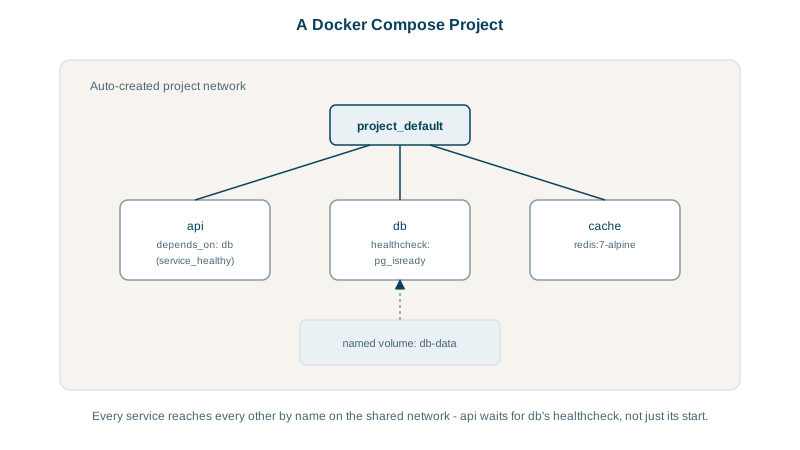
What Docker Compose does for you
- A network per project. Every service joins it, and service names resolve through DNS (Day 6). The API connects to
dbandcacheby name. Onlyapipublishes a port. - Named volumes declared once and kept across
downandup. - Startup order:
depends_oncontrols the order containers start in.
depends_on: started is not ready
By default, depends_on waits only until the database container has started, not until PostgreSQL accepts connections. The API starts, tries to connect during PostgreSQL's few seconds of startup, and crashes. Two fixes, best used together:
- A healthcheck on the database plus
condition: service_healthy, as above: Compose waits untilpg_isreadysucceeds. - Retry with backoff in the application's startup, because in production nothing guarantees order either.
Step 3: development overrides with compose.override.yaml
Compose automatically merges compose.override.yaml if it exists. Use it for development-only settings so the base file stays close to what you'd deploy:
# compose.override.yaml
services:
  api:
    environment:
      ASPNETCORE_ENVIRONMENT: Development
    volumes:
      - ./api:/src          # bind-mount source for live reload (Day 7)
  db:
    ports:
      - "127.0.0.1:5432:5432"   # reach the database from local tools only
docker compose watch can also sync source changes into containers and rebuild when dependency files change.
Profiles keep optional services out of the default start. Give a service profiles: ["tools"], such as a database admin UI, and it starts only with docker compose --profile tools up.
Docker Compose vs Kubernetes
Compose is ideal for local development, integration tests in CI and small single-host deployments. It doesn't schedule containers across machines or replace failed hosts; that's what Kubernetes is for (Day 15).
Check yourself
Give the database service a healthcheck, such as pg_isready, and set the API's depends_on to condition: service_healthy, so Compose waits until the database actually accepts connections, not just until its container starts. Also add connection retries to the API, because databases can restart later too.
By its service name db on the project network; publishing it isn't needed for the API and would expose it outside the host.
Both stop and remove the stack's containers and its default network. down -v also deletes the named volumes declared in the file, which wipes the database's data. Use plain down to restart cleanly and keep data, and -v only when you truly want a fresh start.
Compose merges it automatically on top of compose.yaml, so you can keep production-like settings in the main file and put development extras, such as bind-mounted source code, debug ports and hot reload, in the override.