How to Write a Dockerfile: Best Practices
On this page
A typical first Dockerfile and what's wrong with it
FROM node
ADD . /app
WORKDIR /app
RUN apt-get update
RUN apt-get install -y curl
RUN npm install
CMD npm start
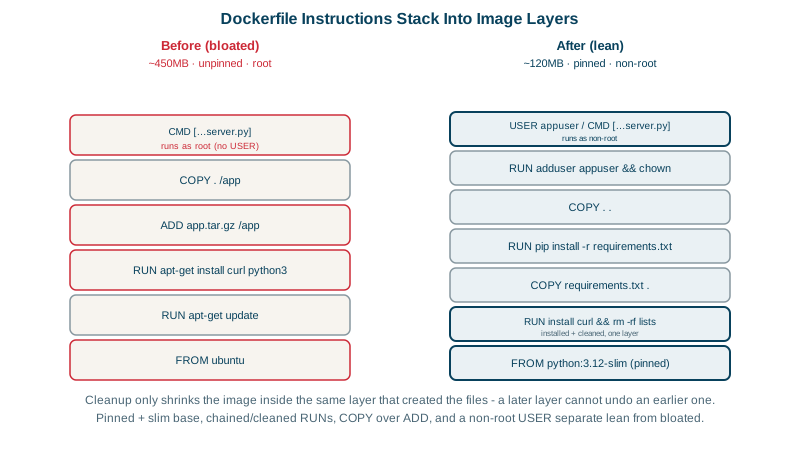
It builds and runs, which is how most people write their first Dockerfile. It's also about 1 GB, rebuilds dependencies on every change, changes behavior when node gets a new major version, runs as root, and ignores stop signals. Let's fix it rule by rule.
Seven Dockerfile best practices
1. Choose a small, pinned base image. node means "latest", a full Debian image that changes under you. Use a specific version and a slim variant: node:22-alpine, node:22-slim, or distroless images for the final stage. Fewer packages means a smaller attack surface, faster pulls and less to patch. For reproducibility, pin by digest too: node:22-alpine@sha256:....
2. Order for the cache. Dependency manifests first, source last (Day 3).
3. Combine related commands and clean up in the same layer. A file deleted in a later layer still exists in the earlier one, inside the image. So install and clean up in one RUN:
RUN apt-get update \
 && apt-get install -y --no-install-recommends curl \
 && rm -rf /var/lib/apt/lists/*
4. Use COPY, not ADD. ADD can also fetch URLs and auto-extract archives, which surprises people. COPY does only what it says.
5. Use the exec form for CMD and ENTRYPOINT. CMD npm start runs through a shell, so the shell is PID 1 and may not forward SIGTERM to your app; stopping the container waits 10 seconds and then kills it (Day 5). CMD ["node", "server.js"] runs the app directly as PID 1. The app then has to handle SIGTERM itself; Day 5 explains why. When you need both, ENTRYPOINT fixes the executable and CMD supplies default arguments that docker run can override.
6. Don't run as root. If an attacker compromises the app, root inside the container makes escaping and damage easier. Official Node images include a node user; otherwise create one. .NET images since .NET 8 include an app user (exposed as $APP_UID) and listen on port 8080 instead of 80, so a non-root user can bind it, but they still run as root unless you add USER $APP_UID (Microsoft docs). An old -p 8000:80 mapping gets "connection reset" after upgrading to .NET 8 for exactly this reason.
7. Use npm ci, not npm install, and production dependencies only, so builds use exactly the lockfile versions.
The production Dockerfile
FROM node:22-alpine
WORKDIR /app
ENV NODE_ENV=production
COPY package.json package-lock.json ./
RUN npm ci --omit=dev && npm cache clean --force
COPY --chown=node:node . .
USER node
EXPOSE 3000
CMD ["node", "server.js"]
Checked with hadolint 2.15, a Dockerfile linter, the "before" version gets an error for ADD, warnings for the untagged base image, unpinned apt packages and the shell-form CMD, and notes about separate RUN layers and missing apt cleanup. The "after" version gets a single informational note (DL3066) suggesting a numeric user id; USER 1000 would silence it, since the official image's node user has id 1000. Run hadolint in CI so these issues never come back.
| Rule | Problem it prevents |
|---|---|
| Small, pinned base | Huge images, surprise upgrades, more vulnerabilities |
| Manifests before source | Reinstalling dependencies on every code change |
One RUN with cleanup | Temporary files trapped in layers |
COPY over ADD | Unexpected downloads or extraction |
Exec-form CMD | Signals not reaching the app; slow, unclean shutdowns |
Non-root USER | A compromised process running as root |
Day 8 takes this further with multi-stage builds, which drop the build tools from the final image entirely.
Check yourself
The files still exist in the earlier layer that created them; a later layer only hides them. Delete them in the same RUN that created them.
It's shell form, so a shell runs as PID 1 and may not pass SIGTERM to the app; npm also adds another process layer. Use exec form, ideally running the app binary directly.
latest is just a tag that moves whenever a new version is published, so the same Dockerfile can produce a different image next month, possibly with a new major version that breaks your app. Pinning a specific version, or even its digest, makes builds reproducible and upgrades a deliberate change.
If an attacker exploits the app, they get the privileges of its user. As root inside the container, a kernel or runtime bug becomes far more dangerous. Create a user in the image and switch to it with USER, as the official Node images allow with the node user.
ENTRYPOINT sets the executable that always runs, and CMD provides default arguments that users can override at docker run. A common pattern is ENTRYPOINT ["node"] with CMD ["server.js"], both in exec form so signals reach the process.