Linux Shell vs Kernel: How a Command Runs
On this page
Shell vs kernel: what happens when you press Enter
You type ls -d /etc | wc -c. A few milliseconds later, a number appears. In between, two programs cooperate:
- The shell (usually bash or zsh) is an ordinary program that reads your line, splits it into words, expands variables and wildcards, sets up pipes and redirections, and decides what to run.
- The kernel is the core of the operating system. It owns the hardware, memory and processes. Programs can't touch any of that directly; they ask the kernel through system calls.
A restaurant is a good picture. The shell is the waiter: it takes your order, makes sense of it and passes it on. The kernel is the kitchen: only it touches the stoves and the fridge. System calls are the order slips, the only way anything gets from the dining room into the kitchen.
Everything in this course ran on an Ubuntu 26.04 LTS virtual machine (kernel 7.0, bash 5.3, systemd 259).
Watching a command run with strace
strace prints the system calls a program makes. Tracing bash as it runs that pipeline (process creation and program loading only):
strace -f -e trace=clone,clone3,execve,wait4 -o trace.txt bash -c 'ls -d /etc | wc -c'26424 execve("/usr/bin/bash", ["bash", "-c", "ls -d /etc | wc -c"], env) = 0
26424 wait4(-1 <unfinished ...>
26425 execve("/usr/bin/ls", ["ls", "-d", "/etc"], env <unfinished ...>
26426 execve("/usr/bin/wc", ["wc", "-c"], env <unfinished ...>
26424 wait4(-1 <unfinished ...>Reading it:
- Process 26424 is bash.
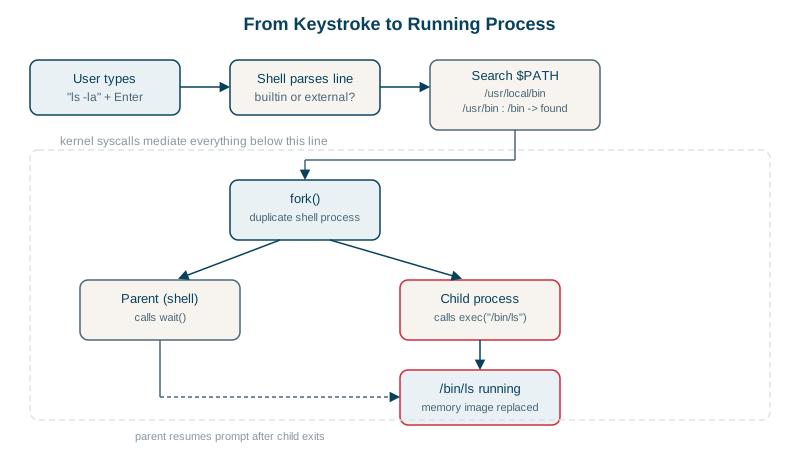
- Bash forks two children (26425 and 26426), connecting them with a pipe.
- Each child calls execve to replace itself with the real program:
/usr/bin/lsand/usr/bin/wc. - Bash waits for both to finish, then reads their exit status.
Fork, exec, wait: nearly every command you run follows this pattern.
Shell builtins vs external commands
Some commands are part of the shell itself:
type cd; type ls; type -a echocd is a shell builtin
ls is /usr/bin/ls
echo is a shell builtin
echo is /usr/bin/echo
echo is /bin/echoTracing cd /tmp; echo hi found exactly one execve: bash itself. cd must be a builtin: a child process changing its own directory couldn't change the shell's. Other builtins: export, source, alias, exit, read. type -a shows that echo exists both as a builtin and as a program; the builtin wins.
How the shell finds a program: PATH
For a command that isn't a builtin, alias or function, the shell searches the directories in PATH, left to right:
/usr/local/sbin:/usr/local/bin:/usr/sbin:/usr/bin:/sbin:/bin:/snap/binThe first match wins. command not found means no directory in PATH has it (Day 7 shows how this differs between interactive shells and cron).
Everything a program does is a system call
strace -c summarizes what a program asked the kernel for. Even cat /etc/hostname makes dozens of calls:
% time     seconds  usecs/call     calls    errors syscall
 31.34    0.000131          43         3           splice
 11.48    0.000048           3        15           read
  9.09    0.000038           3        12         1 openat
Opening files, reading, writing, allocating memory, creating network connections: all requests to the kernel. When something mysterious fails ("permission denied" with no path, a hang), strace often shows exactly which call failed and why.
Check yourself
A separate process can only change its own working directory; to change the shell's directory, the shell must do it itself.
Fork creates a copy of the shell as a child process, with the same environment and open files. Exec then replaces that child's program with ls, keeping the process id. The shell waits for the child to exit and reads its exit status.
Whether its directory is in PATH, since the shell only searches PATH for bare names, and that the file is executable. Running it with an explicit path like ./deploy bypasses the PATH search, which quickly tells you which problem it is.
Run type name, for example type cd or type ls. It reports builtins, aliases, functions and the path of external programs.
The system calls a program makes, such as openat, read and execve, with their arguments and results, which reveals missing files, permission errors and where time goes.