systemd and systemctl Tutorial: Managing Services
On this page
Why run your app as a systemd service
Running python3 server.py & in a terminal isn't a service: it dies when you log out, doesn't start at boot, and nobody restarts it when it crashes. systemd (PID 1 on nearly every modern distribution) manages services for you.
Writing a systemd unit file
# /etc/systemd/system/myapp.service
[Unit]
Description=My Application
After=network-online.target
Wants=network-online.target

[Service]
User=myapp
Group=myapp
WorkingDirectory=/opt/myapp
Environment=PORT=8080
EnvironmentFile=-/etc/myapp/env
ExecStart=/usr/bin/python3 /opt/myapp/server.py
Restart=on-failure
RestartSec=2
NoNewPrivileges=yes
ProtectSystem=strict
ProtectHome=yes
PrivateTmp=yes

[Install]
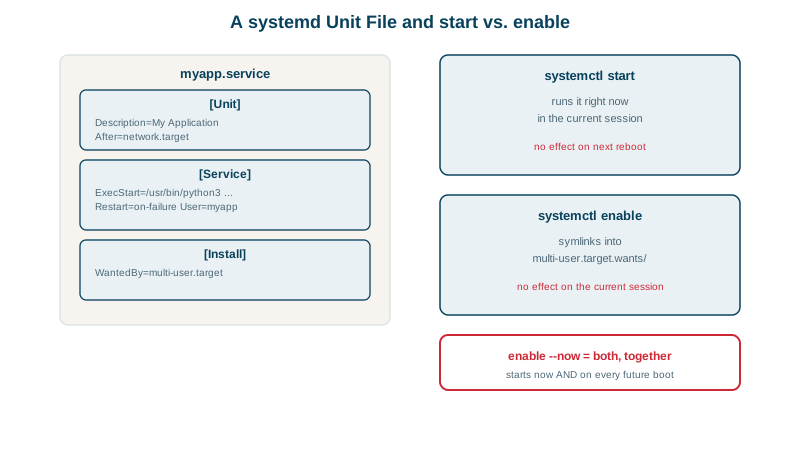
WantedBy=multi-user.targetUser=runs it as an unprivileged system user, never root.EnvironmentFile=-loads settings and secrets from a file (the-makes it optional).Restart=on-failurerestarts it after crashes, 2 seconds apart.WantedBy=multi-user.targetstarts it at boot once enabled.
Check, load and start:
sudo systemd-analyze verify /etc/systemd/system/myapp.service
sudo systemctl daemon-reload
sudo systemctl enable --now myapp
systemctl status myapp● myapp.service - My Application
Loaded: loaded (/etc/systemd/system/myapp.service; enabled; preset: enabled)
Active: active (running) since Wed 2026-10-14 23:10:55 EDT; 1s agoAutomatic restart after a crash
The app was made to fail at startup with a database error. Within seconds:
     Active: activating (auto-restart) (Result: exit-code)
myapp[10233]: ERROR: connection to database timed out
systemd[1]: myapp.service: Failed with result 'exit-code'.
systemd[1]: myapp.service: Scheduled restart job, restart counter is at 1.
systemctl show myapp -p NRestarts reported NRestarts=3 a few seconds later. Restarting can't fix a missing database, but it recovers from transient failures automatically. systemd stops retrying if a unit fails too often in a short window (StartLimitBurst and StartLimitIntervalSec); systemctl reset-failed myapp clears that state.
Everyday systemctl commands
| Command | Does |
|---|---|
systemctl start / stop / restart myapp | Control now |
systemctl reload myapp | Reload config without restarting (if supported) |
systemctl enable / disable myapp | Start at boot or not |
systemctl status myapp | State, recent logs, PID, memory |
systemctl list-units --failed | Everything broken |
journalctl -u myapp -f | Follow its logs (Day 24) |
systemctl edit myapp | Create an override in myapp.service.d/ |
systemctl cat myapp | Show the unit plus overrides |
Overrides: don't edit unit files shipped by packages in /usr/lib/systemd/system/; package updates overwrite them. systemctl edit nginx creates a drop-in file in /etc/systemd/system/nginx.service.d/ with just your changes.
Sandboxing a service with systemd
systemd-analyze security myapp.service→ Overall exposure level for myapp.service: 8.3 EXPOSED 🙁Even with ProtectSystem and a non-root user, much is still allowed. A drop-in adding further restrictions:
# /etc/systemd/system/myapp.service.d/hardening.conf
[Service]
CapabilityBoundingSet=
PrivateDevices=yes
ProtectKernelTunables=yes
ProtectKernelModules=yes
ProtectKernelLogs=yes
ProtectControlGroups=yes
ProtectClock=yes
ProtectHostname=yes
RestrictNamespaces=yes
RestrictRealtime=yes
RestrictSUIDSGID=yes
LockPersonality=yes
MemoryDenyWriteExecute=yes
RestrictAddressFamilies=AF_INET AF_INET6 AF_UNIX
SystemCallArchitectures=native
SystemCallFilter=@system-service
UMask=0077→ Overall exposure level for myapp.service: 1.7 OK 🙂The service still answered requests. With ProtectSystem=strict, the whole filesystem is read-only to the service; grant the paths it must write with ReadWritePaths=/var/lib/myapp (or StateDirectory=myapp, which also creates the directory). Day 25 shows the "Read-only file system" error you get otherwise. Some options (like MemoryDenyWriteExecute) break runtimes with JIT compilers such as Node or Java; test each service.
Check yourself
A compromised or buggy service can then only do what that unprivileged user can do, such as reading its own files, instead of controlling the whole machine.
It creates a drop-in override under /etc/systemd/system that survives package updates, which would overwrite the original file in /usr/lib. It also runs daemon-reload for you.
It makes the filesystem read-only for the service; you add ReadWritePaths or StateDirectory for the paths it needs to write.
systemd restarts the service when it exits with an error or is killed by a signal, with RestartSec controlling the delay.
systemctl status name shows its state, exit code and the last few log lines, and journalctl -u name shows the full log, with -e to jump to the end. Together they usually reveal the error that stopped it.