Linux Environment Variables and .bashrc
On this page
What environment variables are for
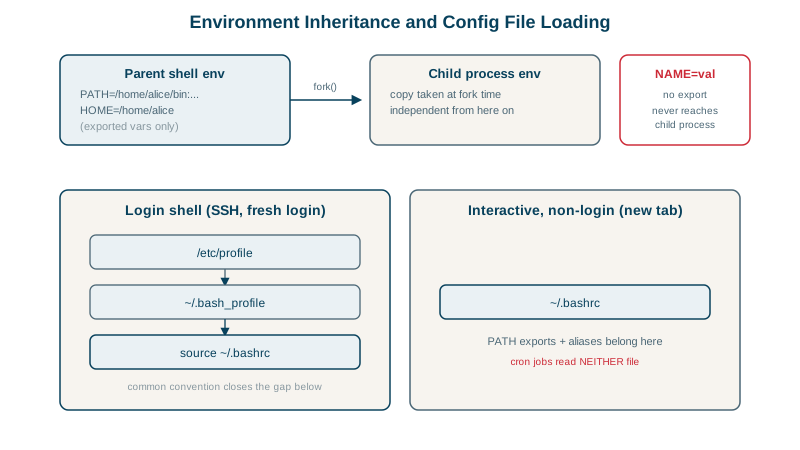
Programs read configuration from their environment: PATH to find commands, HOME, LANG, and application settings like DATABASE_URL or PORT. Every process gets a copy of its parent's environment when it starts.
Shell variables vs environment variables: export
FOO=bar
bash -c 'echo "child sees FOO=[$FOO]"'
export FOO
bash -c 'echo "child sees FOO=[$FOO]"'child sees FOO=[]
child sees FOO=[bar]A plain assignment creates a shell variable, visible only in this shell. export puts it in the environment, copied to child processes. Changes in a child never flow back to the parent.
Set a variable for one command only: PORT=9090 ./server.
How PATH works
PATH is a colon-separated list of directories searched for commands, first match wins (Day 1):
/usr/local/sbin:/usr/local/bin:/usr/sbin:/usr/bin:/sbin:/bin:/snap/binAdd a directory by prepending or appending:
export PATH="$HOME/.local/bin:$PATH"Prepending means your version wins over the system's; appending means the system's wins. Never put . (the current directory) in PATH.
.bashrc vs .bash_profile vs .profile: which runs when
For bash:
| Session | Reads |
|---|---|
Login shell (SSH login, su -, a console) | /etc/profile, then the first of ~/.bash_profile, ~/.bash_login, ~/.profile |
Interactive non-login (a new terminal tab, bash) | ~/.bashrc |
| Non-interactive (scripts, cron, systemd) | Neither, unless BASH_ENV points somewhere |
Ubuntu's default ~/.profile sources ~/.bashrc, so most people put everything in ~/.bashrc. The catch is the last row.
Works in my terminal, fails in cron
Alice installs a tool in ~/.local/bin and adds that directory to PATH in ~/.bashrc. In her terminal:
which make-report/home/alice/.local/bin/make-reportShe schedules it with cron (Day 20):
* * * * * make-report >> /home/alice/report.log 2>&1A minute later, report.log contains:
/bin/sh: 1: make-report: not foundCron runs commands with /bin/sh, non-interactively, so ~/.bashrc is never read, and its PATH (on this Ubuntu version, the system default from /etc/environment) lacks ~/.local/bin. With the full path, $HOME/.local/bin/make-report, the log shows report generated.
The same applies to systemd services, Docker containers and CI jobs: don't rely on interactive shell configuration. Use absolute paths, or set the environment yourself (Environment= in a unit file, PATH= at the top of a crontab).
Secrets in environment variables
Environment variables are a common way to pass secrets to applications (twelve-factor style), with caveats: they're inherited by every child process, readable by the same user in /proc/<pid>/environ, and easily printed in debug output or crash reports. Load them from a protected file (systemd EnvironmentFile= with mode 600, Day 19) or a secrets manager, and never commit .env files.
Check yourself
Plain assignments create shell variables that live only in the current shell. export marks them for the environment, and only environment variables are copied into child processes when they start.
Cron runs commands with a minimal non-interactive sh that doesn't read ~/.bashrc, so the PATH addition for ~/.local/bin wasn't applied. The fix is to set PATH in the crontab or call the script by its absolute path.
Directories earlier in PATH are searched first, so prepending lets your programs override system ones; appending gives system programs priority.
They can leak into child processes, crash reports and /proc/<pid>/environ, and get printed by debugging tools. Secret files or a secret manager are safer.
.bash_profile runs for login shells, such as an SSH session, and .bashrc for interactive non-login shells, such as a new terminal tab. Many setups source .bashrc from .bash_profile so both get the same settings.