Bash Script for Deployment Automation
On this page
What a deployment script must do
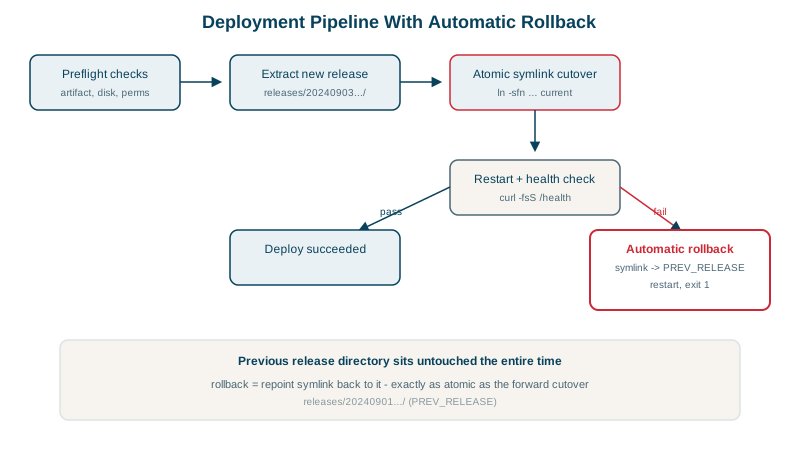
Deploying by hand (copy files, restart, check, panic, undo) goes wrong under pressure. A script does the same steps the same way every time:
- Unpack the release into its own timestamped directory.
- Point a
currentsymlink at it atomically. - Restart the service.
- Check that it's healthy.
- If not, switch back to the previous release automatically.
- Never run two deploys at once, and clean up old releases.
The service from Day 19 runs /opt/myapp/current/server.py, so changing the symlink changes the running version.
The deployment script with automatic rollback
#!/usr/bin/env bash
# deploy-myapp <release.tar.gz>: unpack a release, switch the symlink, restart, health-check, roll back on failure
set -euo pipefail

APP_DIR=/opt/myapp
RELEASES="$APP_DIR/releases"
CURRENT="$APP_DIR/current"
HEALTH_URL=http://127.0.0.1:8080/
KEEP=5

log() { printf '%s %s\n' "$(date +%H:%M:%S)" "$*"; }

[[ $# -eq 1 && -f $1 ]] || { echo "usage: $0 <release.tar.gz>" >&2; exit 2; }
exec 9>/run/deploy-myapp.lock
flock -n 9 || { echo "another deploy is running" >&2; exit 1; }

release="$RELEASES/$(date +%Y%m%d%H%M%S)"
previous=$(readlink -f "$CURRENT" 2>/dev/null || true)

log "unpacking $1 into $release"
mkdir -p "$release"
tar -xzf "$1" -C "$release"

log "switching current -> $release"
ln -sfn "$release" "$CURRENT.new" && mv -T "$CURRENT.new" "$CURRENT"   # atomic swap
systemctl restart myapp

for i in {1..10}; do
  if curl -fs -m 2 "$HEALTH_URL" >/dev/null; then
    log "healthy after $i check(s)"
    find "$RELEASES" -mindepth 1 -maxdepth 1 -type d -printf '%T@ %p\n' |
      sort -rn | tail -n +$((KEEP + 1)) | cut -d' ' -f2- | xargs -r rm -rf   # keep the newest $KEEP
    exit 0
  fi
  sleep 1
done

log "health check failed, rolling back to ${previous:-nothing}"
if [[ -n $previous ]]; then
  ln -sfn "$previous" "$CURRENT.new" && mv -T "$CURRENT.new" "$CURRENT"
  systemctl restart myapp
fi
exit 1
It passes shellcheck. An earlier version cleaned up old releases with ls -1dt ... | tail; shellcheck flagged parsing ls output (SC2012), hence the find -printf pipeline.
Testing the deployment script
A good release:
23:16:01 unpacking /tmp/good.tar.gz into /opt/myapp/releases/20261014231601
23:16:01 switching current -> /opt/myapp/releases/20261014231601
23:16:02 healthy after 2 check(s)
exit 0
A release that crashes on start:
23:16:03 unpacking /tmp/bad.tar.gz into /opt/myapp/releases/20261014231603
23:16:03 switching current -> /opt/myapp/releases/20261014231603
23:16:13 health check failed, rolling back to /opt/myapp/releases/20261014231601
exit 1
Afterwards current pointed at the previous release again, and the service answered ok. The non-zero exit tells CI the deploy failed.
Two deploys at once:
another deploy is running
exit 1
No arguments: usage: /usr/local/bin/deploy-myapp <release.tar.gz>, exit 2.
Bash techniques worth reusing
set -euo pipefailand quoted variables everywhere (Day 15).flockon a file descriptor: the lock is released automatically when the script exits, even if it crashes.- Atomic symlink swap: create a new link, then
mv -Tover the old one, socurrentalways points at a complete release (Day 13). - Capture state before changing it (
previous) so rollback knows where to go. - Health checks with a timeout and retries, not a single
sleep 5. - Meaningful exit codes: 0 success, 1 failure, 2 usage error.
- Timestamped log lines for the CI output and later debugging.
When a deploy script stops being enough
This script suits a single server. Across many servers, use the same ideas in better tools: Ansible or a CI/CD pipeline to orchestrate, containers with rolling updates in Kubernetes or ECS, or blue-green and canary releases (see the CI/CD course). Database migrations need the expand-and-contract approach so rollback stays possible.
Check yourself
The rename is a single atomic operation, so there's never a moment when current is missing or points at a half-written release. Requests during a deploy always see either the old release or the new one.
It takes an exclusive flock on a lock file at the start. A second run can't get the lock and fails immediately with "another deploy is running", instead of two deploys switching symlinks under each other.
So the script knows exactly which release to restore if the new one fails its health check. Without it, rollback means guessing which directory was live.
A release that starts but can't serve requests would otherwise stay live. Checking an endpoint and rolling back automatically limits the damage.
When it needs to deploy to many hosts in parallel, coordinate with load balancers, or handle complex rollback, a tool like Ansible or a CD platform fits better.