Fix Linux Permission Denied Errors
On this page
How to fix permission denied: a method
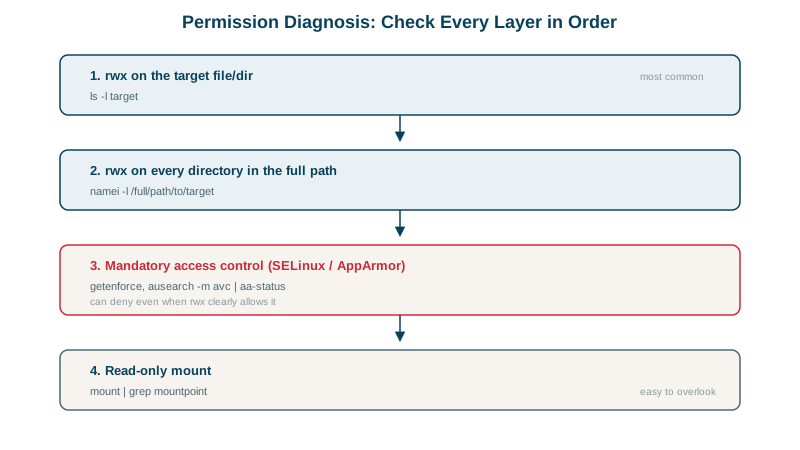
A service can't read a file. The usual reaction is chmod 777, which hides the cause and opens a security hole. Instead, ask in order:
- Who is the process running as, with which groups?
- Every directory on the path: does that user have execute (traverse) permission?
- The file itself: read or write for that user?
- Anything beyond classic permissions: sandboxing, ACLs, SELinux or AppArmor, read-only mounts?
Case 1: a directory blocks the path (namei)
sudo -u myapp cat /srv/data/reports/q3.csvcat: /srv/data/reports/q3.csv: Permission deniedThe file is -rw-r--r--, readable by everyone. namei -l checks every component of the path:
namei -l /srv/data/reports/q3.csvf: /srv/data/reports/q3.csv
drwxr-xr-x root root /
drwxr-xr-x root root srv
drwxr-x--- root root data
drwxr-xr-x root root reports
-rw-r--r-- root root q3.csvdata is drwxr-x---: others have no execute, so myapp can't pass through it. Rather than opening it to everyone, give a group access:
sudo groupadd reports
sudo chgrp reports /srv/data
sudo usermod -aG reports myapp
sudo -u myapp cat /srv/data/reports/q3.csvq3Case 2: the running service still can't read the file
The command works, yet the service still gets permission denied. Check the groups of the running process:
grep Groups /proc/$(systemctl show -p MainPID --value myapp)/statusGroups: 987Group membership is read when a process starts (Day 5). The service started before myapp joined reports. After systemctl restart myapp:
Groups: 987 1004Now it includes 1004 (reports). Whenever you change a service user's groups, restart the service.
Case 3: owner and permissions fine, still denied
The service owns /var/lib/myapp, yet writes fail. Testing under the same sandbox settings as the unit (Day 19):
sudo systemd-run --pipe --wait -q -p User=myapp -p ProtectSystem=strict \
/bin/sh -c 'touch /var/lib/myapp/x'touch: cannot touch '/var/lib/myapp/x': Read-only file systemNot "permission denied": read-only file system. ProtectSystem=strict mounts the filesystem read-only inside the service's sandbox. Adding ReadWritePaths=/var/lib/myapp:
write okThe exact error message is a clue: "Read-only file system" means a mount or sandbox, not file permissions.
Other causes: ACLs, SELinux, AppArmor, read-only mounts
| Symptom or clue | Likely cause | Tool |
|---|---|---|
| Permissions look right, still denied | ACLs | getfacl; ls -l shows a + |
| Denied for a service, fine as root in a shell | SELinux (RHEL family) or AppArmor (Ubuntu) | ausearch -m avc, journalctl -k, aa-status |
| Works in your shell, not as the service | Different user, groups, or environment | systemctl show -p User,Group, /proc/<pid>/status |
| "Operation not permitted" when changing ownership | Only root can chown | sudo |
| Can't delete a file you own | Directory permissions (needs write on the directory), or the sticky bit | ls -ld dir |
strace -f -e trace=openat,access (Day 1) shows the exact path and error the program hit.
Why chmod 777 is never the fix
chmod -R 777 makes everything writable by every user and process on the machine. It doesn't tell you what was wrong, and leaves a hole that's easy to forget. Fix the specific component, with the narrowest grant: a group, an ACL, or a ReadWritePaths entry.
Check yourself
Execute permission on every directory in the path, using namei -l /full/path, which shows the permissions of each component. Then check whether the service runs as the user you think.
Running processes keep the groups they started with; group changes only apply to new processes. The service needed a restart to pick up the new membership.
The block comes from a mount or sandbox, such as a read-only mount or systemd's ProtectSystem, not from file ownership or mode bits. Changing chmod or chown won't help; check the mount options or the service's unit file.
It gives every user write access, hides the real cause, and often still fails because the problem was a directory, mount or security module.