sed and awk Tutorial for Text Processing
On this page
sed vs awk: two tools, two jobs
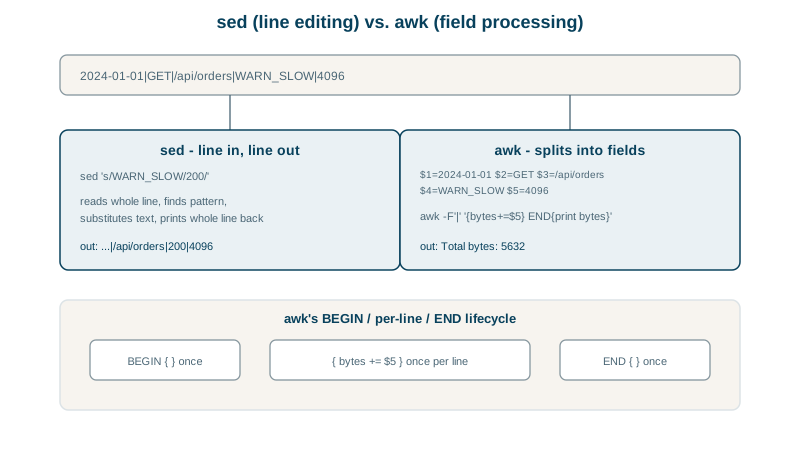
- sed (stream editor) transforms text line by line: replace, delete, insert. Use it for editing.
- awk treats each line as fields and runs a small program on each: filter, extract, compute. Use it for data.
The sample data
A pipe-separated access log:
2026-10-01|GET|/api/users|200|1024
2026-10-01|GET|/api/orders|500|4096
2026-10-01|POST|/api/users|201|512
2026-10-02|GET|/api/orders|500|2048
2026-10-02|GET|/api/users|200|256
awk tutorial: fields, filters and totals
-F'|' sets the separator; $1 to $5 are the fields; a pattern before { } filters lines.
Requests by status code:
awk -F'|' '{count[$4]++} END {for (s in count) print s, count[s]}' access.log | sort200 2
201 1
500 2Bytes by path:
awk -F'|' '{bytes[$3]+=$5} END {for (p in bytes) printf "%-12s %d\n", p, bytes[p]}' access.log | sort/api/orders 6144
/api/users 1792Only server errors:
awk -F'|' '$4 >= 500 {print $1, $3}' access.log2026-10-01 /api/orders
2026-10-02 /api/ordersAssociative arrays (count[$4]++) and the END block cover most reporting you'd otherwise open a spreadsheet for. Without -F, awk splits on whitespace, which suits most log formats and command output (ps aux | awk '$3 > 50 {print $2, $11}').
sed tutorial: substitutions and in-place edits
Preview a change first (sed prints to stdout by default):
sed 's/max_connections [0-9]*/max_connections 4096/' server.conf | grep max_max_connections 4096Then edit in place, keeping a backup:
sed -i.bak 's/^upstream 10.0.0.5/upstream 10.0.0.9/' server.conf
grep upstream server.conf; ls server.conf*upstream 10.0.0.9:3000
server.conf
server.conf.bakOther common edits:
sed '/^#/d' server.conf               # delete comment lines
sed -n '10,20p' big.log               # print lines 10 to 20
sed 's|/old/path|/new/path|g' file    # any delimiter avoids escaping slashes; g = every match on a line
Portability: GNU sed (Linux) accepts -i alone; BSD sed (macOS) requires an argument (-i ''). -i.bak works on both.
When to use something other than sed and awk
- Structured data:
jqfor JSON,yqfor YAML, and real CSV tools (mlr,csvkit) for quoted CSV, where commas inside quotes breakawk -F,. - More than a few lines of awk: a Python script is easier to read and test.
- Config management: templating or tools like Ansible (see the CI/CD course) rather than chains of sed edits.
Check yourself
It increments a counter in an associative array keyed by the fourth field, so after reading all lines, count holds the number of lines per distinct value, like requests per status code. An END block then prints them.
Without -i, sed prints the result to the terminal without changing the file, so you can check the edit first. With -i.bak you also keep a backup.
Commas inside quoted fields, like "Smith, John", are treated as separators, splitting values incorrectly. Use a CSV-aware tool such as mlr, csvkit or a short Python script.
The last field of the line, since NF holds the number of fields. $(NF-1) is the second to last. It's useful when lines have a varying number of fields but the value you want is always at the end.