Bash Scripting Tutorial: Variables, If and Loops
On this page
A bash script worth writing: a log checker
Checking which logs are too big by hand is tedious. A script that takes a directory and a size limit, reports each file, and exits non-zero when something's wrong can run in cron or CI:
#!/usr/bin/env bash
# check-logs.sh <dir> [max_kb]: report log files larger than a limit
set -euo pipefail

if [[ $# -lt 1 ]]; then
  echo "usage: $0 <dir> [max_kb]" >&2
  exit 2
fi

dir=$1
max_kb=${2:-1}            # default 1 KB
big=0

for f in "$dir"/*.log; do
  size_kb=$(( $(stat -c %s "$f") / 1024 ))
  if (( size_kb >= max_kb )); then
    echo "BIG   $f (${size_kb} KB)"
    big=$((big + 1))
  else
    echo "ok    $f"
  fi
done

echo "$big file(s) at or over ${max_kb} KB"
(( big == 0 ))            # exit status: 0 if none are big
Run on a directory with three logs, one named with a space:
$ ./check-logs.sh logs; echo "exit $?"
ok    logs/app 1.log
BIG   logs/app2.log (1 KB)
ok    logs/db.log
1 file(s) at or over 1 KB
exit 1

$ ./check-logs.sh; echo "exit $?"
usage: ./check-logs.sh <dir> [max_kb]
exit 2
It passes shellcheck cleanly.
Bash basics: arguments, variables, if and loops
- Shebang:
#!/usr/bin/env bashruns it with bash wherever bash is installed. - Arguments:
$1,$2,$#(count),$@(all, keep it quoted as"$@"),$0(script name). - Defaults:
${2:-1}uses 1 when the second argument is missing. - Arithmetic:
$(( ... ))computes;(( ... ))tests numbers. - Command substitution:
$(stat -c %s "$f")captures output. - Conditionals:
[[ ... ]]for strings and files (-f file,-d dir,-z "$s"empty,==),(( ... ))for numbers. - Loops:
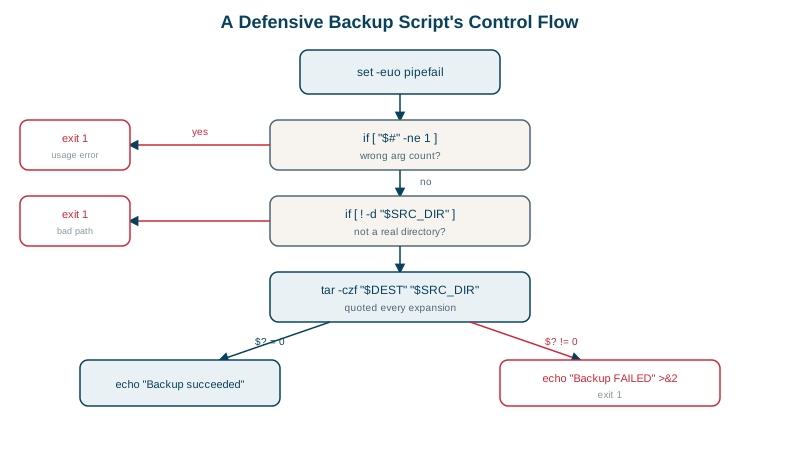
for f in "$dir"/*.logiterates over a glob;while read -r line; do ...; done < filereads lines. - Exit codes: 0 means success; anything else is failure, and callers (cron, CI,
&&) depend on it. - Errors to stderr:
>&2.
Bash functions and cleanup with trap
Once a script grows past a screen, split it into functions, and make sure temporary files are removed however the script ends:
#!/usr/bin/env bash
set -euo pipefail

workdir=$(mktemp -d)
trap 'rm -rf "$workdir"; echo "cleaned up $workdir" >&2' EXIT   # runs however the script exits

log() { echo "[$(date +%H:%M:%S)] $*" >&2; }

count_errors() {
  local file=$1                     # local: doesn't leak into the rest of the script
  grep -c ERROR "$file" || true     # grep exits 1 when there are no matches
}

printf 'ok\nERROR disk\nERROR net\n' > "$workdir/app.log"
log "checking $workdir/app.log"
echo "errors: $(count_errors "$workdir/app.log")"[14:02:11] checking /tmp/tmp.XXXX/app.log
errors: 2
cleaned up /tmp/tmp.XXXX- A function's arguments are
$1,$2and so on, just like the script's, andlocalkeeps its variables private. trap '...' EXITruns the cleanup on success, on an error underset -e, and on Ctrl+C, so no half-finished temp files are left behind.|| truematters in strict mode: whengrep -cfinds nothing it prints 0 but exits with 1, and without|| true,set -ewould stop the script there.
Why you should quote your variables
f="logs/app 1.log"
ls -l $fls: cannot access 'logs/app': No such file or directory
ls: cannot access '1.log': No such file or directoryUnquoted, $f is split on the space into two arguments. ls -l "$f" works. Quote every variable expansion unless you specifically want splitting. This one habit prevents a whole category of bugs, including the classic rm -rf $DIR/ where an empty variable deletes from /.
Bash strict mode: set -euo pipefail
-eexits on the first failing command:
$ bash -c 'set -e; cp /nope /tmp/x; echo "never printed"'
cp: cannot stat '/nope': No such file or directory
exit 1-utreats unset variables as errors, catching typos:
$ bash -c 'set -u; name=world; echo "hello $nmae"'
bash: line 1: nmae: unbound variable
-o pipefailfails a pipeline if any part fails (Day 8).
-e has gaps (it doesn't trigger inside conditions, or for commands before ||), so still check important commands yourself.
Checking scripts with shellcheck
shellcheck catches bugs before they run. On a two-line script with a common mistake, for f in $(ls logs); do rm $f; done:
SC2045 (error): Iterating over ls output is fragile. Use globs.
SC2086 (info): Double quote to prevent globbing and word splitting.
Run it in your editor and in CI. When a script grows past 100 lines or needs data structures, consider Python.
Check yourself
The unquoted variable was split on the space into two separate arguments, logs/app and 1.log, neither of which exists. Writing "$f" keeps it as one argument.
References to unset variables, such as a misspelled $DEPOLY_DIR, which would otherwise silently expand to an empty string. That matters because a command like rm -rf "$DIR/"* with an empty variable can target the wrong place.
Its exit status becomes the script's: 0 when no files are too big, 1 otherwise, so cron or CI can react.
It runs the cleanup function whenever the script exits, normally or on error, so temporary files and locks are always removed.
[[ ]] is a bash keyword, so variables inside it aren't word-split or glob-expanded, which avoids many quoting bugs. It also supports pattern matching, regex with =~ and && inside the test. Use [ ] only for scripts that must run in plain sh.