Linux Filesystem Hierarchy Explained (/etc, /var)
On this page
Why the filesystem hierarchy matters
A database is slow. Where's its config? Its data? Its logs? On any Linux server, the Filesystem Hierarchy Standard answers before you search. The top level of the course's Ubuntu VM:
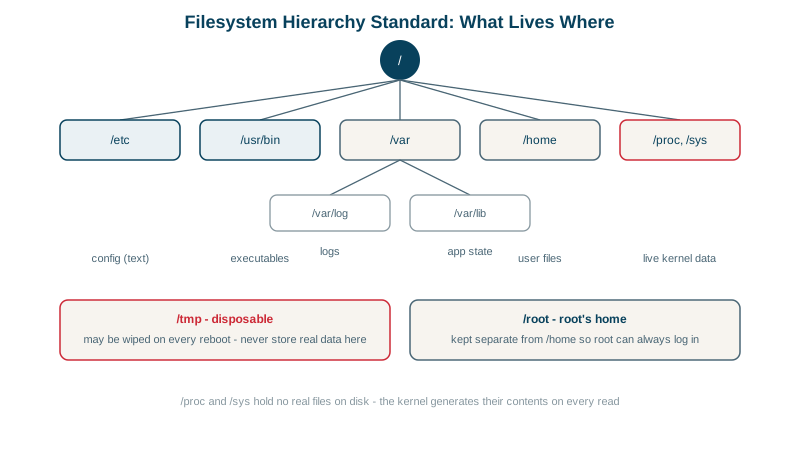
bin boot dev etc home lib media mnt opt proc root run sbin snap srv sys tmp usr varLinux directories that matter: /etc, /var, /usr, /run
| Path | Holds | Examples |
|---|---|---|
/etc | System-wide configuration, text files | /etc/nginx/, /etc/ssh/sshd_config, /etc/systemd/system/ |
/var | Variable data that changes while running | /var/log/, /var/lib/postgresql/, /var/cache/, /var/spool/ |
/usr | Installed programs and libraries, read-only in normal use | /usr/bin/, /usr/lib/, /usr/share/ |
/usr/local | Software you installed outside the package manager | /usr/local/bin/ |
/opt | Self-contained third-party applications | /opt/myapp/ |
/home, /root | Users' and root's home directories | |
/srv | Data served by this machine | /srv/www/ |
/tmp | Temporary files; often cleared at boot | |
/run | Runtime state for this boot: PID files, sockets | /run/nginx.pid |
/boot | Kernel and bootloader | |
/dev | Device files | /dev/vda1, /dev/null |
/proc, /sys | Virtual files exposing the kernel |
Sizes on the lab VM show where space tends to go: /usr 3.4G (software), /var/lib 203M (application data), /var/log 17M, /etc 6.3M. On busy servers, /var is what fills up (Day 14).
The merged /usr: why /bin is now /usr/bin
ls -ld /bin /sbin /liblrwxrwxrwx /bin -> usr/bin
lrwxrwxrwx /lib -> usr/lib
lrwxrwxrwx /sbin -> usr/sbinModern distributions merged these into /usr ("usrmerge"); the old paths are symlinks, so scripts using /bin/bash still work.
Where a service keeps its files
For a typical packaged service like nginx or PostgreSQL:
- Binary:
/usr/sbin/nginx(dpkg -S /usr/sbin/nginxnames the package, Day 21). - Config:
/etc/nginx/. - Data:
/var/lib/.... - Logs:
/var/log/nginx/and the journal (Day 24). - Unit file:
/usr/lib/systemd/system/nginx.service, with local overrides in/etc/systemd/system/(Day 19). - Runtime:
/run/nginx.pid.
For your own applications, follow the same pattern: code in /opt/myapp, config in /etc/myapp, data in /var/lib/myapp, logs to the journal or /var/log/myapp. Then backups (/etc and /var/lib) and permissions follow naturally.
/proc and /sys: the kernel as files
These aren't on disk; the kernel generates them when read:
cat /proc/loadavg
head -1 /proc/meminfo1.07 0.34 0.13 2/225 99854
MemTotal: 1997476 kB/proc/<pid>/describes each process:cmdline,environ,status, open files infd/(Day 25 reads a process's groups from/proc/<pid>/status)./proc/sys/holds tunable kernel settings, changed withsysctl./sysexposes devices and kernel subsystems.
Tools like ps, top and free are mostly friendly readers of /proc.
Check yourself
Configuration in /etc, for example /etc/nginx; persistent data in /var/lib, for example /var/lib/postgresql; logs in /var/log; and runtime files like sockets and PID files in /run.
It holds logs, caches, mail and print spools, and application data like databases, all of which keep growing while the system runs. Putting /var on its own filesystem limits the damage.
A virtual file generated by the kernel on each read, showing the 1, 5 and 15 minute load averages and current process counts. It isn't stored on disk; tools like uptime and top simply read it.
Live details about a process: its command line, environment, open file descriptors, memory maps and status, generated by the kernel on demand.
It's often cleared on reboot or by cleanup timers like systemd-tmpfiles, and on many systems it's a memory-backed tmpfs that vanishes on restart. Anything that must survive belongs under /var/lib or a home directory.