Linux Job Control and Signals (kill, bg, fg)
On this page
What signals are for
You want a process to stop. There's a polite way and a forceful way, and the difference decides whether it finishes writing its data, closes connections and removes lock files, or leaves a mess.
A signal is a small notification the kernel delivers to a process. Programs can handle most signals (run cleanup code) or ignore them; two can't be caught.
Linux signals you'll use: SIGTERM, SIGKILL, SIGHUP, SIGINT
| Signal | Number | Default | Typical use |
|---|---|---|---|
SIGTERM | 15 | Terminate | "Please shut down": the default for kill and systemctl stop |
SIGINT | 2 | Terminate | Ctrl+C in the terminal |
SIGHUP | 1 | Terminate | Terminal closed; many daemons use it as "reload config" |
SIGKILL | 9 | Kill immediately | Can't be caught or ignored: last resort |
SIGSTOP / SIGCONT | 19 / 18 | Pause / resume | SIGSTOP can't be caught |
SIGTSTP | 20 | Pause | Ctrl+Z |
SIGUSR1, SIGUSR2 | 10, 12 | Terminate | Application-defined (log reopen, debug dumps) |
Graceful shutdown vs kill -9
A Python program that handles SIGTERM:
import signal, time, sys
def term(s, f):
    print("got SIGTERM: closing connections, exiting cleanly", flush=True); sys.exit(0)
signal.signal(signal.SIGTERM, term)
time.sleep(60)$ kill <pid>
got SIGTERM: closing connections, exiting cleanly
exit status: 0The same kind of process killed with SIGKILL:
$ kill -9 <pid>
Killed                     sleep 60
after SIGKILL exit status: 137 (128+9)
No cleanup ran. A shell reports a process killed by signal N as exit status 128 + N, so 137 means SIGKILL. You'll see 137 in Kubernetes and Docker when a container is OOM-killed or killed after its grace period, and 143 (128 + 15) after a SIGTERM.
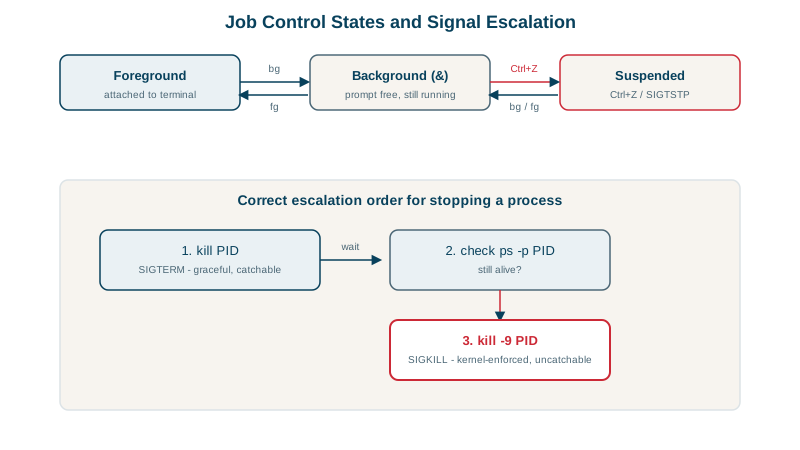
Always try SIGTERM first, wait, and use SIGKILL only if the process doesn't exit. systemd does exactly this: SIGTERM, then SIGKILL after TimeoutStopSec (90 seconds by default).
Pausing and resuming with SIGSTOP and SIGCONT
$ kill -STOP <pid>;  ps -o pid,stat -p <pid>     ->  T  (stopped)
$ kill -CONT <pid>;  ps -o pid,stat -p <pid>     ->  S  (sleeping again)
Useful to pause a runaway job without losing its work.
Job control: bg, fg, jobs and Ctrl+Z
long-task          # runs in the foreground; Ctrl+Z pauses it (SIGTSTP)
bg                 # resume it in the background
jobs               # list this shell's jobs: [1]+ Running long-task &
fg %1              # bring job 1 back to the foreground
long-task &        # start directly in the background
Background jobs still belong to your terminal session: closing the terminal sends SIGHUP, which usually kills them. For work that must survive logout, use nohup long-task &, a terminal multiplexer (tmux, screen), or better, a systemd service or a systemd-run transient unit (Day 19).
Finding and signaling processes: pgrep and pkill
pgrep -a worker              # find PIDs by name, with command lines
pkill -TERM -f 'worker.py'   # signal by pattern (check with pgrep first)
systemctl kill -s HUP nginx  # signal a service's processes through systemd
Check yourself
SIGTERM lets the process run cleanup such as flushing data and closing connections; SIGKILL can't be handled, so no cleanup happens.
It was killed with SIGKILL, since exit codes above 128 are 128 plus the signal number and SIGKILL is 9. The usual causes are the OOM killer or a stop timeout after SIGTERM was ignored.
Closing the terminal sends SIGHUP to its jobs; use nohup, tmux or a service for work that must outlive the session.
Many daemons, like nginx and sshd, treat SIGHUP as "reload your configuration" rather than exit, because they have no terminal to hang up. systemctl reload often sends exactly this signal.
They match processes by name or full command line directly. Pipelines like ps aux | grep app are fragile and can match the grep process itself, so a following kill may hit the wrong thing.