Linux Cron Jobs Tutorial: Scheduling Tasks
On this page
Scheduling jobs on Linux
Backups, report generation, cache cleanup, certificate renewal: servers run many jobs on a schedule. Two tools do it: classic cron and systemd timers.
Crontab syntax explained
# minute  hour  day-of-month  month  day-of-week  command
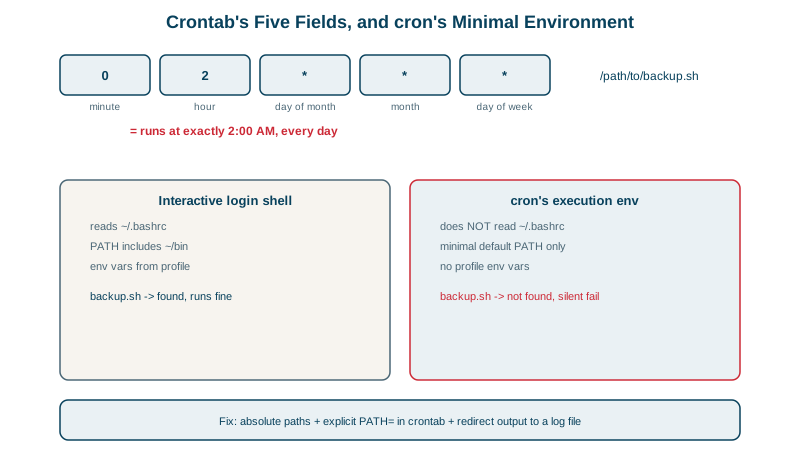
  0       2     *             *      *            /usr/local/bin/backup.sh
  */15    *     *             *      *            /usr/local/bin/sync-prices
  30      9     *             *      1-5          /usr/local/bin/weekday-report
  0       0     1             *      *            /usr/local/bin/monthly-invoices
Read the second line aloud as: at minute 0 of hour 2, on any day of the month, in any month, on any day of the week, run the backup. */15 means every 15 minutes, and 1-5 in the last field means Monday to Friday.
Edit with crontab -e (per user) or files in /etc/cron.d/ (system jobs, with a user column). crontab -l lists them. Tools like crontab.guru explain an expression in words.
Why cron jobs fail when the script works in your shell
Cron jobs run non-interactively with /bin/sh, a minimal environment, the user's home directory as the working directory, and no terminal. What cron's environment looked like on the course's Ubuntu 26.04 VM (captured with a job running env):
HOME=/root
PATH=/usr/local/sbin:/usr/local/bin:/usr/sbin:/usr/bin:/sbin:/bin:/usr/games:/usr/local/games:/snap/bin
SHELL=/bin/sh
Ubuntu fills in the system PATH from /etc/environment; other distributions give cron only /usr/bin:/bin. Either way, nothing from ~/.bashrc applies. Alice's tool in ~/.local/bin, which works in her terminal, failed in cron:
* * * * * make-report >> /home/alice/report.log 2>&1/bin/sh: 1: make-report: not foundWith the full path, $HOME/.local/bin/make-report, the log showed report generated (Day 7 explains why).
Rules for reliable cron jobs
- Use absolute paths for commands and files, or set
PATH=at the top of the crontab. - Capture output:
>> /var/log/job.log 2>&1. Otherwise cron tries to email output, which usually goes nowhere. - Prevent overlap: if a run can take longer than the interval, wrap it with
flock -n /run/job.lock cmd. - Alert on failure, and on silence: a job that stopped running entirely produces no error. Ping a dead man's switch (Healthchecks.io, Cronitor) or expose a "last success" metric (see the observability course).
- Mind time zones and daylight saving: a 02:30 job can run twice or not at all on DST change days.
systemd timers: the modern alternative to cron
A timer activates a service unit. The job is an ordinary oneshot service:
# /etc/systemd/system/backup.service
[Unit]
Description=Nightly backup
[Service]
Type=oneshot
ExecStart=/usr/local/lib/acme/backup.sh# /etc/systemd/system/backup.timer
[Unit]
Description=Run backup nightly
[Timer]
OnCalendar=*-*-* 02:00:00
RandomizedDelaySec=15m
Persistent=true
[Install]
WantedBy=timers.targetsudo systemctl enable --now backup.timer
systemctl list-timers backup.timerNEXT LEFT LAST PASSED UNIT ACTIVATES
Thu 2026-10-15 02:04:07 EDT 2h 52min - - backup.timer backup.serviceThe next run is 02:04, not 02:00, because of the random delay that keeps a fleet of servers from all starting at once. systemd-analyze calendar '*-*-* 02:00:00' checks an expression before you use it.
Compared with cron:
| cron | systemd timer | |
|---|---|---|
| Logs | Wherever you redirect | The journal: journalctl -u backup |
| Missed runs (machine was off) | Skipped | Persistent=true runs it at boot |
| Overlap | Possible | A running oneshot isn't started twice |
| Resource limits and sandboxing | No | Everything from Day 19 |
| Setup | One line | Two small files |
Run the job by hand any time with systemctl start backup.service; the journal showed Finished backup.service - Nightly backup.
Check yourself
Cron runs commands with a minimal non-interactive sh that doesn't read ~/.bashrc, so the PATH addition for ~/.local/bin wasn't there. Set PATH in the crontab or use absolute paths.
If the machine was off at the scheduled time, the job runs as soon as possible after the next boot.
Have each successful run ping a dead man's switch service or record a last-success time, and alert when it's overdue. Monitoring for failures alone misses jobs that never start, such as after a crontab was deleted.
At 03:00 every Monday: minute 0, hour 3, any day of month, any month, day of week 1. Remember cron uses the server's time zone, which may not be yours.
Without redirection, output goes to local mail that nobody reads. Redirect it to a log file or the journal so failures are visible.