Linux File Permissions Explained (chmod, rwx)
On this page
Permission denied: exit code 126
ls -l deploy.sh
./deploy.sh
echo "exit $?"-rw-r--r-- 1 alice alice 15 Oct 14 23:09 deploy.sh
bash: line 4: ./deploy.sh: Permission denied
exit 126The file exists and alice owns it, but it isn't executable. Exit code 126 means "found, but couldn't run". Understanding the permission string fixes this in seconds.
How to read Linux file permissions: rwx
After the type character (- file, d directory, l symlink) come three groups of three:
 -    rw-    r--    r--
type owner group others- r read, w write, x execute.
- Linux checks one set: the owner's if you're the owner, else the group's if you're in the group, else others'. They don't add up.
chmod in symbolic and octal form (644, 755, 600)
Symbolic form changes specific bits:
chmod u+x deploy.sh        # owner gets execute
ls -l deploy.sh && ./deploy.sh-rwxr--r-- 1 alice alice 15 Oct 14 23:09 deploy.sh
deployingOther examples: chmod g-w file, chmod o= file (remove everything for others), chmod a+r file.
Octal form sets everything at once: r=4, w=2, x=1, added per group. Read each digit as a sum: 6 is 4+2, read and write; 4 is read only; 7 is 4+2+1, everything; 0 is nothing. So 640 means owner rw-, group r--, others ---:
chmod 640 .env
stat -c "%A %a %U:%G %n" .env deploy.sh-rw-r----- 640 alice:alice .env
-rwxr--r-- 744 alice:alice deploy.sh| Octal | Meaning | Typical use |
|---|---|---|
644 | rw-r--r-- | Normal files |
640 | rw-r----- | Config readable by a service's group |
600 | rw------- | Secrets, SSH private keys |
755 | rwxr-xr-x | Directories, scripts and programs |
700 | rwx------ | Private directories like ~/.ssh |
Avoid 777: it lets every user on the system change the file.
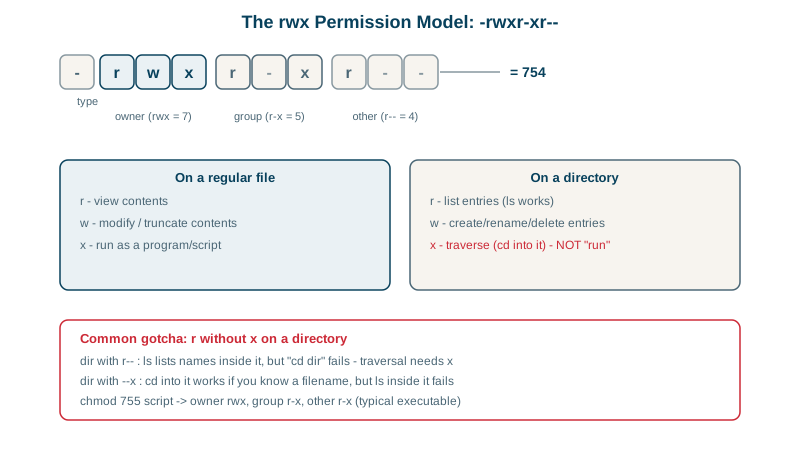
What r, w and x mean on directories
- r: list the names inside.
- x: enter it and access entries by name (traverse).
- w: create, delete and rename entries (with x).
A directory with read but no execute, tested:
chmod 644 locked      # r but no x
ls locked
cat locked/ff
cat: locked/f: Permission deniedYou can see the name f but can't open it, because opening needs to traverse the directory. And to read /srv/data/reports/q3.csv, every directory on the path needs x for you (Day 25 shows namei finding the blocking one).
umask: default permissions for new files
umask; touch newfile; mkdir newdir; stat -c "%A %a %n" newfile newdir0022
-rw-r--r-- 644 newfile
drwxr-xr-x 755 newdirNew files start from 666 and directories from 777, minus the umask's bits: 022 removes write for group and others. A stricter umask (077, as in the systemd unit on Day 19) makes new files private.
Special bits: setuid, setgid and sticky
- setgid on a directory (
chmod g+s shared/): new files inherit the directory's group; useful for shared team folders. - sticky bit (
/tmpisdrwxrwxrwt): users can only delete their own files in a shared directory. - setuid on programs (like
passwd): runs as the file's owner. Rare, security sensitive; don't add it to your own scripts.
Check yourself
The command was found but couldn't be executed, typically because the file lacks execute permission, or it's mounted noexec. Exit code 127 means the command wasn't found at all.
Read and write for the owner (6 = 4+2), read for the group (4), and nothing for others (0). It's a common mode for config files that a service's group needs to read.
Opening a file requires execute (traverse) permission on every directory in its path. The directory's 644 mode allowed listing names but not entering it, so the readable file couldn't be reached.
The owner gets rwx (7 = 4+2+1), the group r-x (5 = 4+1), and others nothing (0). On a directory, that means group members can list and enter it but not create or delete files, and everyone else is kept out.