Linux Package Management: apt vs yum
On this page
Why use a package manager
A program needs libraries, which need other libraries. A package manager resolves those dependencies, installs files to the right places (Day 6), verifies signatures, records what came from where, and upgrades or removes everything cleanly later.
Two families dominate:
| Family | Distributions | Low level | High level |
|---|---|---|---|
| Debian | Debian, Ubuntu | dpkg (.deb) | apt |
| Red Hat | RHEL, Fedora, Rocky, Alma, Amazon Linux | rpm (.rpm) | dnf (older: yum) |
apt in practice on Ubuntu
Refresh the package lists first; they're the catalog of what's available:
sudo apt update
apt-cache policy nginxnginx:
Installed: (none)
Candidate: 1.28.3-2ubuntu1.11
Version table:Install, then check:
sudo apt install -y nginx
dpkg -s nginx | grep -E '^(Status|Version)'Status: install ok installed
Version: 1.28.3-2ubuntu1.11Dependencies were pulled in automatically:
apt-cache depends nginx | head -6nginx
Depends: libc6
Depends: libcrypt1
Depends: libpcre2-8-0
Depends: libssl3t64
Depends: zlib1gWhich package installed a file?
dpkg -S /usr/sbin/nginxnginx: /usr/sbin/nginx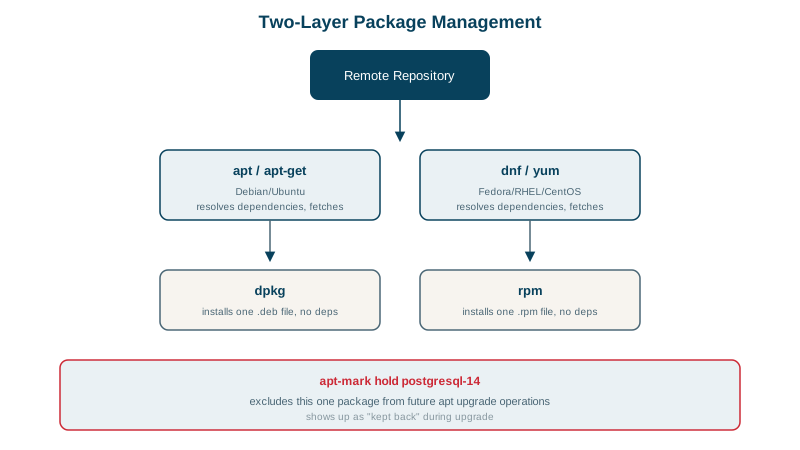
apt vs dnf vs yum command equivalents
| Task | apt (Ubuntu, Debian) | dnf (RHEL, Fedora) |
|---|---|---|
| Refresh metadata | apt update | dnf makecache (automatic) |
| Install | apt install nginx | dnf install nginx |
| Remove | apt remove nginx (purge also removes config) | dnf remove nginx |
| Upgrade all | apt upgrade (full-upgrade allows removals) | dnf upgrade |
| Search | apt search term | dnf search term |
| Package info | apt show nginx | dnf info nginx |
| Owner of a file | dpkg -S /path | rpm -qf /path |
| Files in a package | dpkg -L nginx | rpm -ql nginx |
| Clean cache | apt clean | dnf clean all |
Holding and pinning package versions
Pin a package so routine upgrades don't touch it (a database whose upgrade needs planning):
sudo apt-mark hold nginx
apt-mark showholdnginx set on hold.
nginxA simulated upgrade afterwards showed it held back: 36 upgraded, 0 newly installed, 0 to remove and 4 not upgraded. Remember to unhold (apt-mark unhold) and upgrade deliberately; held packages also miss security fixes. On dnf, the versionlock plugin does the same.
Safe package upgrade habits
- Preview:
apt-get -s upgrade(simulate) orapt list --upgradable. - Security updates automatically:
unattended-upgradeson Ubuntu (enabled on the course VM, Day 27),dnf-automaticon RHEL. - Kernel and library updates often need a restart of services or a reboot;
needrestart(Ubuntu) anddnf needs-restarting(RHEL) tell you which. - Use only trusted repositories. Third-party repositories are signed with their own keys, kept in
/etc/apt/keyrings/and referenced per repository rather than trusted globally. - For applications, prefer containers or language package managers with lockfiles; keep the OS package set small (Day 27).
Check yourself
It refreshes the local package lists from the repositories, so apt knows the current versions and where to download them. Without it, apt may try outdated versions that no longer exist on the mirror.
dpkg -S /path on Debian-based systems, and rpm -qf /path on Red Hat-based ones. It's useful for finding which package to reinstall or update.
It stops receiving updates, including security fixes, and can block upgrades of packages that depend on newer versions. Review holds regularly and record why each exists.
upgrade installs newer versions of installed packages but never removes any. full-upgrade also adds or removes packages when dependencies require it, which can matter for kernel and library transitions. Review what full-upgrade will remove before confirming.
Security patches then get applied within a day, without waiting for someone to log in and remember. Most compromises exploit known, already patched vulnerabilities, so shortening that window matters more than almost any other setting.