Linux Processes and PIDs Explained
On this page
What is a Linux process?
A program is a recipe; a process is someone cooking it. The same recipe can be cooked in three kitchens at once, each with its own ingredients and progress. A process is a running instance of a program, with its own memory, open files, environment, working directory, user and PID (process ID). Day 1 showed the shell creating processes with fork (copy myself) and exec (become another program), then waiting for them.
Every process except PID 1 has a parent (PPID). On modern Linux, PID 1 is systemd, which starts services and adopts orphaned processes.
Seeing processes with ps and pstree
ps -ef                        # every process, full format
ps aux --sort=-%mem | head    # biggest memory users
ps -o pid,ppid,stat,cmd -p 1234
pstree -p                     # the parent-child tree
pgrep -a nginx                # find by name
Process states: running, sleeping, D and zombie
The STAT column:
| State | Meaning |
|---|---|
R | Running or ready to run |
S | Sleeping, waiting for something (most processes, most of the time) |
D | Uninterruptible sleep, usually waiting on disk or network I/O; can't be killed until the I/O returns |
T | Stopped (paused by a signal, Day 17) |
Z | Zombie: finished, waiting for its parent to collect its exit status |
Many D processes point at storage trouble (a hung network filesystem); they also raise the load average (Day 18).
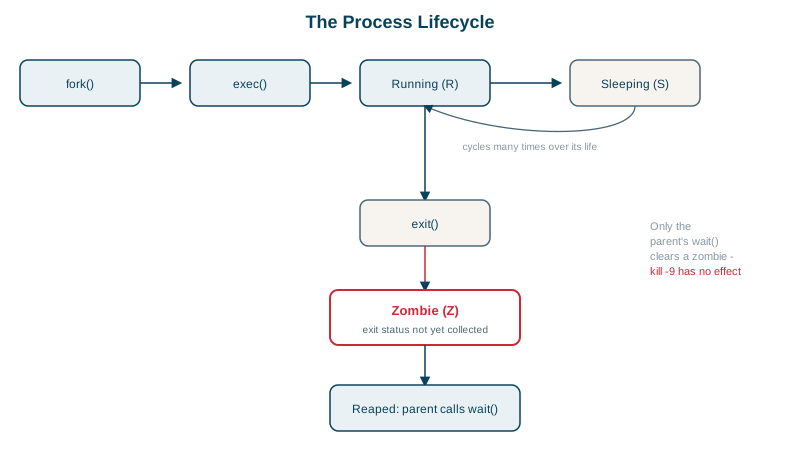
Creating and cleaning up a zombie process
A Python parent that forks a child which exits immediately, but never calls wait():
import os, time
pid = os.fork()
if pid == 0:
    os._exit(0)          # child exits immediately
time.sleep(6) # parent never calls wait(): the child stays a zombie PID PPID STAT CMD
10066 10064 Z [python3] <defunct>The child has finished and released its memory, but its entry stays in the process table so the parent can read its exit status. Zombies use almost nothing, but a buggy parent that keeps creating them can exhaust PIDs. You can't kill a zombie (it's already dead); fix or restart the parent. When the parent exits, systemd adopts the zombie and reaps it.
In containers, the first process is PID 1 and must reap children. Running an app that doesn't do this as PID 1 accumulates zombies; docker run --init or tini solves it.
Inspecting a process in /proc
Each process has a directory of live information:
cat /proc/1234/status          # state, memory, threads, user and group IDs, groups
ls -l /proc/1234/fd            # open files, sockets and pipes
cat /proc/1234/cmdline | tr '\0' ' '
cat /proc/1234/environ | tr '\0' '\n'    # its environment (owner or root only)
Day 25 reads /proc/<pid>/status to prove a running service still has old group memberships.
Process limits with ulimit
- Open files:
ulimit -n(andLimitNOFILE=in systemd units); "Too many open files" errors mean a leak or a limit set too low. - Process count:
ulimit -u; the kernel'spid_max. - Memory: cgroups (through systemd's
MemoryMax=or container limits) cap a service; the kernel's OOM killer ends processes when memory runs out, recorded injournalctl -k.
Check yourself
It has already exited; it remains only so its parent can collect the exit status, so the parent must wait for it or exit.
It's blocked in uninterruptible I/O, often waiting on a slow or hung disk or network filesystem like NFS. It can't be killed until the I/O completes, and it counts toward load average.
PID 1, usually systemd, or a designated subreaper, which reaps it when it exits. In containers, the process running as PID 1 must reap children, which is why tools like tini exist.
The maximum number of open file descriptors per process. Busy servers often need it raised, or they fail with "Too many open files".
pstree -p or ps -ef --forest shows parent-child relationships, with process ids. That makes it easy to see which shell or service started a process and which children will be affected if you stop the parent.