grep and Regular Expressions Tutorial
On this page
What grep does
"Which config files mention port 8080?" "How many errors since midnight?" "Which lines contain an IP address?" grep answers these in milliseconds across thousands of files.
Everyday grep options
| Option | Effect |
|---|---|
-i | Ignore case |
-n | Show line numbers |
-v | Invert: lines that don't match |
-c | Count matching lines |
-o | Print only the matched part |
-r / -R | Search directories recursively |
-l | List only filenames with matches |
-w | Match whole words |
-E | Extended regular expressions: +, ?, {} and alternation work without backslashes |
-F | Fixed string, no regex (fast, safe for literal text with dots) |
-A 3, -B 3, -C 3 | Lines of context after, before, around |
Building a regular expression step by step
The file:
listen 192.168.1.10:8080
max_connections 65535
upstream 10.0.0.5:3000
# listen 127.0.0.1:9000
version 1.2.3.4
Goal: active (not commented) lines containing an IP address with a port.
Attempt 1: four dot-separated numbers.
grep -nE '[0-9]+\.[0-9]+\.[0-9]+\.[0-9]+' server.conf1:listen 192.168.1.10:8080
3:upstream 10.0.0.5:3000
4:# listen 127.0.0.1:9000
5:version 1.2.3.4Too loose: it matched the version number and the commented-out line. (The \. matters: an unescaped . matches any character.)
Attempt 2: require a port, and no # before the address.
grep -nE '^[^#]*\b([0-9]{1,3}\.){3}[0-9]{1,3}:[0-9]+' server.conf1:listen 192.168.1.10:8080
3:upstream 10.0.0.5:3000^[^#]*from the start of the line, any characters except#.\ba word boundary.([0-9]{1,3}\.){3}three groups of one to three digits and a dot.[0-9]{1,3}:[0-9]+the last group, a colon, a port.
-o extracts just the matches (here without the comment rule, so all three appear):
192.168.1.10:8080
10.0.0.5:3000
127.0.0.1:9000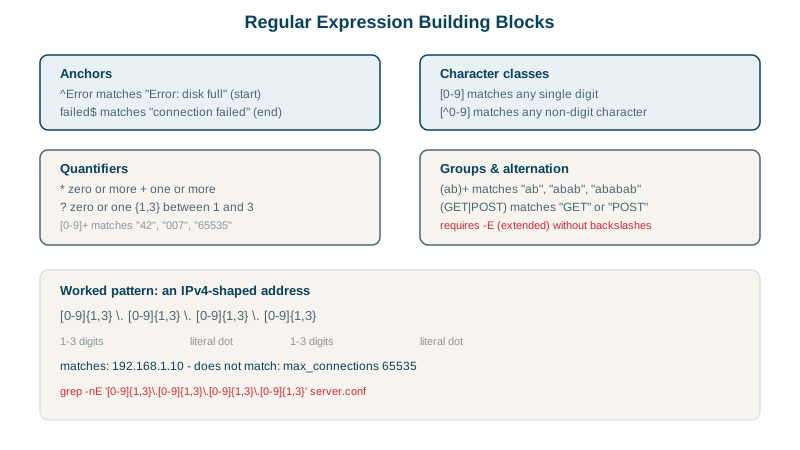
Regular expression building blocks
| Piece | Means |
|---|---|
. | Any single character |
[abc], [0-9], [^#] | One of these; a range; anything except |
*, +, ? | Zero or more, one or more, zero or one |
{3}, {1,3} | Exactly 3; between 1 and 3 |
^, $ | Start, end of line |
\b | Word boundary |
( ) | Group, used with repetition or alternation |
Alternation uses a vertical bar inside a group: (GET|POST) matches either word.
Practical grep patterns for logs and configs
grep -rn 'TODO' src/                       # every TODO with file and line
grep -c ' 500 ' access.log                 # count lines with status 500
grep -v '^#' server.conf | grep -v '^$'    # strip comments and blank lines
grep -E 'ERROR|FATAL' app.log | tail -20   # recent serious errors
grep -rlF 'api.old-domain.com' /etc/       # files mentioning a literal hostname
For large codebases, ripgrep (rg) is much faster and skips .gitignored files by default.
Check yourself
It only required four dot-separated numbers, and the version line has exactly that shape. A pattern matches anything with the right shape, so it needed the extra requirement of a port after the address to tell IP addresses apart from version strings.
. matches any single character, so 1.2 matches 1x2; \. matches only a literal dot. Unescaped dots in patterns for IP addresses or versions are a common source of false matches.
Use grep -v pattern, which inverts the match and prints every line that doesn't contain it. It's handy for filtering noise, like grep -v healthcheck access.log, and can be chained to remove several patterns.
For extended regex features like +, ?, | and {n} without backslashes. Plain grep treats them as literals unless escaped.
It searches a directory tree recursively, limited to file names matching the glob, like grep -r --include='*.conf' listen /etc. That skips binaries and unrelated files, making the search faster and the output easier to read.