Linux Networking Commands: ip, netstat, curl
On this page
Is it the network? A quick diagnosis
A service can't reach its database; users can't reach the site. Before anyone opens a ticket with the network team, a few commands show whether the machine has the right address and route, whether the service is listening, and where the connection fails.
Checking addresses and routes with ip
ip -br addr
ip routelo UNKNOWN 127.0.0.1/8 ::1/128
eth0 UP 192.168.5.15/24 metric 200 fe80::5055:55ff:febf:3839/64
default via 192.168.5.2 dev eth0 proto dhcp src 192.168.5.15 metric 200
192.168.5.0/24 dev eth0 proto kernel scope link src 192.168.5.15 metric 200The interface is up with an address, and traffic outside the local subnet goes to the default gateway 192.168.5.2. No default route means no internet. (ifconfig and route are the older equivalents.)
What's listening: ss replaces netstat
sudo ss -tlnpState Recv-Q Send-Q Local Address:Port Peer Address:Port Process
LISTEN 0 4096 0.0.0.0:22 0.0.0.0:* sshd
LISTEN 0 511 0.0.0.0:80 0.0.0.0:* nginx
LISTEN 0 5 127.0.0.1:8080 0.0.0.0:* python3-t TCP, -l listening, -n numeric, -p process. Read the local address: nginx on 0.0.0.0:80 accepts connections on every interface; the app on 127.0.0.1:8080 only from this machine. "Works on the server, unreachable from outside" is often a service bound to 127.0.0.1. ss -tn shows established connections; netstat -tlnp is the older tool.
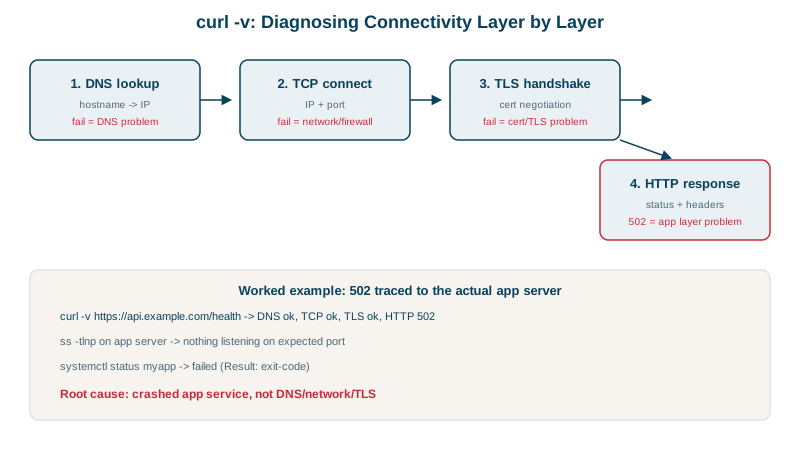
Testing a connection with curl timings
curl -s -o /dev/null -w 'dns %{time_namelookup}s connect %{time_connect}s tls %{time_appconnect}s total %{time_total}s code %{http_code}\n' https://example.com/dns 0.025507s connect 0.046214s tls 0.197241s total 0.226095s code 200The stages show where time goes: name resolution, the TCP handshake, TLS, then the server's response (the networking course covers each in depth). curl -v shows headers and the TLS handshake.
Connection refused vs timed out
curl -s -m 3 http://127.0.0.1:9999;  echo "exit $?"
curl -s -m 3 http://10.255.255.1; echo "exit $?"exit 7 (connection refused)
exit 28 (timed out)- Refused, instantly: the host answered, but nothing listens on that port. Check the service and its port (
ss -tlnp). - Timed out: no answer at all. A firewall is dropping packets, the host is down, or there's no route. Check firewalls (
ufw status, security groups) and routes.
Checking DNS name resolution
getent hosts example.com        # what applications see (uses /etc/hosts too)
resolvectl status | grep 'DNS Servers'
dig +short example.com # query DNS directly104.20.23.154 example.com
DNS Servers: 192.168.5.2If getent and dig disagree, check /etc/hosts and /etc/nsswitch.conf.
A quick network troubleshooting checklist
ip addr,ip route: address and default route present?getent hosts name: does the name resolve to the right address?ss -tlnpon the server: is the service listening, on the right interface?curl -vornc -zv host port: refused or timeout?- Firewalls on both ends, and anything in between.
Check yourself
Whether it listens on 127.0.0.1 only, using ss -tlnp, since a loopback-only service can't be reached from outside. If it listens on 0.0.0.0, check the host firewall and cloud security groups.
7 means the connection was refused: the host answered, but nothing was listening on the port. 28 means it timed out: packets were dropped by a firewall or there's no route. Refused points at the service, timeout at the network.
The machine can't send traffic outside its local subnet, so the internet and other networks are unreachable even though local hosts respond. ip route shows whether a default via entry exists.
Each network interface with its IP addresses, subnet masks and state, such as UP or DOWN. It confirms the machine has the address you expect and that the interface is actually up.
dig name queries DNS directly and shows the answer and TTL, while getent hosts name uses the system's resolver configuration, including /etc/hosts, exactly as applications do. Differences between them point at local configuration.